How to Make AI Fruit Videos in 2026: Talking Fruit Drama Guide
Plan a talking fruit drama series, script each character's dialogue, lip-sync them in their own voices and export vertical episodes that stay monetizable.
 Emmanuel Greyco Tulabut
On this page
You searched for how to make AI fruit videos, so this guide shows the full workflow: planning a cast, writing dialogue, giving every fruit its own lip-synced voice, and exporting vertical episodes.
Timing matters: in November 2026, vidIQ estimates "ai fruit story" at roughly 84,000 monthly YouTube searches, and "how to make ai fruit video" is growing fast while the broad head term cools. Viewers now want better-made series, not more copies. Below you get a series plan, a step-by-step build in Clippie, a fair route using other tools, and the monetization rules to respect.
Executive summary: This guide explains what AI fruit videos are, why the talking fruit drama format holds attention, and how to plan a series with a consistent cast. It walks through building episodes with a fruit template and character talk mode, compares a multi-tool route, covers YouTube and TikTok originality and disclosure rules, and ends with eight episode ideas and the mistakes to avoid. It suits faceless creators starting a character series.
Table of Contents
What Are AI Fruit Videos?
Why the AI Fruit Story Format Works
How to Plan an AI Fruit Drama Series
How to Make AI Fruit Videos in Clippie (Step-by-Step)
The Multi-Tool Route for Talking Fruit Videos
Monetization and Originality Rules for AI Fruit Videos
8 AI Fruit Story Episode Ideas
Common Mistakes When Making AI Fruit Videos
FAQs
What to Do Next
What Are AI Fruit Videos?
AI fruit videos are short, AI-generated soap operas starring cartoon fruit and vegetables with faces, voices and dramatic relationships. Each episode is dialogue-led: characters speak on camera, argue, confess and betray each other, usually ending on a cliffhanger that pushes viewers to the next part of the series.
Where the trend came from
Late February 2026: the Daily Dot traced the "cheating fruit" wave to a TikTok about a strawberry whose husband is betrayed with an eggplant, posted by @trombonechef.
March 13, 2026: the anonymous account Ai Cinema (@ai.cinema021) began a dating-show parody on TikTok and YouTube, featuring characters such as Strawberina and Bananito.
Early April 2026: AFP, via RTÉ, reported millions of viewers before the creator posted a finale amid criticism and video removals.
C21 Media reported the series ran 22 episodes of two to four minutes each. Copycats followed within weeks, CGTN linked the format to China's short-drama boom, and The Nation Thailand covered a Thai fruit-drama craze. The format outlived the original, which is why searches shifted from "what is this" to "how do I make one".

Why the AI Fruit Story Format Works
The talking fruit drama works because it fuses instantly readable characters with soap-opera stakes. A viewer knows who a banana is in under a second, so every second of screen time goes to conflict, not exposition. Episodic cliffhangers and distinct voices then turn one-off viewers into followers.
The four mechanics behind it
Recognizable characters: a strawberry needs no backstory, even with the sound off.
High stakes, low realism: betrayal and public breakups land as comedy because the cast is produce.
Episodic cliffhangers: each part ends on an unresolved line, driving profile visits and binge viewing.
Character voices: each fruit speaks its own lines, so the clip feels like a show, not a slideshow.
The breakdown of viral storytelling formats for short-form video shows how these same cliffhanger and recurring-character hooks work across other niches.
How to Plan an AI Fruit Drama Series
Plan an AI fruit drama like a TV writers' room: pick a small cast, write a one-page character bible, choose two or three recurring conflicts, and fix an episode length. Planning before generating keeps characters consistent and stops every episode collapsing into the same plot.
Build a cast of four to six
The lead: wants something specific, such as a promotion, a partner or revenge.
The rival: blocks the lead and has a believable reason.
The wildcard: the character who reveals secrets at the worst moment.
The comic relief: a vegetable among fruit works well here.
Write a character bible
For each character, note look (color, accessories), voice (age, accent, energy), speech habits and one secret. Reuse it every episode so details never drift.
Choose recurring conflicts and length
Pick two or three engines: rivalry, hidden identity, an "expiry date" or a competition.
Keep early episodes around 45 to 90 seconds with one twist each. TikTok's PineDrama app, per C21, uses 60 to 90 second serialized episodes.
How to Make AI Fruit Videos in Clippie (Step-by-Step)
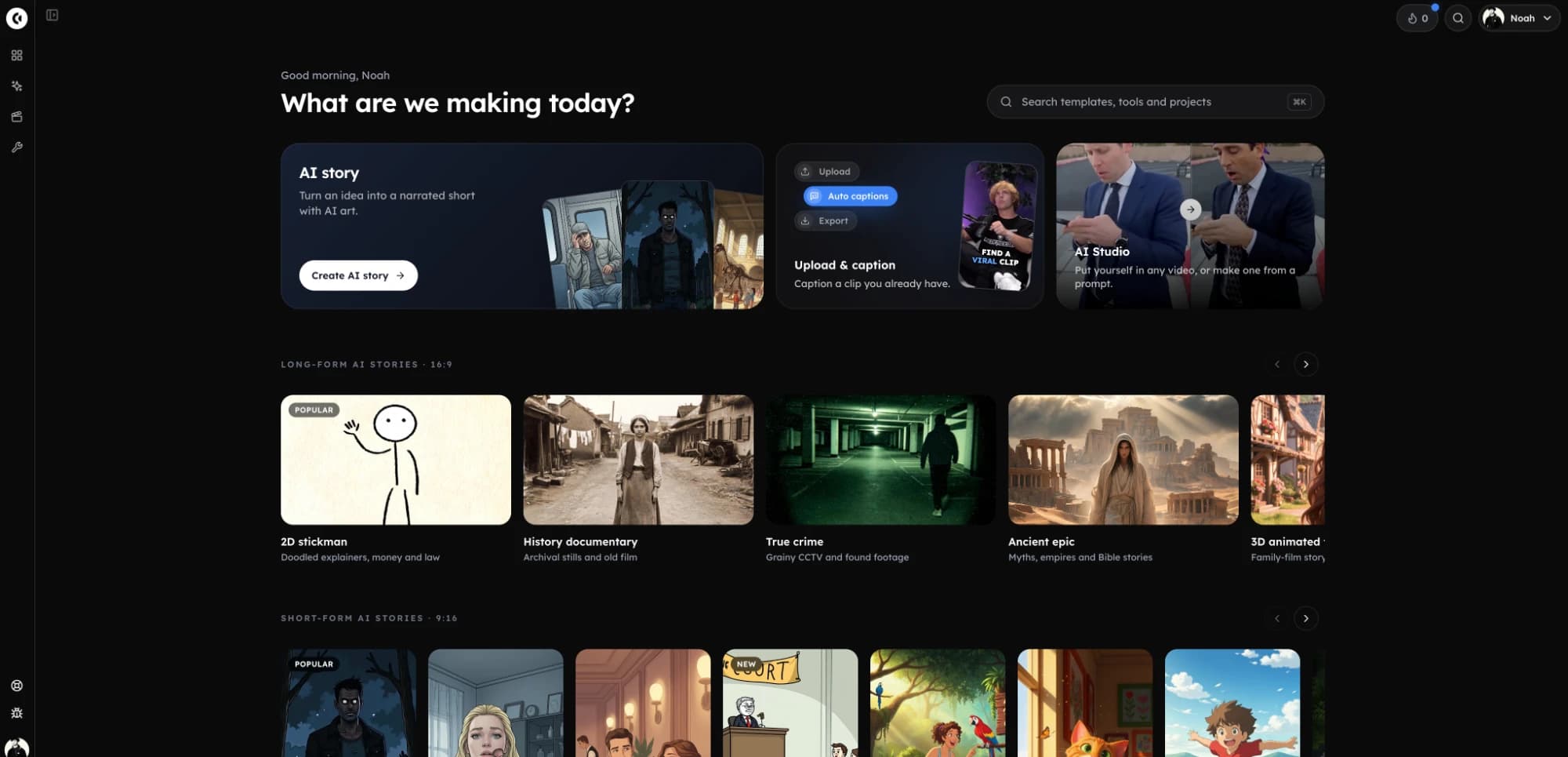
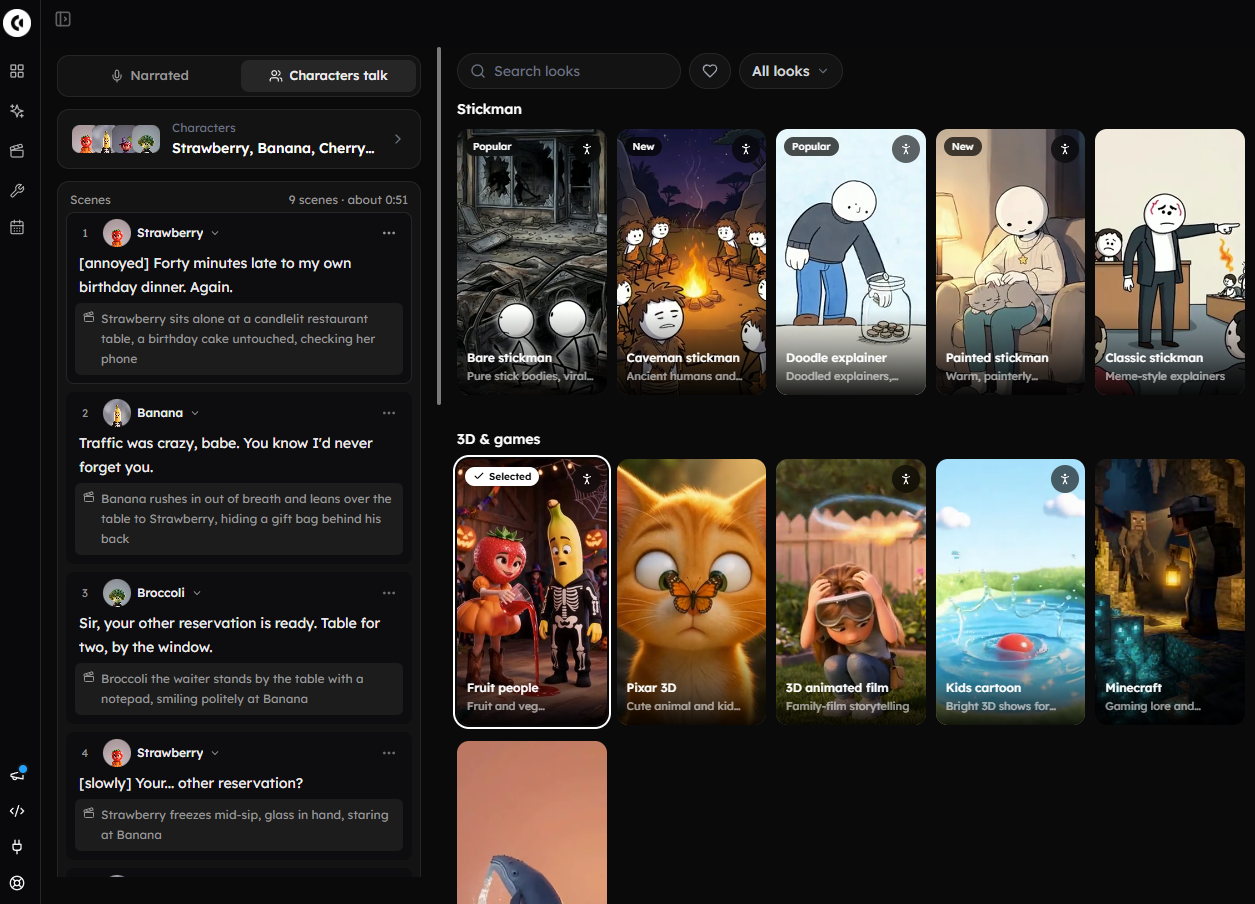
In Clippie you make AI fruit videos inside AI Story: pick the Fruit videos template, keep or replace its fruit cast, switch to Characters talk mode so each scene is a character speaking lip-synced, write lines as "Name: line", tune voices, animate key scenes, then export in 9:16.
Step 1: Open AI Story and Pick the Fruit Videos Template
Open AI Story video generation and browse the 9:16 templates. Choose Fruit videos, described as "talking fruit characters, each with their own voice". It loads a Fruit look (built on the Seedream 5.0 Lite image model) plus a starter story.
Step 2: Keep the Starter Cast or Add Your Own Fruit Characters
The template ships with Strawberry, Banana, Cherry and Broccoli, already drawn and voiced. To expand the cast, add a character with a name, an appearance description and an uploaded or drawn picture.
Mention characters with @ in the script so they stay consistent across scenes.
Saved characters live on your Characters page; reuse them via From library, which also offers ready-made fruit characters.
Use Keep off screen for a character who is discussed but never shown.
Step 3: Switch On Characters Talk Mode
In Characters talk mode, each scene is one of your characters speaking on camera, lip-synced in their own voice, with no narrator. This is what makes the result feel like an AI fruit drama rather than a narrated slideshow.
Step 4: Write Dialogue as "Name: line"
Let the AI write the scenes, or paste your own script with one line per scene:
Strawberry: You told me you were at the farmers' market.Banana: I was. With Cherry.Broccoli: [laughs] This fridge is a war zone.
Treat AI-written drafts as a starting point; original scripts are your best defense against repetitive-content flags.
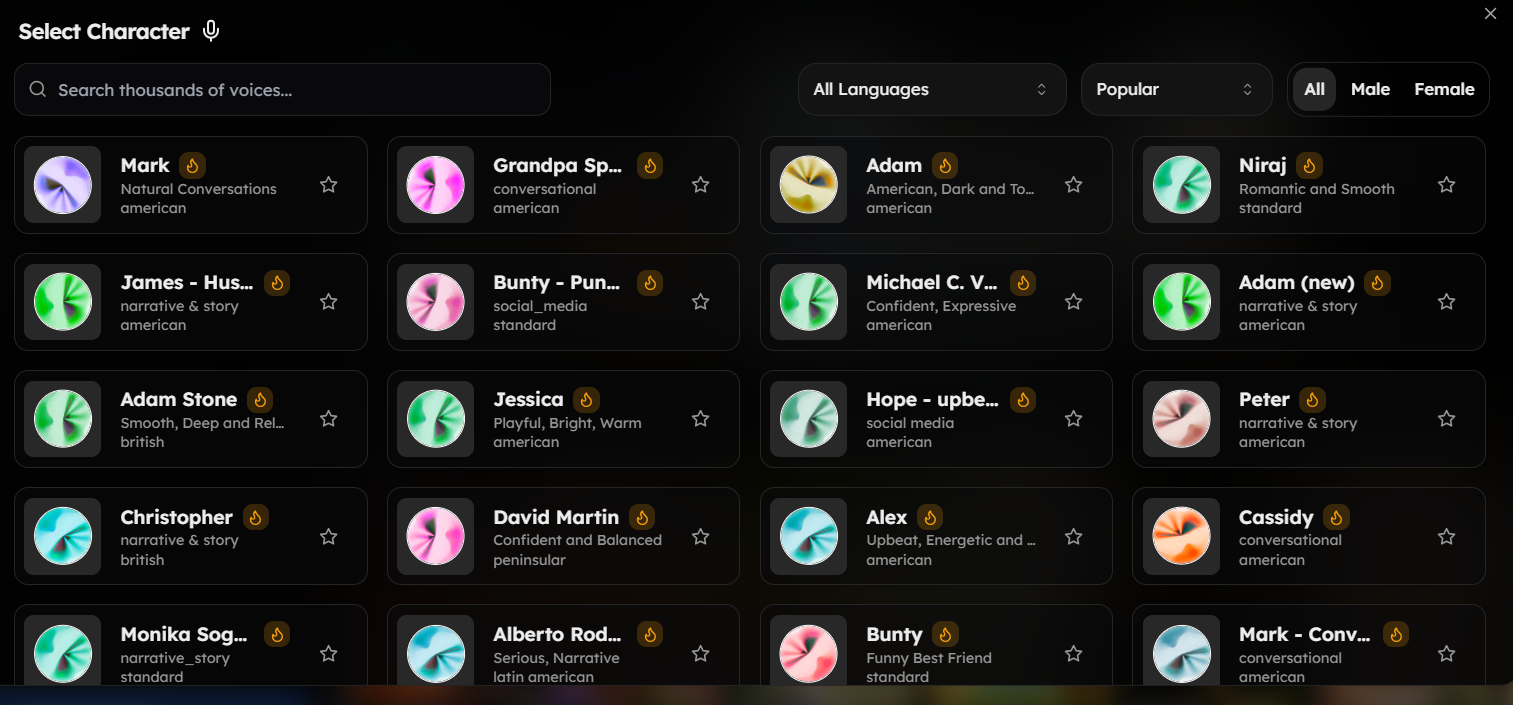
Step 5: Set Voices, Voice Styles and Acting Tags
Assign each character a voice from the 16,000+ voice library, then pick a style such as Dramatic, Warm, Energetic or Eerie. Tags like [whispers], [laughs] and [long pause] are performed, not read aloud, which sells the soap-opera timing.
Step 6: Direct Scenes and Animate the Key Moments
Use scene instructions (up to 2,000 characters) to set locations, such as a fridge shelf. Animate only the reveal and the cliffhanger; the cost is shown first. Redo pictures regenerates visuals while keeping words, voiceover and timing.
Step 7: Review and Export in 9:16
Check lip-sync on the emotional lines, then export vertically for Shorts, TikTok and Reels. For a visual walkthrough, see this animated AI story video tutorial on YouTube.
Where it falls short
Clippie is not a timeline editor, so frame-precise cuts or custom transitions need a separate editor.
The starter cast is four characters; anyone else must be defined by you.
Animated scenes and AI visuals use credits, and there is no no-cost tier. Plans start at $19.99 a month, with discounts on longer billing; check the pricing page.

The Multi-Tool Route for Talking Fruit Videos
Without an all-in-one tool, you can make talking fruit videos by chaining three pieces of software: an image model that keeps characters consistent, a lip-sync or talking-photo tool that animates each face to a voice track, and a vertical video editor that assembles the episode and adds captions.
Consistent characters: generate a reference sheet per fruit and reuse it as the reference image for every shot.
Voices and lip-sync: voice each line, then run every shot plus its audio through a lip-sync tool.
Assembly: cut clips together in an editor such as CapCut and add captions, music and effects.
When it's the better choice: you want precise timeline control, custom camera moves or heavy effects, or you already pay for strong image and editing tools.
Where it falls short: every line is a separate generate, export and import cycle, and characters drift more easily across tools.
Monetization and Originality Rules for AI Fruit Videos
AI fruit videos can earn money, but platforms reward original series, not templated copies. YouTube's monetization policy targets mass-produced, repetitive content, and both YouTube and TikTok require AI labels for realistic content. Cartoon fruit is usually non-realistic, yet each platform's current rule still deserves a check.
YouTube's inauthentic content rule
YouTube renamed its repetitious content policy "inauthentic content" in July 2025. It flags AI content built on generic templates that looks mass-produced.
Allowed: recurring series where each episode has its own storyline.
Risky: the same plot with swapped names, or templated storylines with little variation.
AI disclosure
YouTube says creators don't need to disclose non-realistic AI content, citing fully animated video as an example.
TikTok's Community Guidelines require labels when AI realistically depicts people or scenes. When unsure, switch the AI label on.
Brand and IP caution
ITV Studios, which distributes the dating show that inspired the viral series, told C21 Media it would act against unauthorized commercial use of its brand. Invent your own show names. For niche-selection context, Clippie's top monetizable faceless niches for 2026 video covers where story formats fit.

8 AI Fruit Story Episode Ideas
The best AI fruit story ideas borrow familiar TV genres, such as mystery, heist, family saga and courtroom drama, and recast them with produce. Each idea below has a built-in twist and a cliffhanger, and none depends on copying an existing show's characters or branding.
Idea #1: The Smoothie Ultimatum
Banana learns the blender is booked for Friday. Who made the booking?
Idea #2: Broccoli's Secret Twin
An identical broccoli arrives claiming to be the real one.
Idea #3: The Stem Pact
Two cherries joined at the stem are separated at the market and raised apart.
Idea #4: The Fridge Heist
Strawberry plans an escape from the crisper drawer before clean-out day.
Idea #5: Expiry Date
Banana spots his first brown speck and starts a bucket list.
Idea #6: The Fruit Bowl Election
A leaked voice note derails the race for "Top of the Bowl".
Idea #7: Courtroom of the Crisper
Cherry is on trial for bruising a peach, and every witness disagrees.
Idea #8: The Market Stall Wedding
The wedding is on, until an uninvited lemon objects at the vows.
Spreading ideas across genres gives each episode real variation. For why story formats keep growing, read about the rise of AI story videos in 2026.
Common Mistakes When Making AI Fruit Videos
Most AI fruit videos fail for predictable reasons: copied plots and names, drifting character designs, a narrator instead of character voices, and repetitive storylines that look mass-produced. Fixing these early protects both retention and monetization, and costs nothing beyond a little planning.
Mistake #1: Copying a Viral Series
Reusing another account's names, plots or branding invites reports, takedowns and IP problems.
Mistake #2: Letting Characters Drift
Without a character bible, Strawberry gets a new face by episode three. Define characters once and @mention them.
Mistake #3: Recycling One Plot
Ten cheating storylines in a row is the textbook "templated storyline" pattern. Rotate conflicts.
Mistake #4: Narrating Instead of Acting
A narrator describing feelings kills the soap-opera energy. Let characters speak.
Mistake #5: Animating Everything
Animating every scene burns credits. Animate the reveal and the final beat.
Mistake #6: Chasing Shock Content
Critics cited by Channel 4 News said many fruit dramas recycle sexist tropes, and Dazed flagged suggestive clips. Cartoon fruit draws younger viewers, so keep stories brand-safe.
FAQs
What app do people use to make AI fruit videos?
Creators either use an all-in-one story tool with talking characters and a fruit template, or chain separate tools: an image model for consistent characters, a lip-sync tool, a voice generator and an editor such as CapCut. All-in-one is faster per episode; separate tools give finer editing control at the cost of many more steps.
Can you make AI fruit videos for free?
Some third-party image, voice and editing apps offer limited no-cost tiers, so you can test the multi-tool route without paying, usually with watermarks or caps. Clippie is a paid tool. Its plans start at $19.99 a month, with discounts on longer billing, so check the pricing page before committing to a series.
How long should an AI fruit video episode be?
Start with 45 to 90 seconds and one twist per episode. The best-known fruit dating parody ran episodes of two to four minutes, according to C21 Media, but that length works only once viewers already know the cast. Short early episodes help new viewers commit before you stretch the runtime.
Can AI fruit videos be monetized on YouTube?
Yes, if your channel qualifies for the YouTube Partner Program and each episode is materially different. YouTube's inauthentic content rules target AI videos built on generic templates that look mass-produced. Original scripts, a consistent cast and varied plots across episodes put a fruit series on the right side of that line.
Do I need to label AI fruit videos as AI-generated?
On YouTube, non-realistic AI content such as fully animated cartoons generally doesn't need disclosure. TikTok requires labels when AI realistically depicts people or scenes. Cartoon fruit is usually non-realistic, but rules change, so check each platform's current guidance and turn the label on whenever a scene could pass as real.
How do I keep my fruit characters looking the same in every episode?
Write a character bible with each fruit's colors, accessories and expression, then define every character once with a reference picture. In a tool with character mentions, tag them with @ in every scene. In a multi-tool workflow, reuse the same reference image for every generation instead of describing the character from scratch.
What to Do Next
Write your character bible: four to six characters, each with a look, a voice and a secret.
Draft three episodes: different conflicts, each ending on an unresolved line.
Build episode one: load the Fruit videos template, switch to Characters talk mode and paste your "Name: line" script.
Publish and compare: see which cliffhangers drive profile visits, then build episode four around the strongest character.
Build the story step by step
How to make talking fruit videos: script, voices and captions
Make a talking fruit drama from an original script: set up the cast, assign voices, review the scene images, animate the dialogue and finish the captions.
How to plan a talking-fruit video series
Build a recurring talking-fruit cast, write three connected but complete episodes, and keep the voices, visual details and reveals consistent.
Talking fruit prompts and scripts for your next AI video
Three original talking fruit scripts with cast notes, scene directions and prompts you can adapt for a fruit drama, family argument or fridge mystery.
Try it in Clippie
Make an AI fruit video
Fruit characters with their own voices act out a drama on camera, with captions, ready for TikTok and Shorts.
Make a fruit video