How to Make 2D Stickman Animation Videos for Free (2026)
Six no-cost stick figure tools checked for November 2026, a step-by-step workflow, the mistakes that waste hours, and an honest paid AI option for YouTube.
 Emmanuel Greyco Tulabut
On this page
You searched for how to make 2D stickman animation videos for free, and most results are thin template pages or paid course listings. This guide fixes that.
Stickman content is one of the fastest-rising faceless formats on YouTube: vidIQ estimates around 2.96 million monthly YouTube searches for "stickman animation" in November 2026, up 67%, and searches for doing it with AI at no cost are climbing faster still. Below you get the free tools that genuinely work, a step-by-step free workflow, and a separate, clearly paid AI route for publishing long videos faster.
Executive summary: This guide shows two honest ways to make 2D stickman animation in 2026. Route A uses genuinely free tools (Pivot Animator, Stick Nodes, FlipaClip, OpenToonz, CapCut templates and a free AI image option), each checked for platform, export and watermark limits. Route B uses AI stickman templates on a paid plan. It is for faceless YouTube and Shorts creators who want a working process, not theory.
Table of Contents
What Makes 2D Stickman Animation Videos Work
Free Tools vs AI: Choosing Your Stickman Route
Route A: Free Stickman Animation Tools Checked for November 2026
Route A Workflow: How to Make a Stickman Animation for Free
Route B: How to Make Stickman Animation With AI Templates
Stickman Animation for YouTube: Format, Length and Policy
Stickman Animation Mistakes to Avoid
FAQs
What to Do Next

What Makes 2D Stickman Animation Videos Work
Stickman videos work because they strip a story down to poses, timing and voice. A stick figure reads at phone size, is cheap to draw and stays consistent, so attention goes to the narration. The strongest channels pair simple visuals with second-person survival, "what if" and explainer scripts.
The visual rules
Simple shapes: a circle head, straight limbs, thick dark lines.
Clear poses: each scene reads as one action, even muted.
Plain backgrounds: a flat backdrop with one or two props is enough.
One idea per scene: change the picture when the sentence changes.
The formats that suit stick figures
Second-person survival: "You wake up at 2:47 a.m. and the ship is tilting."
"What if" scenarios: one hypothetical followed through step by step.
Explainers: history, money or law, where a doodled figure beats stock footage.

Free Tools vs AI: Choosing Your Stickman Route
Choose the free route if you have more time than money and want control over every pose. Choose the AI route if you need long videos on a schedule and accept a monthly cost. Starting free is a good way to learn timing before paying for anything.
Cost: Route A costs $0 if you stay inside each tool's free tier. Route B is paid and starts at $19.99 a month.
Time: hand animation takes hours per minute of video. AI templates generate scenes in one pass.
Control: hand animation lets you place every joint. AI gives scene-level control through prompts and regeneration.
Best fit: Route A suits short loops, Shorts and fights. Route B suits long narrated stories.

Route A: Free Stickman Animation Tools Checked for November 2026
These five tools let you make stick figure animation without paying, and one free AI image option helps if you cannot draw. Each was checked against its own site or app store listing in November 2026 for platform, exports and watermarks, not hands-on tested.
Tool #1: Pivot Animator (Windows)
What it is: the classic freeware stick figure animator. You drag joints on ready-made or custom figures frame by frame.
What's free: the whole program. The official download page lists version 5.2.11, exporting MP4, WEBM, WMV and animated PNG.
Where it falls short: Windows only (10 or 11 recommended), with no sound editing. Download it only from the official pivotanimator.net page.
Tool #2: Stick Nodes (Android and iOS)
What it is: a mobile stickfigure animator with node-based figures, automatic tweening and a virtual camera.
What's free: the base app, including GIF export.
Where it falls short: MP4 export, sounds and filters are Pro-only. Stick Nodes Pro is a separate one-off purchase (£3.99 on the UK App Store in November 2026) that also removes the startup ad and export watermark.
Tool #3: FlipaClip (Android and iOS)
What it is: a frame-by-frame drawing animator with onion skin and brushes, good for hand-drawn stick figures.
What's free: drawing tools, onion skin, MP4 and GIF export, and 3 animation layers (more can be unlocked by watching ads).
Where it falls short: free exports carry a FlipaClip watermark, and removing it requires the FlipaClip Plus subscription.
Tool #4: OpenToonz (Windows, macOS, Linux)
What it is: a professional open-source 2D animation suite (Modified BSD license), usable for personal or commercial work.
What's free: everything.
Where it falls short: the steepest learning curve here. It is overkill for a simple stickman Short.
Tool #5: CapCut Stickman Templates
What it is: ready-made stickman templates on CapCut's explore pages that you remix with your own text or clips.
What's free: CapCut's March 2026 help pages say it does not add a watermark to exports on its own.
Where it falls short: many templates end with a CapCut logo clip you must delete, and Pro-badged effects or stock can add a watermark in the free version.
Tool #6: A Free AI Image Route With Gemini
What it is: Google's Gemini app lists image generation with Nano Banana 2 as available without a paid Google AI plan.
How to use it: generate stickman stills from one consistent prompt, then animate them with zooms and cuts in CapCut.
Where it falls short: free users get "standard limits" that Google says can change without notice, and Gemini video generation is not available on the free tier.

Route A Workflow: How to Make a Stickman Animation for Free
The free workflow is: script, record voice, build the figure, animate key poses, export, then assemble with sound in a free editor. Locking the voiceover before you animate is the biggest time saver, because every pose is timed to a spoken line instead of guessed.
Step 1: Write a 60-Second Script and Shot List
Write 130–160 words, then split it into one line per scene. Next to each line, note the single pose that shows it: "you freeze", "you climb the ladder".
Step 2: Record the Voiceover First
Record on your phone in a quiet, soft-furnished room. To compare narration options, our roundup of AI voiceover tools for faceless YouTube channels covers the trade-offs.
Step 3: Build or Pick Your Stickman
Use Pivot Animator's figure builder or a Stick Nodes template figure, add one signature detail, and reuse that file for the whole series.
Step 4: Animate Key Poses, Then the In-Betweens
Set the start and end pose of each action first, then fill the frames between them. Stick Nodes tweens automatically; in Pivot Animator, move joints a little per frame. Fewer, bolder poses read best.
Step 5: Export Each Scene
Pivot Animator exports MP4 directly. Stick Nodes' free version exports GIF only, and FlipaClip's free MP4 carries a watermark.
Step 6: Assemble, Add Sound and Export in CapCut
Put the voiceover and scene clips on CapCut's timeline, trim each clip to its line, add sound effects and delete any CapCut outro clip.
Route B: How to Make Stickman Animation With AI Templates
Making stickman animation with AI means writing or pasting a script and letting templates draw, voice and time every scene. Clippie's AI Story generator added five stickman templates on October 24, 2026. This route is paid, with plans from $19.99 a month and discounts on longer billing.
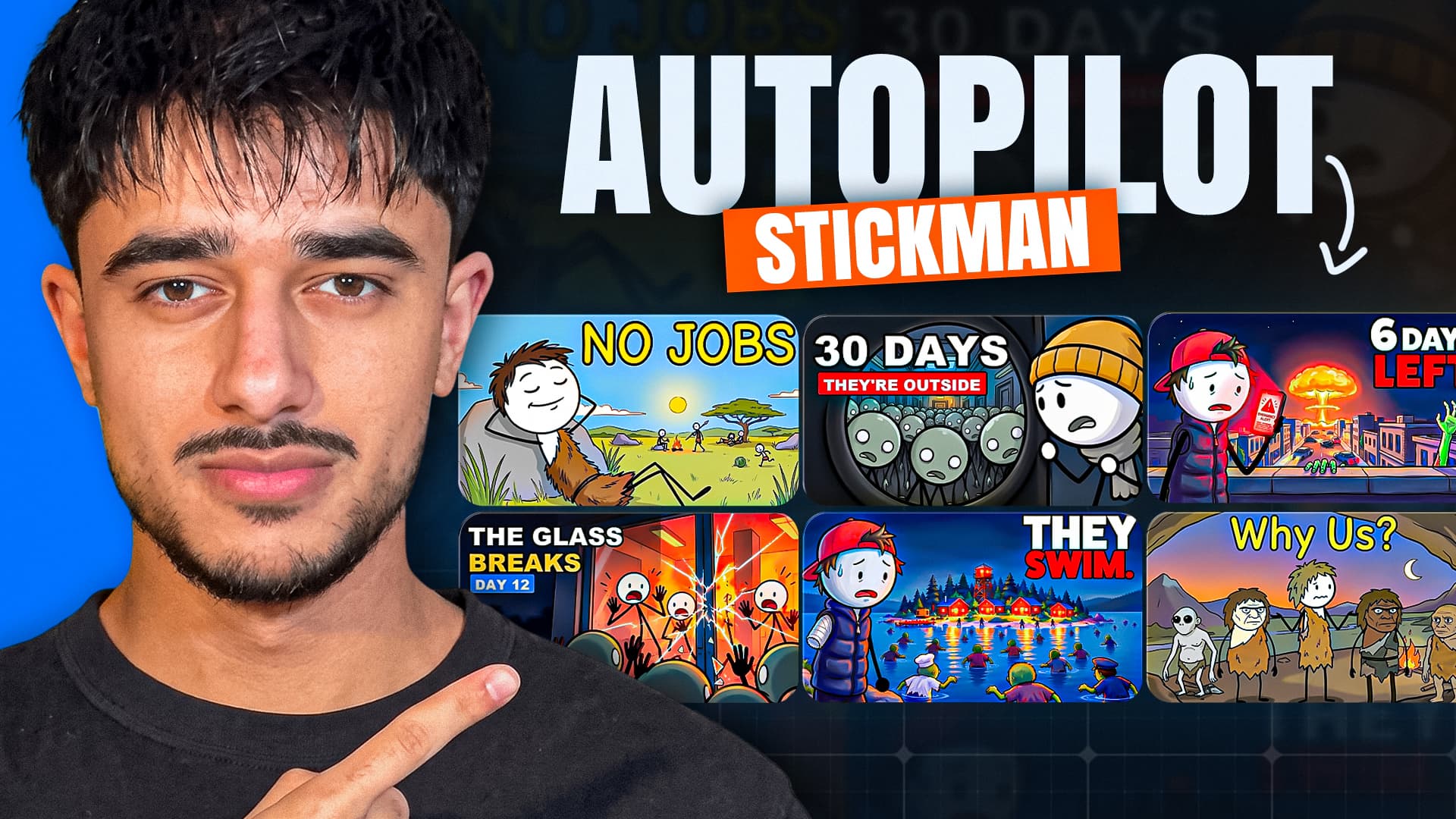
Clippie's November 1, 2026 stickman animation workflow walkthrough builds a 16:9 survival story with the Bare stickman template, following the steps below.
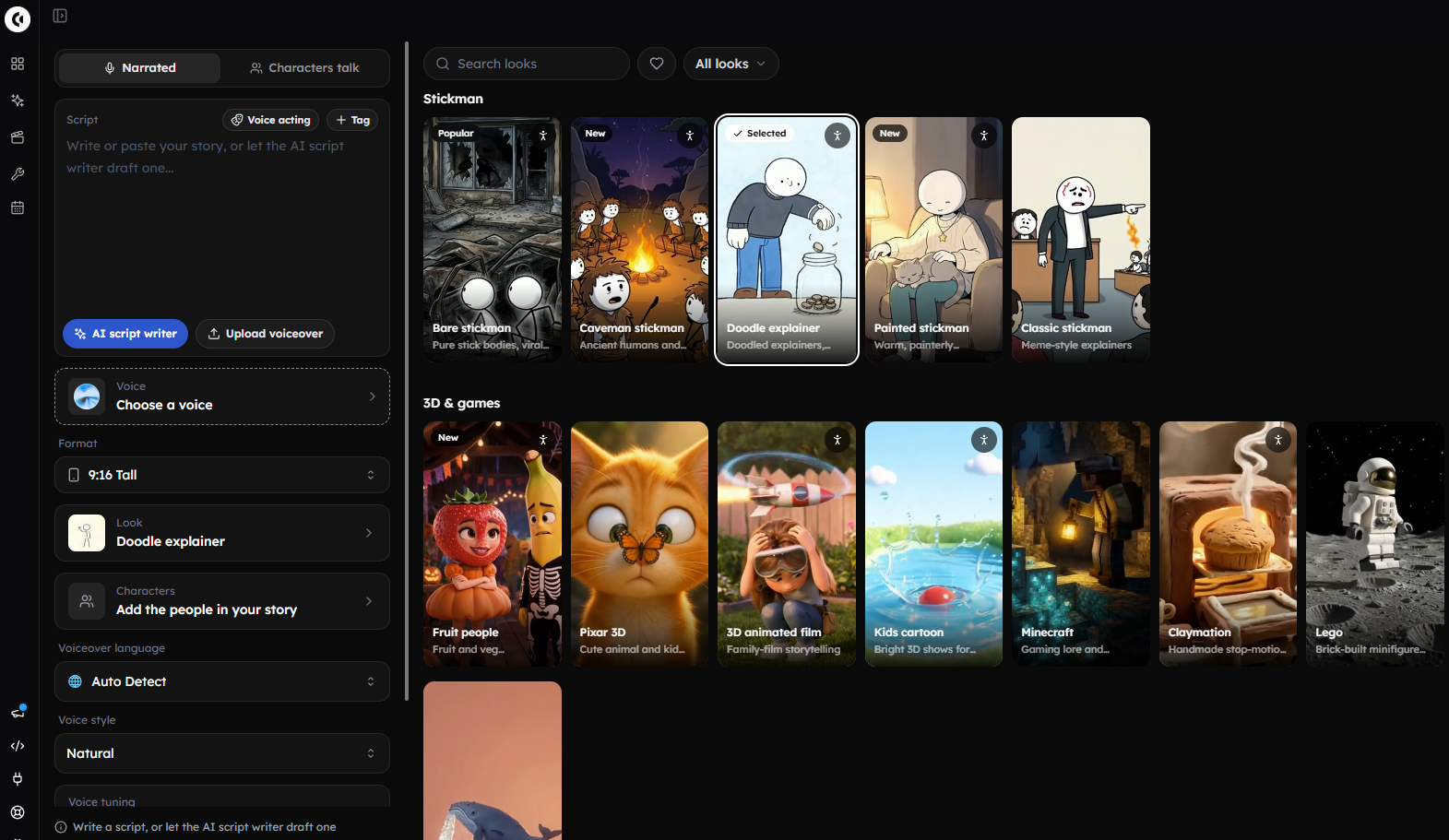
Step 1: Open AI Story and Pick a Stickman Template
Open the AI Story video generator and choose a stickman template. Each one works in 16:9 and 9:16:
Bare stickman: pure stick bodies, built for viral survival stories.
Doodle explainer: doodled explainers for money and law topics.
Caveman stickman: ancient humans and first inventions.
Painted stickman: warm, painterly stickman scenes.
Classic stickman: meme-style explainers.
Step 2: Write or Paste the Script
Use the AI script writer, which writes to a target length and shows an estimated runtime, or paste your own. Write times and numbers the way you want them spoken, such as "2:47 a.m.".
Step 3: Add a Consistent Stickman Character
Create a character with a name, appearance and an uploaded or drawn picture, or pick a ready-made stickman from the Characters library with "From library".
Mention it with @ in the script so it stays the same across scenes.
Use "Keep off screen" for a character who is talked about but not shown.
Step 4: Control the Look With Scene Instructions
Scene instructions (up to 2,000 characters) apply to all scenes or some. Example: "Plain white background, thick black lines, no text inside scenes, camera stays still, red only for danger."
Step 5: Choose a Voice and Add Acting Tags
Pick from 16,000+ AI voices and a voice style such as Calm, Dramatic or Eerie. Tags like [whispers] and [long pause] are performed, not read aloud.
Step 6: Generate, Fix, Animate and Export
Use "Redo pictures" to regenerate visuals while keeping the words, voiceover and timing (no voiceover minutes used).
Animate selected scenes with an AI video model. Quick picks cover the first 10 seconds, 30 seconds, 1 minute or the whole video, and the cost is shown before you confirm.
Export in 16:9 for long-form or 9:16 for Shorts.
Paid plans can also run this flow from Claude or ChatGPT through the Clippie MCP connector, at the same credits and minutes as the app.
Where it falls short: it costs money every month, with no trial or no-cost tier. You cannot hand-pose joints as in Pivot Animator, some scenes need regenerating, and it is not a timeline editor. If you enjoy animating and post one short a week, Route A is the better choice.

Stickman Animation for YouTube: Format, Length and Policy
For stickman animation on YouTube, use 16:9 for narrated long-form stories and 9:16 for Shorts, open with the scenario in the first line, and make every video original. YouTube's monetization rules penalize mass-produced, repetitive uploads, so a distinct character and script matter more than tools.
Length: the stickman explainer channels highlighted in Clippie's walkthrough run around 11–14 minutes. Start with 3–5 minutes while you learn pacing.
Hook: state the situation and stakes in the first sentence: "You have 90 seconds before the water reaches the door."
Audience setting: stick figures are not automatically children's content. Set "Made for kids" by who the video is really for.
Policy: since July 15, 2025, YouTube has called its repetitive-content rule the "inauthentic content" policy. Mass-produced, near-identical videos can lose monetization.
For the general animated story workflow, watch this animated AI story video tutorial.

Stickman Animation Mistakes to Avoid
Most failed stickman videos share the same five problems: overdesigned characters, animation done before the voice is final, unsafe downloads, copied series and leftover watermarks. Fix them and even a simple free workflow can produce clean, original videos that are worth uploading and are ready for monetization review.
Mistake #1: Overdesigning the Stickman
Faces, shading and outfits slow you down and blur at phone size. Add one signature detail, like a red scarf.
Mistake #2: Animating Before the Voiceover Is Locked
Re-recording a line after animating means retiming every pose. Lock the audio first.
Mistake #3: Downloading "Pro" Cracks or Mirror Copies
Modified APKs and rehosted installers are a common malware route. Use official sites and app stores only.
Mistake #4: Copying a Viral Channel's Character and Series
Borrow the format, never the character, title style or story beats of a specific channel. Near-copies risk both viewer trust and monetization.
Mistake #5: Leaving Watermarks and Template Outros
A FlipaClip watermark or CapCut logo outro signals a rushed upload. Check the last two seconds and every corner before publishing.
FAQs
Can I make 2D stickman animation completely free?
Yes. Pivot Animator on Windows and OpenToonz on Windows, macOS or Linux are fully free desktop programs. Stick Nodes and FlipaClip are free on mobile but limit exports: Stick Nodes' free version exports GIF only, and FlipaClip's free exports carry a watermark. CapCut can assemble the final video at no cost.
What is the easiest free stickman animation software for beginners?
Pivot Animator is the easiest on a Windows PC because the figure is ready to move and you only drag joints frame by frame. On a phone, Stick Nodes is the friendliest because it tweens between poses automatically. OpenToonz is powerful but is better learned after you understand basic timing and key poses.
How do I make stickman animation with AI?
Write a script, then use an AI tool that turns each line into a stickman scene with a matching voiceover. You can generate stills for free in the Gemini app, within Google's limits, and animate them with cuts and zooms in CapCut, or use a paid AI Story template that handles scenes, voice, captions and export together.
How long does a stickman animation take to make?
Hand animation can take several hours per minute of polished movement, depending on how many poses you use. A 60-second Pivot Animator or Stick Nodes short is a realistic first weekend project. AI templates are faster per minute, but still budget time to review and regenerate weak scenes.
Can stickman animation videos be monetized on YouTube?
They can, if the channel meets YouTube Partner Program requirements and the videos are original. YouTube's inauthentic content policy targets mass-produced and repetitive uploads, so use your own character, setting and scripts. Avoid copying another channel's series, and set the audience honestly rather than marking every stickman video as made for kids.
Should I use 16:9 or 9:16 for stickman videos?
Use 16:9 for narrated long-form stories and explainers, the format used by the stickman survival channels shown in Clippie's walkthrough. Use 9:16 for Shorts, quick "what if" beats and fight loops. If you plan both, animate in 16:9 and keep the action centered so you can crop vertical clips later.
What to Do Next
Pick one route and finish one video this week:
Going free: install Pivot Animator or Stick Nodes, write a 60-second survival script, record your voice and assemble it in CapCut.
Going AI: start from the Bare stickman template and follow our full AI story video workflow.
Either way: keep one recognizable stickman across every upload.
Build the story step by step
How to storyboard a Stickman survival video
Build a Stickman survival story around one difficult choice, with an original six-scene script, visual instructions and a practical production checklist.
How to plan ancient-human Stickman stories
Plan an ancient-human Stickman video with a clear story, a consistent setting and an explicit distinction between researched history and fictional scenes.
Stickman animation prompts and video ideas you can build on
Original stickman prompts for survival stories, what-if videos, explainers and horror, with separate script, scene and animation instructions for Clippie.
Try it in Clippie
Make a stickman video
Turn a script into Stickman scenes, narration and captions in 16:9 or 9:16. Add AI animation to the moments that need motion.
Make a stickman video