
How to Use Nano Banana Image Generator (Complete Guide 2026)
Learn how to use Nano Banana in Clippie AI to generate high-quality images fast. This complete guide covers step-by-step instructions, a structured prompt framework, and optional text prompts for better results.
Introduction
Creating high-quality AI images quickly is essential for content creators working on social media, faceless videos, and digital assets. With Nano Banana in Clippie AI, you can generate visually appealing images in seconds using clear and structured prompts.
Nano Banana comes in two versions: Nano Banana and Nano Banana Pro. The standard version is optimized for speed and efficiency, making it ideal for quick image generation and rapid content creation. Nano Banana Pro, on the other hand, delivers more refined details, better visual consistency, and higher overall quality, making it a better choice for more polished outputs.
Whether you're generating images for content, creative projects, or testing ideas, both versions help you produce clean and engaging visuals with minimal effort.
In this guide, you’ll learn how to use the Nano Banana Image Generator in Clippie AI, along with a complete prompt framework to help you generate better, more consistent AI images.
Table of Contents
How to Use Nano Banana Image Generator
Prompt Guide for Better Results
Prompt Examples
Common Mistakes to Avoid
FAQs
Step 1: Open the AI Image Generator in AI Playground
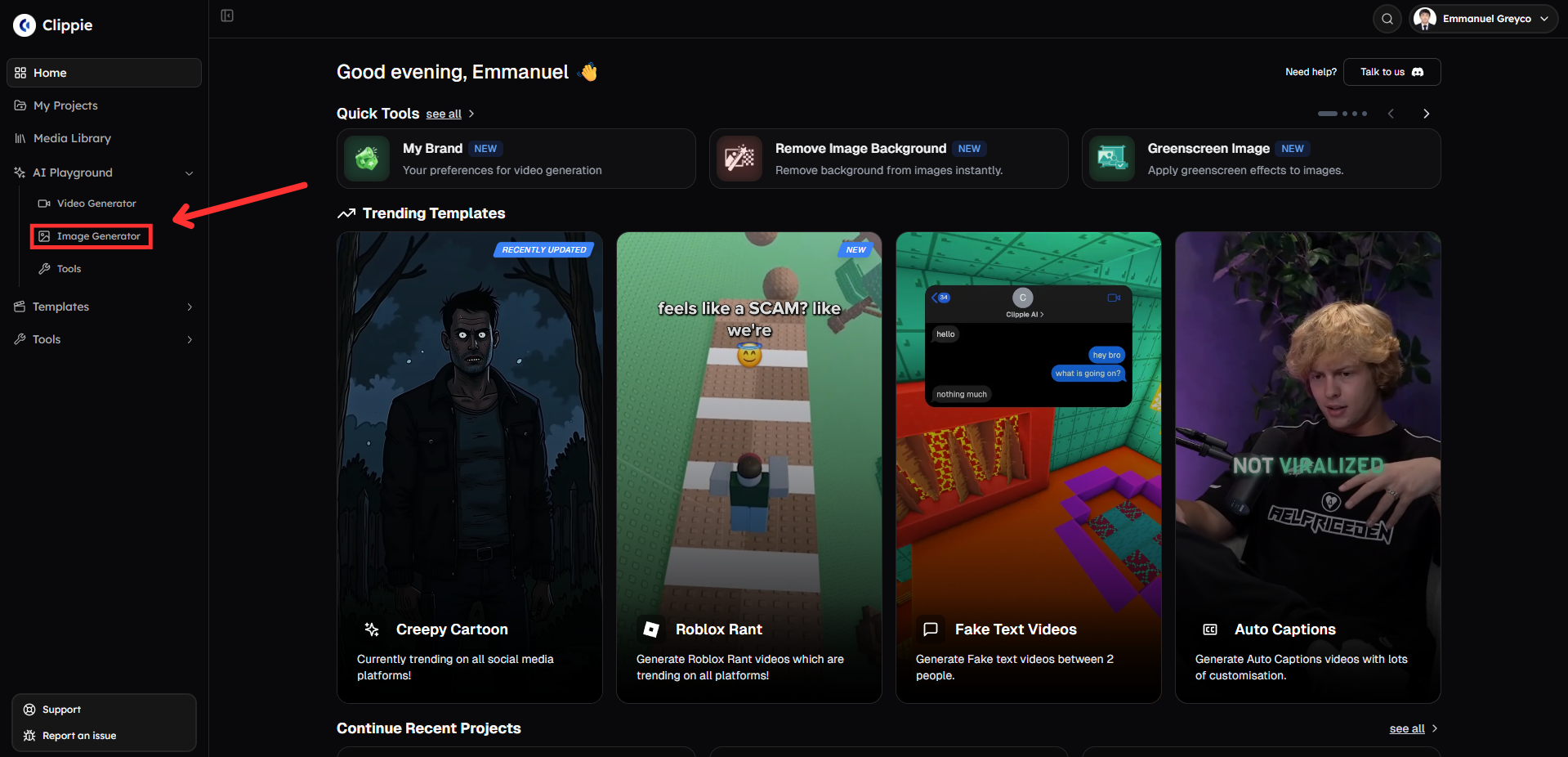
Start by accessing the image generation tool inside Clippie AI.
Go to AI Playground and select Image Generator.
Step 2: Generate Your Image with Nano Banana
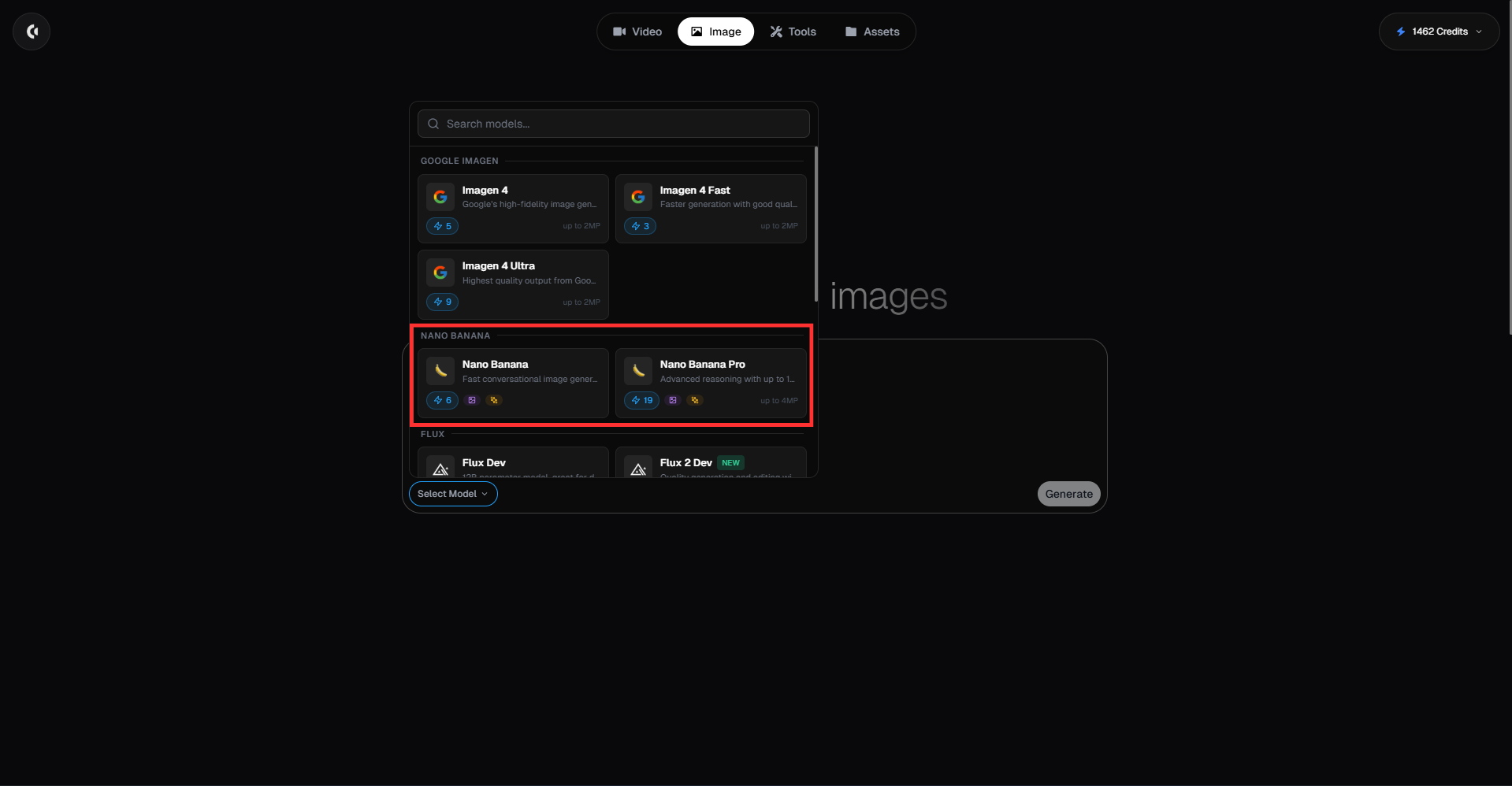
Create your image using the Nano Banana model.
Select Nano Banana or Nano Banana Pro.
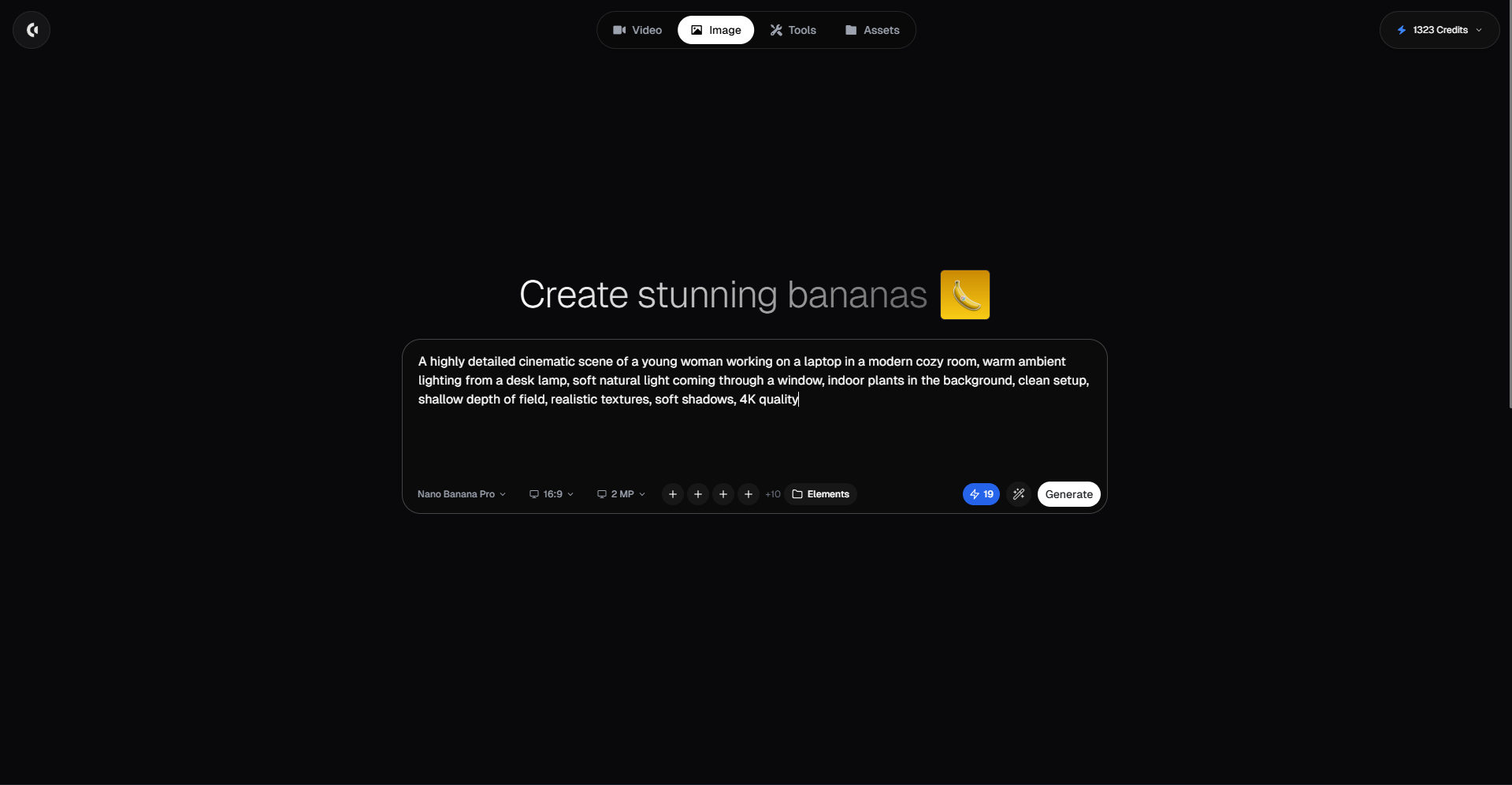
Type a detailed prompt describing the image you want to generate.
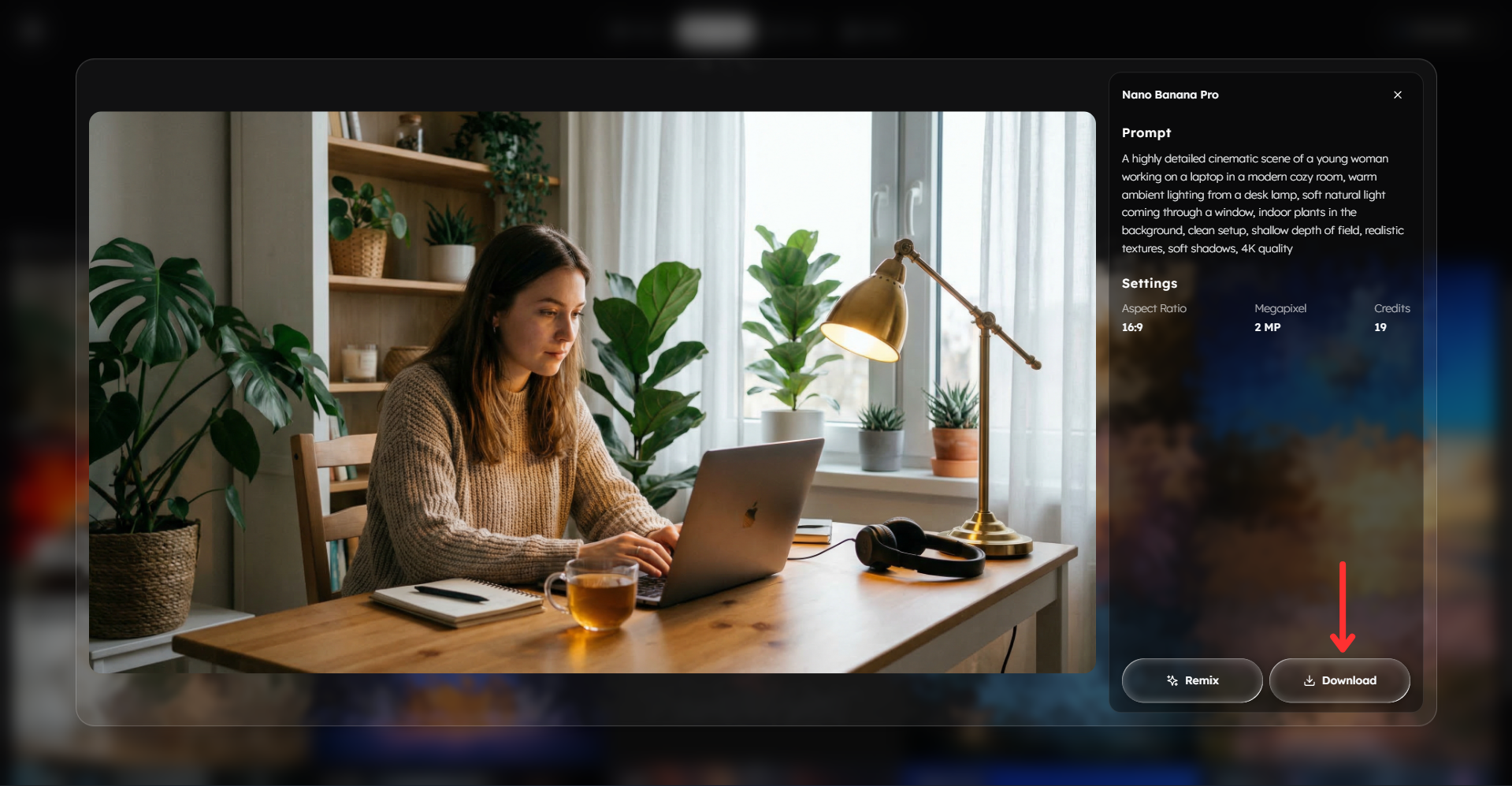
Example prompt: A highly detailed cinematic scene of a young woman working on a laptop in a modern cozy room, warm ambient lighting from a desk lamp, soft natural light coming through a window, indoor plants in the background, clean setup, shallow depth of field, realistic textures, soft shadows, 4K quality
Choose your preferred aspect ratio.
If you are using:
Nano Banana → upload up to 3 reference images
Nano Banana Pro → upload up to 4 reference images
You can also add a collection of elements to guide the AI using reference images.
Click Generate to create your image.
Pro tip: Keep your prompt clear and structured. Focus on the subject, environment, and lighting to get the best results.
Step 3: Download Your Image
Once your image has been generated:
Download your image.
You can now use the image in videos, thumbnails, social posts, or creative projects.
Prompt Guide: How to Write High-Quality Prompts for Nano Banana
Nano Banana works best when your prompts are simple but structured. Since it’s optimized for speed, clarity is more important than overloading with details.
1. Use the Core Prompt Formula
Use this simple structure:
Subject + Environment + Style + Lighting + Composition + Details + Quality
Think of prompts like describing a scene to a photographer.
2. Subject (Main Focus)
Clearly define your subject.
Examples:
a surprised man
a woman using a laptop
a luxury sports car
a skeleton working in an office
a modern house
Tip: Be specific but concise.
3. Environment (Where the Scene Happens)
Add context to your subject.
Examples:
in a modern office
on a beach during sunset
in a futuristic city
Environment adds context and improves realism.
4. Style (Visual Direction)
Keep styles simple and consistent.
Examples:
cinematic
realistic
minimalist
aesthetic
Avoid mixing too many styles.
5. Lighting (Very Important)
Lighting improves realism and depth.
Examples:
soft natural lighting
warm indoor lighting
golden hour lighting
dramatic shadows
Good lighting makes images feel more professional.
6. Composition (Optional but Helpful)
Examples:
close up shot
wide angle shot
centered subject
blurred background
Composition helps control how the subject appears.
7. Details & Enhancements
Examples:
realistic textures
soft shadows
depth of field
clean composition
Avoid adding too many unnecessary details.
8. Quality Keywords
Examples:
high quality
4K
ultra realistic
These help guide the final output.
9. Optional: Adding Text in Images
You can include text in your image if needed by specifying it clearly in your prompt.
Examples:
text saying “WELCOME” at the top
small text in the bottom corner saying “2026”
Tips:
Keep text short and clear
Specify placement (top, center, bottom)
Avoid long sentences
10. Example of a Strong Prompt
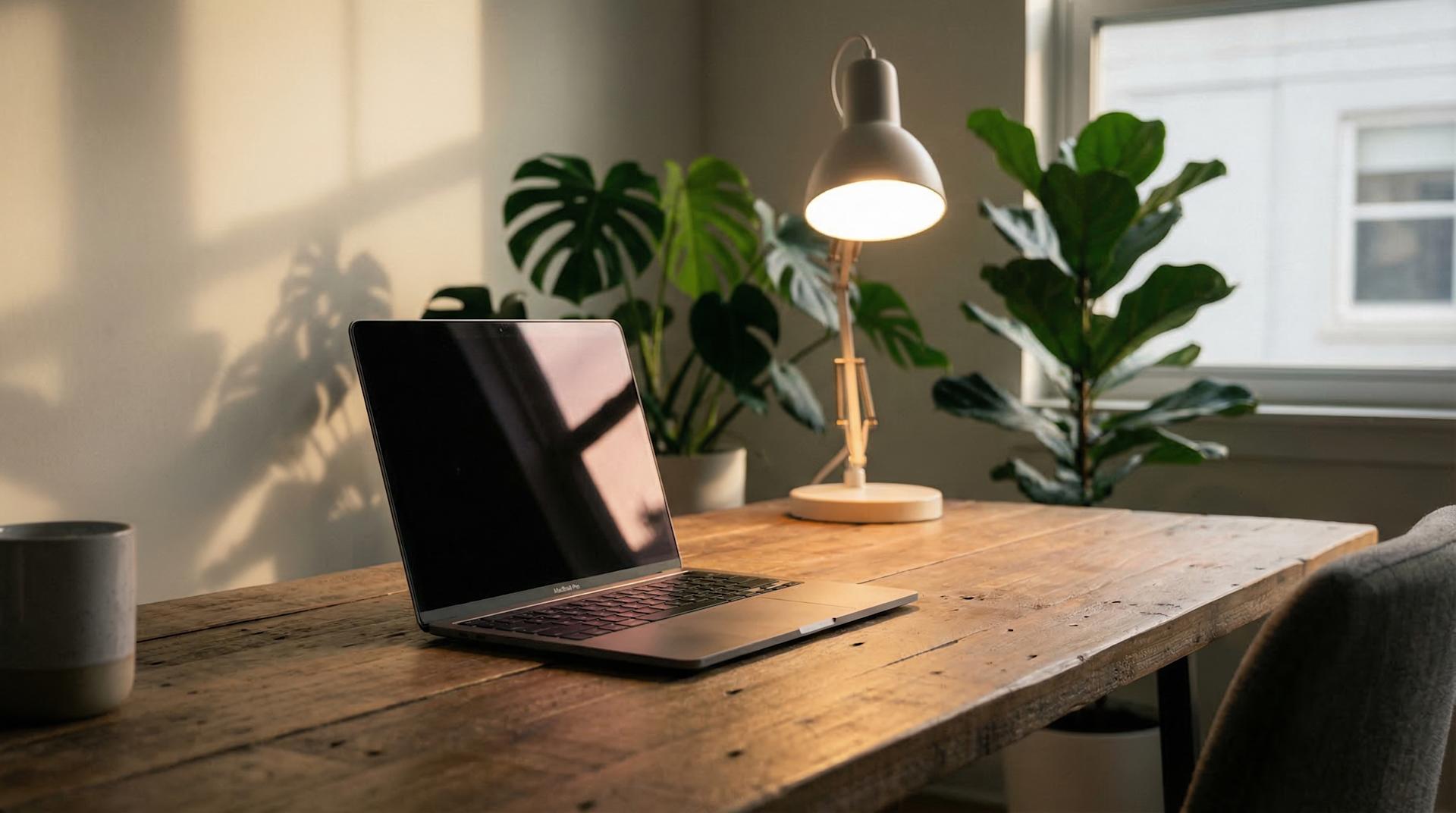
"A cinematic scene of a modern workspace with a laptop on a wooden desk, indoor plants in the background, warm lighting from a desk lamp, soft shadows, shallow depth of field, clean and minimal aesthetic, realistic textures, 4K quality"
11. Bad vs Good Prompt
Bad:
“workspace”
Good:
A modern minimalist workspace with a laptop, warm lighting, indoor plants, soft shadows, clean aesthetic, realistic, 4K
12. Using Reference Images & Elements
Nano Banana allows:
Up to 3 reference images
Element collections
Use them to:
guide style
improve consistency
match a specific look
13. Common Mistakes to Avoid
Writing very short prompts
Not including lighting
Using too many styles
Being too vague
Clear prompts always produce better images.
14. Pro Tip for Best Results
Think in layers: What → Where → How → Details → Quality
Clear prompts always produce better results.
Bonus: Get 1-on-1 Support in Our Discord Community
If you get stuck or want personalized help, join our Discord community. Our team offers 24/7 one-to-one support to help you go viral with your content.
Click me to join our discord community!
FAQs: Using Nano Banana Image Generator
How do I write a good prompt for Nano Banana to get high-quality images?
To get high-quality images with Nano Banana, your prompt should clearly describe the subject, environment, style, lighting, and level of detail you want.
A simple structure that works well is:
Subject + Environment + Style + Lighting + Details + Quality
For example:
A cinematic image of a woman using a laptop in a modern home office, warm natural lighting coming through a window, indoor plants in the background, shallow depth of field, realistic textures, high quality, 4K
Clear prompts help Nano Banana understand exactly what you want to generate. The more structured your prompt is, the more accurate and visually appealing your image will be.
Avoid very short prompts such as “woman working” because they do not give the AI enough information to produce a detailed result.
What makes Nano Banana Pro better than Nano Banana?
Nano Banana Pro produces more refined images with improved realism, stronger detail, and better consistency across generations.
While Nano Banana is optimised for speed and quick content creation, Nano Banana Pro is designed for:
• higher detail images • improved facial consistency • better lighting realism • more accurate textures • stronger results when using reference images
If you are creating professional content, thumbnails, social media visuals, or images for AI video tools like Veo, Nano Banana Pro will usually produce better results.
Nano Banana is still very useful for fast idea generation and rapid content workflows.
How detailed should my prompt be for Nano Banana?
Your prompt should be detailed enough to describe the scene clearly, but not overly complicated.
A good prompt usually contains:
• the subject • where the scene takes place • lighting description • visual style • level of detail or quality
Example of a good level of detail:
A realistic image of a man sitting in a modern office, warm indoor lighting, clean desk setup, shallow depth of field, realistic textures, high quality
Very long or confusing prompts are not necessary. Clear and structured prompts perform best.
Can I use reference images in Nano Banana to improve results?
Yes, reference images can significantly improve image quality and consistency.
Reference images help Nano Banana understand:
• the style you want • how a character should look • clothing appearance • environment composition • colour palette • visual consistency across multiple images
Upload limits:
Nano Banana → up to 3 reference images Nano Banana Pro → up to 4 reference images
Using reference images is especially helpful when creating consistent characters for video content or social media posts.
Related Blog Posts
How to Use Seedream Image Generator (Complete Guide 2026)
How to Use Imagen Image Generator (Complete Guide 2026)
How to Use Flux Image Generator (Complete Guide 2026)

Click Me To Start Creating With Clippie AI Now!
Make an AI story video
Write a script or let AI write one. Clippie turns it into a narrated video with AI scenes, voiceover and captions.
Read more

How to Make Top 5 Ranking Videos in 2026 (Step-by-Step)
Build ranking Shorts that can still earn: pick a debatable topic, set clear criteria, source clips you may use, script the countdown, add your commentary.

How to Create Short-Form Videos Using AI: 8 Steps (2026)
A beginner workflow for AI videos on TikTok, Reels and Shorts: pick a format, script a hook, add visuals, voice and captions, export at 9:16, label AI.

7 Free CapCut Alternatives for Short-Form Video (2026)
Compare Edits, YouTube Create, VN, Clipchamp, Canva, DaVinci Resolve and Shotcut: what each gives free users, what it caps first and where it falls short.