
How to make stickman videos with AI or by hand.
Write a short script, split it into scenes, give every scene a stickman, add a voiceover and captions, animate the figures and export. This guide covers both ways to do it: in minutes with AI, or frame by frame in a free animation app.
- Steps6
- Stickman looks5
- AI voices125
Stickman scenes drawn and animated in Clippie, in four of the five stickman looks.
How to make a stickman video. Six steps.
- 1
Pick a format and length
A 30 to 60 second Short in 9:16 for TikTok, Reels and YouTube Shorts, or a 5 to 30 minute story or explainer in 16:9 for YouTube.
- 2
Write the script
Open on a hook, tell one story with one main character, and write it to be read aloud. Paste your own, or have an AI script writer draft one from a topic.
- 3
Pick one stickman look
Bare stick bodies, doodled explainer figures, painted scenes or classic meme stickmen. Keep the same look and character for the whole video.
- 4
Make a scene for every line
Split the script into scenes of 5 to 8 seconds and draw or generate a stickman image for each one, showing what the narrator is saying.
- 5
Add a voiceover and captions
Record yourself or use an AI voice, then add word-by-word captions so people watching on mute keep watching.
- 6
Animate, edit and export
Make the stickmen move, tighten the timing, add music and sound effects, then export in 16:9 or 9:16.
The full guide. Everything that goes into a stickman video.
Two ways to make stickman videos, what each one is good for, and the habits that keep stickman channels growing.
The short answer
To make a stickman video, write a short script, split it into scenes, create a stickman image for each scene, add a voiceover, animate the figures, then add captions and export in 9:16 for Shorts or 16:9 for YouTube.
You can do every step yourself in a free animation app, which takes hours per minute of video, or let an AI stickman video maker like Clippie write the script, draw and animate every scene and narrate it in a few minutes. Most faceless stickman story and explainer channels now use AI for the scenes and spend their time on the script.
Method 1: make a stickman video with AI
This is the fastest way to make narrated stickman videos: survival series, “what if” stories, history and psychology explainers. In Clippie it works like this:
- Open a stickman template: Bare stickman in 16:9 for YouTube or 9:16 for Shorts, Doodle explainer for explainers, or Caveman stickman for ancient-human videos. The look and the frame are set for you.
- Write or generate the script: Paste your own, or type a topic and the AI script writer drafts one in the tone and length you pick, up to 10 minutes. Edit it like any text.
- Generate the scenes: Clippie splits the script into scenes and draws a stickman scene for every line, keeping the same look across the whole video. Redraw any scene you do not like.
- Pick a voice: Choose from 125 AI voices, a calm narrator for explainers or a tense one for survival stories, and regenerate any line until it sounds right.
- Animate the scenes: Animate one scene, or animate every scene at once from one prompt, so the stickmen walk, run and react instead of sitting still.
- Add captions and export: Word-by-word captions in 100+ languages are added for you. Change anything scene by scene, then export in 16:9, 9:16 or 4:3.
A 60-second Short is about 8 to 12 scenes and a 10-minute video about 75 to 120, which is why drawing them by hand is the part most creators hand to AI.
Method 2: animate stickmen by hand
Hand animation gives you full control over every pose, which matters for fight scenes and physical comedy. It is also much slower: at 12 frames a second, one minute of animation is up to 720 drawings or poses. These tools are the usual places to start:
- Pivot Animator: free Windows software built for stick figures. You pose a jointed stickman frame by frame and it plays the frames back as animation.
- FlipaClip: a frame-by-frame drawing app for iPhone and Android, with onion skinning so you can see the previous frame while you draw the next one. The easiest way to animate stickmen on your phone.
- Blender (Grease Pencil): free 2D drawing and animation inside Blender. Powerful, with a steeper learning curve.
- Adobe Animate: paid professional 2D animation software with rigs and tweening, used for polished stick figure animation.
- Canva: not an animation tool, but you can place stick figure graphics on slides and add simple motion for basic explainer videos.
Whichever tool you animate in, you still need a script, a voiceover and captions, and you put them together in a video editor before you export.
Which method should you use?
Use AI if you want to post narrated stickman stories or explainers often, on YouTube, TikTok or Shorts. The work that decides whether a video does well is the story and the hook, and AI gives you back the hours you would spend drawing scenes.
Animate by hand if the motion itself is the point, like stick fights, dance or slapstick, or if you are learning animation. Many creators do both: AI for the story channel, hand animation for the occasional showpiece.
What makes stickman videos work
The stickman channels that grow tend to follow the same rules, whichever way they make their videos:
- Hook in the first second: open on the most surprising moment or question, like “Day 1: I woke up alone in the Arctic”, not on an introduction.
- One recurring character: a stickman viewers recognise from video to video turns one-off views into a series people follow.
- Short scenes: change the picture every 5 to 8 seconds so there is always something new to look at.
- Movement: animated scenes hold attention better than still images, even when the motion is simple.
- Captions: most short-form video is watched with the sound off at first.
- Post as a series: “Day 1 to Day 100” survival stories and “how did humans invent…” explainers give people a reason to watch the next one.
Stickman how-tos and templates. Pick what you want to make.
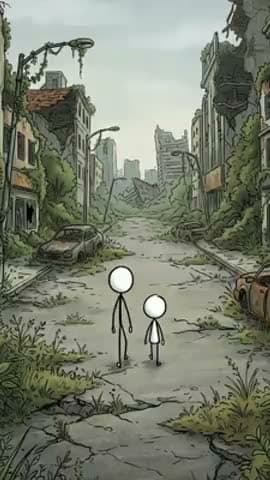 How-toHow to make viral stickman videosHooks, story formats and pacing that keep people watching.
 How-toHow to make stickman YouTube videosStart a faceless stickman channel in 16:9, with Shorts on the side.
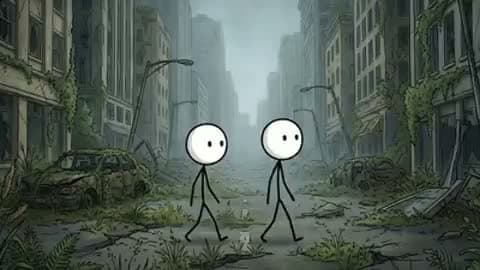 How-toHow to make long stickman videos10-minute and longer stickman videos without drawing 100 scenes.
- YouTubeBare stickman, 16:9Pure stick bodies in detailed, moody worlds. The look behind viral survival series.
- ShortsBare stickman, 9:16The same look for Shorts, TikTok and Reels.
- YouTubeDoodle explainer, 16:9Doodled stickmen on a clean background for money, law and psychology explainers.
Everything a stickman video needs. In one editor.
Five stickman looks
Bare stickman, Caveman stickman, Doodle explainer, Painted stickman and Classic stickman. Switch looks without rewriting the story.
Animate every scene
One prompt animates every scene in parallel in the background. Free on any paid plan.
125 AI voices
A calm narrator for explainers, a tense one for survival stories. Regenerate any line until it lands.
Captions in 100+ languages
Word-by-word captions keep muted viewers watching and make the video easy to translate.
Edit scene by scene
Change a line, redraw a scene, swap the voice or retime it, without starting over.
16:9, 9:16 or 4:3
Landscape for YouTube, vertical for Shorts, TikTok and Reels, from the same story.
Frequently asked questions.
How do you make a stickman video?
Write a short script, split it into scenes of 5 to 8 seconds, create a stickman image for each scene, add a voiceover, animate the stickmen, then add captions and export in 9:16 for Shorts or 16:9 for YouTube. With an AI stickman video maker like Clippie, you write or generate the script and it does the scenes, animation, voice and captions for you.
Can I make stickman videos for free?
Yes, by hand: Pivot Animator (Windows), FlipaClip (iPhone and Android) and Blender are free, but every frame is yours to animate. In Clippie you can open the stickman templates, write a script and preview scenes without paying. Exporting finished videos, scene animation and AI credits for the drawn looks come with a paid plan.
What is the best app to make stickman videos?
For narrated stickman stories and explainers, an AI stickman video maker like Clippie is fastest, because it writes, draws, animates and narrates every scene. For hand-animated stick figures, Pivot Animator is the classic free choice on Windows and FlipaClip is the easiest on a phone.
How do I make a stickman animation on my phone?
Use FlipaClip to draw a stickman frame by frame, or open Clippie in your phone’s browser, pick the 9:16 stickman template and generate the scenes, voice and captions from a script.
How long does it take to make a stickman video?
By hand, a minute of smooth animation can take a full day or more. With AI, a one-minute Short takes a few minutes to generate, and most of your time goes into the script.
Can AI make stickman videos?
Yes. AI can write the script, draw every scene in a consistent stickman style, animate the figures and narrate it. In Clippie you pick a stickman template, give it a script or a topic, and edit the result scene by scene.
Can I use my own script?
Yes. Paste it and Clippie splits it into scenes and draws a stickman scene for each one. Or let the AI script writer draft one from a topic, a tone and a length, then edit it.
How much does it cost to make a stickman video?
Bare stickman, Caveman stickman, Doodle explainer and Painted stickman scenes are drawn by AI image models and use AI credits per scene, and you see the total before you generate. Classic stickman is a Clippie style included in your plan. Animating scenes is free on any paid plan, and exporting uses your plan’s export minutes.
Can I monetize these videos on YouTube?
The images, voice and captions are generated for you, so there is no copyrighted footage to get flagged. YouTube still rewards original work, so write or edit your own script, check your facts and add your own angle.

