
Bible stories on screen, told with care.
Start from the passage, not a guess. Clippie turns your script into grand painted scenes with a calm narrator and captions, and you decide every word before anyone sees it.
- Story looks45 to choose from
- AI voices125, plus a voice library
- CaptionsIn 100+ languages
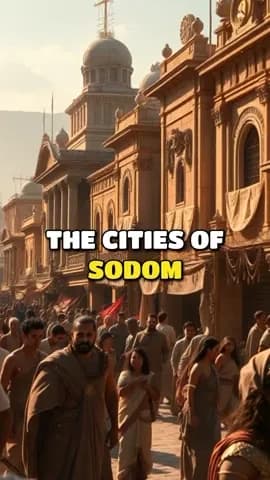
A frame from a narrated Bible story, and clips of the Ancient epic look, a general ancient-world style.
From the passage to a finished video.
- 1
Start from the text
Paste your retelling, or choose the Religion theme and name the passage in the writer’s idea box. Then read the draft side by side with scripture and correct it.
- 2
Decide what to show
Ancient epic suits grand events. If your tradition avoids depicting certain figures, mark a character “Keep off screen” so the story can name them without drawing them.
- 3
Choose a reverent voice
Pick a calm or warm narrator, and regenerate any line that reads wrong. Check how names are pronounced, then export in 16:9 or 9:16.
Handle scripture with care. Three things to get right.
AI can get scripture wrong
An AI draft can blend accounts, add details the text does not contain or misquote a verse with confidence. Treat its draft as a starting point. Have someone who knows the text read the script, especially for teaching use.
Quoting a Bible translation
Many modern English translations are under copyright, and their publishers set limits on quotation. Check the publisher’s policy before reading long passages from one. The King James Version is public domain in most countries, though not without limits in the UK. Retelling a story in your own words avoids most of this.
Pictures and tradition
Christian traditions differ on images of God and Christ, and pictures can carry assumptions about what people looked like. Decide on your approach up front, look at each scene before exporting and redraw anything that does not sit right.
- Old Testament epics: Noah, the Exodus, Esther and Daniel suit the Ancient epic look.
- Parables: The Prodigal Son and the Good Samaritan work well as short narrated stories.
- Children’s ministry: The Storybook and Kids cartoon looks are gentler, for Sunday school.
- Devotional shorts: A single verse and a short reflection in your own words, in 9:16.
For churches and creators. Made to be checked.
Religion theme
A script writer theme with Educational, Cinematic and Dramatic tones.
Ancient epic look
Grand painted scenes in 16:9 for YouTube and 9:16 for shorts.
Keep off screen
Name a figure in the story without drawing them.
Calm and warm voices
125 picked voices with styles, plus your own imported voice.
Other languages
Narration in many languages and captions in over 100, for congregations and viewers abroad.
Edit every line
Change the wording, a picture or the timing of any scene before export.
Frequently asked questions.
Is the AI script accurate to the Bible?
Not reliably. It is a draft, and it can add or change details. Check every line against your translation before you publish.
Can a church use these videos?
Yes. You own the output and may use it for any lawful purpose under Clippie’s terms. Make sure any translation you quote allows it.
Can I make it for children?
Yes. Switch to the Storybook or Kids cartoon look, use a warm voice and keep the telling simple. Read YouTube’s made for kids rules if you publish there.
Can I narrate in Spanish or another language?
Yes. Clippie can narrate and caption in many languages. Have a speaker check names and terms, since they differ between Bible traditions.
Does it show Jesus?
Only if your script does, and you can review each scene. Picture models draw from your words, so the results vary. You can keep any character off screen.
What does a video use from my plan?
Drawing the scene pictures and editing are included. The voiceover uses voice minutes and the finished export uses export minutes. Animating scenes is optional and uses AI credits, and the price shows before you start.

