
Top 10 AI Tools for Faceless YouTube Channels in 2026 (Complete Guide)
Discover the top 10 AI tools for faceless YouTube channels in 2026, covering scriptwriting, voiceover, video generation, captions, and compression, plus how to build a full workflow with Clippie AI.

Searching for the best AI tools to run a faceless YouTube channel in 2026?
You're in the right place. Faceless YouTube channels are one of the fastest-growing content business models right now, and the creators scaling them fastest aren't working harder. They're working with better tools.
This guide breaks down the top 10 AI tools across every stage of faceless YouTube production, from scriptwriting and voiceover to video generation, captioning, compression, and full workflow management. By the end, you'll know exactly which tools belong in your stack and how to build a production system that scales.
Executive Summary
This guide is for faceless YouTube creators who want to scale their channel output in 2026 without burning out or hiring a full production team. It covers what faceless channels genuinely need at each growth stage, the 10 best AI tools by category, how to choose tools based on your consistency goals, and how Clippie AI fits into a complete YouTube production workflow. Every tool recommendation is matched to a specific production problem, not just listed for the sake of completeness.
Table of Contents
What Faceless YouTube Channels Actually Need to Scale in 2026
The 5 Categories of AI Tools Every Faceless Creator Should Understand
Top 10 AI Tools for Faceless YouTube Channels in 2026
How to Choose AI Tools Based on Your Consistency Goal
How to Manage Your Entire Faceless YouTube Workflow With Clippie AI
Frequently Asked Questions

1. What Faceless YouTube Channels Actually Need to Scale in 2026
Most creators approach tool selection backwards, they collect tools first and build a workflow second. This creates fragmentation, wasted spend, and production bottlenecks that kill consistency.
Before picking any tool, understand what a scaling faceless YouTube channel actually requires.
The 3 Non-Negotiables for Faceless Channel Growth
1. Consistent output volume
YouTube's algorithm rewards channels that publish regularly. For a faceless channel targeting growth in 2026, the minimum effective posting frequency is:
Long-form (8–15 min videos): 2–3 per week
Shorts (30–60 seconds): 4–7 per week
Combined strategy: 2 long-form + 3–5 Shorts per week
Manual production at this volume is unsustainable without AI. A single 10-minute video takes 4–8 hours to produce manually. AI tools compress that to 45–90 minutes.
2. Quality that holds watch time
YouTube's primary ranking signal is average view duration. A video that holds 60% of viewers to the end will outrank a video with 10x more clicks but 20% retention.
AI tools that directly impact watch time:
Voiceover quality (natural delivery keeps viewers engaged)
Auto-captions (85%+ of viewers watch with sound off at least part of the time)
Visual variety (AI-generated images and B-roll prevent visual monotony)
3. A workflow that doesn't require you every step
The goal of a faceless channel is to eventually run with minimal daily input from the creator. AI tools that replace human effort at each production stage, narration, visuals, captions, export, are what make this possible.

The Production Stages Where AI Makes the Biggest Difference
Scripting: AI drafts and structures content in minutes vs hours
Voiceover: AI narration replaces recording studio setup entirely
Visuals: AI image and video generation replaces stock footage sourcing
Captioning: Auto-subtitles replace manual transcription and timing
Compression and export: Automated export removes technical barriers to publishing

2. The 5 Categories of AI Tools Every Faceless Creator Should Understand
Before reviewing specific tools, understand what each category solves. This prevents overlapping subscriptions and gaps in your workflow.
Category 1: Scriptwriting and Research
What it solves: The blank page problem. AI scriptwriting tools generate structured video scripts from a topic or keyword input, including hooks, body sections, and CTAs.
What to look for:
Retention-optimised structure (hook → body → CTA)
Niche flexibility
Ability to match a specific tone or format
Category 2: AI Voiceover
What it solves: The recording bottleneck. AI voiceover converts your script into natural-sounding narration without microphones, acoustic treatment, or re-recording.
What to look for:
Natural delivery with emotional range
Custom voice cloning for channel identity consistency
Integration with your editing platform

Category 3: AI Video and Image Generation
What it solves: The B-roll problem. Faceless YouTube videos need visual variety, AI generation creates custom footage and images without stock library subscriptions.
What to look for:
Quality of motion and scene coherence (for video generation)
Speed of image generation
Ability to create niche-specific visuals
Category 4: Captioning and Transcription
What it solves: The subtitle gap. Manual captioning is one of the most time-consuming production tasks. AI auto-captioning eliminates it entirely.
What to look for:
Transcription accuracy
Auto-sync to audio/voiceover
Multi-language support
Category 5: Compression and Export
What it solves: The upload friction. Large video files slow upload times, increase storage costs, and sometimes fail platform size requirements. Compression tools solve this without visible quality loss.
What to look for:
H.264/H.265 encoding support (YouTube's preferred formats)
Batch processing for high-volume creators
Minimal quality degradation at target file sizes

3. Top 10 AI Tools for Faceless YouTube Channels in 2026
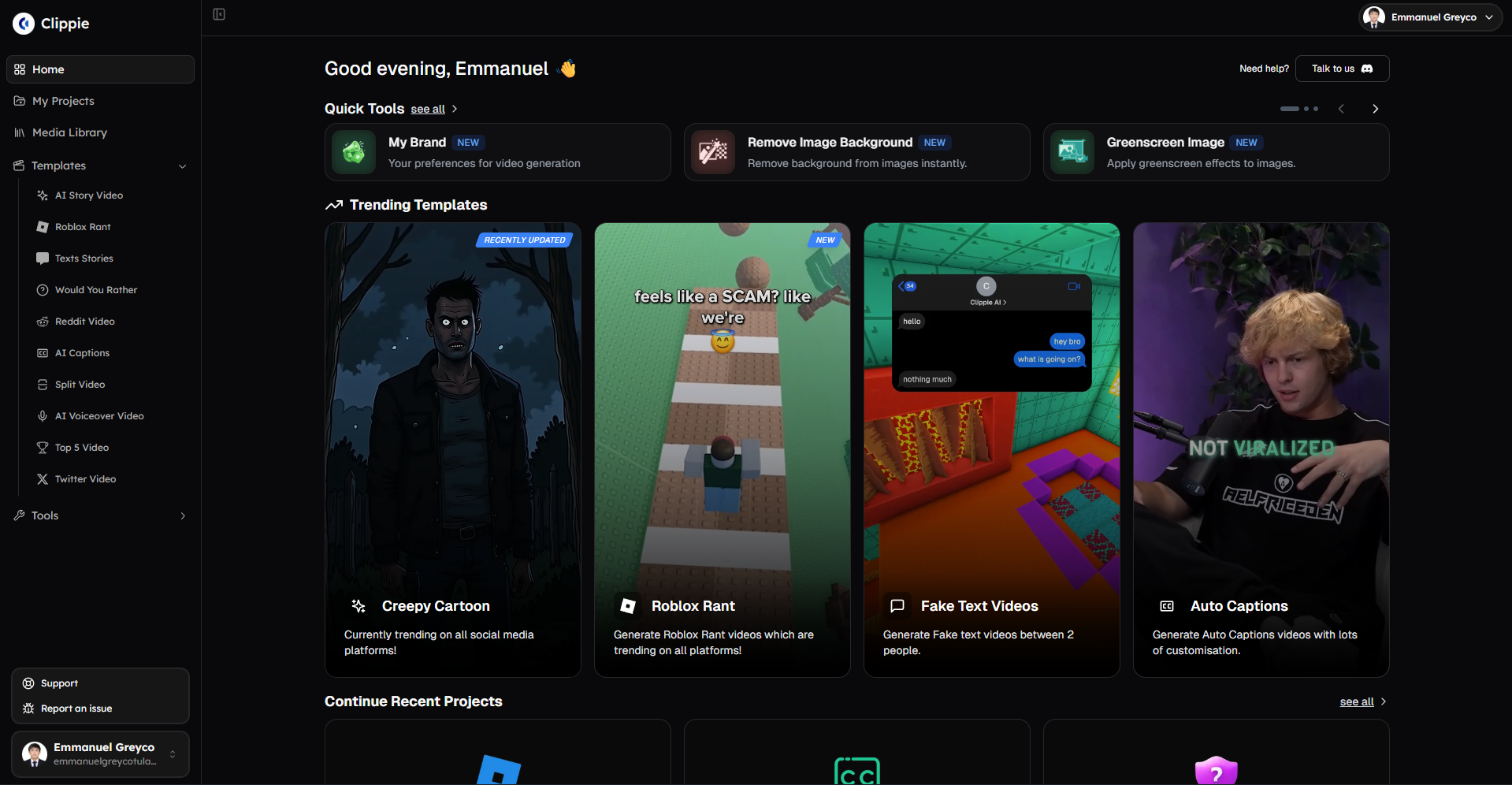
Tool #1: Clippie AI (All-in-One Production Platform)
Category: Voiceover + Captions + Image Generation + Export
What it does: Clippie AI is an all-in-one video creation platform built specifically for faceless content creators. It handles voiceover generation, AI image creation, speech-to-subtitles, and video export inside a single workflow, eliminating the multi-tool fragmentation that slows most faceless channels down.
Why it leads this list: Most tools solve one production problem. Clippie AI solves five simultaneously, and keeps them integrated so there's no friction between stages.
Key features:
50+ AI voices with natural delivery
Custom voice cloning, up to 30 voices on the Pro plan
AI image generation for scene visuals and title cards
Auto-captioning in 102+ languages
Video export optimised for YouTube, TikTok, and Shorts
Pricing:
Lite: $19.99/month → 30 mins export, 30 mins voice, 100 images, 1 custom voice
Creator: $34.99/month → 120 mins export, 120 mins voice, 500 images, 10 custom voices
Pro: $69.99/month → 250 mins export, 250 mins voice, 1,000 images, 30 custom voices
No free tier available.
Best for: Faceless creators who want a single platform covering the full production workflow without managing multiple subscriptions.
Tool #2: ChatGPT (OpenAI)
Category: Scriptwriting and Research
What it does: ChatGPT generates video scripts, outlines, hooks, and CTAs from simple topic inputs. It's the most widely used AI writing tool among content creators for a reason, it's fast, flexible, and handles any niche.
Key features:
Generates full scripts from a single prompt
Strong at hooks and attention-holding structures
Handles tone matching, educational, rant, explainer, listicle
Can research and summarise topics for script accuracy
Limitations:
Output quality varies without detailed prompting
No retention-specific logic built in by default
Requires iteration to match your channel's voice
Best for: Creators who want fast first-draft scripts they can refine before loading into their production platform.
Tool #3: ElevenLabs
Category: AI Voiceover
What it does: ElevenLabs produces some of the most natural-sounding AI voiceovers available in 2026. Its voice cloning technology is industry-leading, a short audio sample generates a highly realistic custom voice.
Key features:
Extremely natural speech with emotional range
Voice cloning from short audio samples
Large pre-built voice library across accents and genders
API access for advanced workflow integration
Limitations:
Standalone tool, no editing, captions, or export built in
Requires integration with a separate editing platform
Adds cost on top of your production stack
Best for: Creators who prioritise voiceover quality above all else and are comfortable managing a multi-tool workflow.
Tool #4: VEO3 / VEO3.1 (Google DeepMind)
Category: AI Video Generation
What it does:VEO3 and its updated version VEO3.1 are currently the benchmark for AI-generated video quality. They produce photorealistic scene footage from detailed text prompts, landscapes, urban environments, abstract visuals, and dynamic motion sequences.
Key features:
Photorealistic scene generation
Strong temporal consistency, scenes hold together across multiple seconds
VEO3.1 improves on motion accuracy and lighting coherence
Ideal for nature, urban, and atmospheric B-roll
Limitations:
Access is still limited for independent creators as a direct subscription
Prompt engineering significantly affects output quality, requires practice
Not integrated into all-in-one production platforms
Best for: Creators producing documentary-style, explainer, or high-production-value faceless content that requires cinematic B-roll.
Tool #5: Seedance 1.0
Category: AI Video Generation
What it does: Seedance 1.0 is a strong competitor to VEO3 with a distinctly more cinematic, stylised aesthetic. It performs particularly well on character-driven and narrative scenes, making it a natural fit for storytelling formats.
Key features:
Strong narrative and character scene generation
Faster generation times than some competing models
Cinematic visual style, less hyper-realistic, more filmic
Works well for Reddit story, rant, and drama-format channels
Limitations:
Stylised output is not ideal for every niche, educational channels may prefer VEO3's realism
Still requires a separate production platform for editing and export
Best for: Faceless storytelling channels, Reddit stories, drama content, confession videos, and narrative formats.
Tool #6: Submagic
Category: Captioning
What it does: Submagic is a purpose-built captioning tool for short-form and long-form video content. It generates animated, styled captions with word-by-word highlighting, the format that dominates TikTok and Shorts in 2026.
Key features:
Animated captions with current TikTok-native styling
Word-by-word highlighting that drives retention
Fast processing speed
Style library with multiple caption format options
Limitations:
Standalone tool, requires export and re-import into your editing workflow
Adds a separate subscription cost
Less useful for creators already using an all-in-one platform with built-in captioning
Best for: Creators who post primarily on TikTok and Shorts and want highly styled animated captions as a standalone feature.
Tool #7: OpenAI Whisper
Category: Transcription and Captioning
What it does: Whisper is OpenAI's open-source transcription model, and one of the most accurate speech-to-text engines available. It powers many of the captioning tools on this list behind the scenes.
Key features:
Extremely high transcription accuracy across accents and languages
Free to use (self-hosted)
Handles background noise and varied audio quality well
Supports 99+ languages
Limitations:
Technical setup required, not plug-and-play for non-technical creators
No caption styling or animation built in
Requires integration into a broader editing workflow
Best for: Technically confident creators who want free, highly accurate transcription and are comfortable building their own pipeline around it.
Tool #8: Otter.ai
Category: Transcription and Research
What it does: Otter.ai is a transcription and note-taking tool primarily used for meetings and interviews. For faceless YouTube creators, it's useful for transcribing research sources, competitor video analysis, and turning spoken ideas into written scripts.
Key features:
Real-time transcription
Speaker identification
Summary and highlight generation
Integrates with Zoom, Google Meet, and Microsoft Teams
Limitations:
Not a video production tool, purely transcription and notes
Less relevant for creators who script first and generate voiceover second
Better as a research aid than a core production tool
Best for: Creators who ideate by speaking rather than writing, or who research by watching/listening to sources they want to transcribe.
Tool #9: HandBrake
Category: Video Compression
What it does: HandBrake is the most widely used free video compression tool among content creators. It converts and compresses video files into YouTube and platform-optimised formats without subscription fees.
Key features:
Open-source and completely free
H.264 and H.265 encoding support
Batch processing, compress multiple files simultaneously
High control over quality settings and output specs
Limitations:
Desktop application only, no cloud processing
Manual configuration required for optimal results
No integration with AI production workflows
Best for: High-volume faceless creators who produce large video files and need to batch-compress before uploading, especially for long-form content above 10 minutes.
Tool #10: Claude (Anthropic)
Category: Scriptwriting and Long-Form Content
What it does: Claude excels at long-form, structured content generation. For faceless YouTube creators producing 10–20 minute educational or explainer videos, Claude's ability to follow complex multi-part prompts and maintain consistent tone across longer outputs makes it a strong scriptwriting tool.
Key features:
Handles long-form scripts with consistent structure and tone
Strong reasoning for educational and explainer content
Follows detailed multi-part prompting well
Good at research synthesis and content organisation
Limitations:
Best results require detailed prompting, generic inputs produce generic output
No video production integration
Works best as a scripting companion, not a replacement for human editorial judgment
Best for: Faceless creators producing long-form YouTube content who need structured, well-reasoned scripts with educational depth.

4. How to Choose AI Tools Based on Your Consistency Goal
Tool selection should be driven by your consistency target, not by what's trending or what has the most features.
Goal: Post 2–3 Long-Form Videos Per Week
Production challenge: Long-form scripts take time. B-roll sourcing is the biggest bottleneck. File sizes are large.
Recommended stack:
Claude or ChatGPT for long-form scripting
Clippie AI for voiceover, captions, and export (Creator plan, 120 mins/month)
VEO3 or Seedance for cinematic B-roll generation
HandBrake for batch compression before upload
Time per video with this stack: 60–90 minutes
Goal: Post 5–7 Shorts Per Week
Production challenge: Volume is the bottleneck. Each Short needs to be produced fast without sacrificing quality.
Recommended stack:
ChatGPT for rapid short-form script drafts
Clippie AI for voiceover, image generation, captions, and export (Creator plan)
No compression needed at Shorts file sizes
Time per video with this stack: 15–25 minutes
Goal: Run Multiple Faceless Channels Simultaneously
Production challenge: Custom voices per channel. High image generation capacity. Parallel export workflows.
Recommended stack:
Claude for structured long-form scripts
Clippie AI Pro ($69.99/month), 30 custom voices, 1,000 AI images, 250 mins export
Seedance or VEO3 for premium B-roll
HandBrake for bulk compression across channels
Time per video with this stack: 20–40 minutes depending on format

The Single-Platform Advantage
The creators who maintain the highest consistency are rarely the ones with the most tools. They're the ones with the fewest friction points in their workflow.
Every tool handoff, export from one platform, import into another, re-sync audio, adjust captions, adds minutes and mental overhead to every single video. At 5–7 videos per week, that overhead compounds into hours of lost production time.
This is the core argument for Clippie AI as the anchor of a faceless YouTube workflow. Voiceover, image generation, captioning, and export in one place means no handoffs, no re-syncing, and no context switching.

5. How to Manage Your Entire Faceless YouTube Workflow With Clippie AI
Here is the complete step-by-step production workflow for a faceless YouTube channel using Clippie AI as the production core.
Step 1: Ideation and Research (External)
Use ChatGPT or Claude to:
Generate video topic ideas based on your niche keywords
Research the topic and pull key facts and angles
Identify the hook, 3–5 main points, and CTA
Time: 10–15 minutes
Step 2: Script (External)
Write or generate a tight script:
Long-form (10 min video): 1,200–1,800 words
Short-form (60 sec): 120–200 words
Keep sentences short and direct, AI voiceover reads declarative language best
Time: 10–20 minutes
Step 3: Voiceover (Clippie AI)
Paste script into Clippie AI:
Select from 50+ voices or use your cloned custom voice
Generate narration in seconds
Review and regenerate any sections that don't land correctly
Time: 3–5 minutes
Step 4: Visuals (Clippie AI)
Use Clippie's built-in AI image generation:
Generate a title card for the opening
Create scene-setting images for each main section
Produce reaction or emphasis visuals at key emotional beats
No stock library. No external sourcing. No file transfers.
Time: 5–10 minutes
Step 5: Captions (Clippie AI - Automatic)
Clippie auto-syncs captions to your voiceover:
Select language (102+ available)
Review auto-generated subtitles for accuracy
Adjust timing if needed (rarely required)
Time: 2–3 minutes
Step 6: Export (Clippie AI)
Export in your target format:
YouTube long-form: standard horizontal export
Shorts / TikTok / Reels: vertical format
File size is production-ready, compression via HandBrake if needed for very long files
Time: 2–5 minutes
Step 7: Upload and Optimise (YouTube Studio)
Upload to YouTube with:
SEO-optimised title (primary keyword in first 60 characters)
Description with keyword-rich first paragraph
Custom thumbnail
End screen and cards linking to related videos
Time: 10–15 minutes
Total production time per long-form video: 45–75 minutes
Total production time per Short: 15–25 minutes
Clippie AI Plans: Matched to YouTube Channel Scale
Lite: $19.99/month
30 mins video export (~3–5 videos/month)
30 mins AI voice generation
30 mins speech-to-subtitles
100 AI images
1 custom voice
Captions in 102+ languages
50+ AI voices
24/7 support
Best for: New faceless channels testing formats and building initial content library
Creator: $34.99/month
120 mins video export (~10–15 videos/month)
120 mins AI voice generation
120 mins speech-to-subtitles
500 AI images
10 custom voices
Captions in 102+ languages
50+ AI voices
24/7 support
Best for: Growing channels posting 2–3 long-form videos + 3–5 Shorts per week
Pro: $69.99/month
250 mins video export (~15–25 videos/month)
250 mins AI voice generation
250 mins speech-to-subtitles
1,000 AI images
30 custom voices
Captions in 102+ languages
50+ AI voices
24/7 support
Best for: Established channels or multi-channel operators running parallel production workflows
No free tier is available on Clippie AI.
💡 See how this workflow applies to short-form content specifically in our guide on Best Short-Form Video Formats for Monetisation in 2026
💡 For the complete tool landscape across every production category, read Best Tools for Faceless Video Creation in 2026 (Ranked by Use Case)
Conclusion: Build Your Faceless YouTube Stack Around Consistency, Not Features
The best AI tool stack for a faceless YouTube channel in 2026 is not the most expensive one or the one with the most individual features.
It's the one that lets you produce the right volume of content at the right quality, consistently, without the workflow friction that causes most faceless creators to burn out or abandon their channels in month three.
The 10 tools in this guide cover every production problem a faceless YouTube channel faces. Start with the ones that solve your current biggest bottleneck. Add tools as your volume and revenue grow.
And anchor the workflow in Clippie AI, so that voiceover, visuals, captions, and export stay in one place, and production stays fast enough to keep up with a real posting schedule.

Start your faceless YouTube production workflow with Clippie AI →
Frequently Asked Questions
Q1: What is the best AI tool for running a faceless YouTube channel in 2026?
For an all-in-one production solution, Clippie AI is the strongest option, it covers voiceover, image generation, captioning, and export in a single platform. For standalone voiceover quality, ElevenLabs leads. For scriptwriting, ChatGPT and Claude both perform well depending on whether you need fast short-form drafts (ChatGPT) or structured long-form scripts (Claude). Most serious faceless creators combine a scriptwriting tool with Clippie AI for the full production workflow.
Q2: How many videos can I realistically produce per month with AI tools?
With Clippie AI's Creator plan (120 mins export capacity), a faceless creator can produce approximately 10–15 videos per month. At the Pro level (250 mins), output scales to 15–25 videos per month. The limiting factor is export capacity, measured in minutes of finished video, not the number of videos. A channel posting mostly Shorts (2–4 mins each) will produce more videos per month than one focused on 10–15 minute long-form content.
Q3: Do I need technical skills to use AI tools for a faceless YouTube channel?
No. Tools like Clippie AI, ChatGPT, and Submagic are designed for non-technical creators. The only tool on this list requiring any technical setup is OpenAI Whisper (self-hosted), and that's entirely optional given that auto-captioning is built into Clippie AI. A creator with no technical background can build and operate a complete faceless YouTube production workflow using the tools in this guide.
Q4: Is it worth running a faceless YouTube channel in 2026?
Yes, faceless YouTube channels remain one of the strongest content business models available. YouTube AdSense revenue, affiliate marketing, digital product sales, and sponsorships are all accessible at relatively modest subscriber counts when the channel serves a high-intent niche. The AI production tools available in 2026 have dramatically reduced the time and cost required to run a faceless channel, making the business model more accessible than ever.
Q5: How do I maintain a consistent voice across my faceless YouTube channel?
Custom voice cloning is the most effective tool for voice consistency. Clippie AI's Creator plan supports 10 custom voices and the Pro plan supports 30, meaning a single cloned voice can be used across every video on a channel, building recognisable audio branding without the creator recording every episode. Consistent caption style and visual treatment (title card design, colour palette) also contribute significantly to channel identity.
Q6: What is the biggest mistake faceless YouTube creators make with AI tools?
The most common mistake is tool fragmentation, using 5–6 separate tools that each solve one problem, creating a workflow with too many handoff points. Every file transfer between tools adds friction, introduces errors, and consumes time. The second most common mistake is under-investing in voiceover quality. Watch time is YouTube's primary ranking signal, and a robotic or unnatural voiceover kills retention regardless of how strong the script or visuals are. Both mistakes are solved by anchoring production in an integrated platform like Clippie AI.
Read more

Best AI Tools for Faceless YouTube Channels in 2026
A faceless YouTube channel needs one good tool per stage, not thirty. Research, scripting, voice, video and thumbnail picks, plus three stacks by budget

Best AI Video Tools for Faceless Content in 2026
The right tool depends on what you make: story shorts, prompt-to-video, repurposing, captions or avatars. Honest picks for each, plus where each one fails.

The Psychology Behind Viral Short-Form Videos, Minus the Myths
Viewers decide fast, but not for the reasons most guides repeat. Seven patterns behind videos people finish, plus how to read your own retention curve.