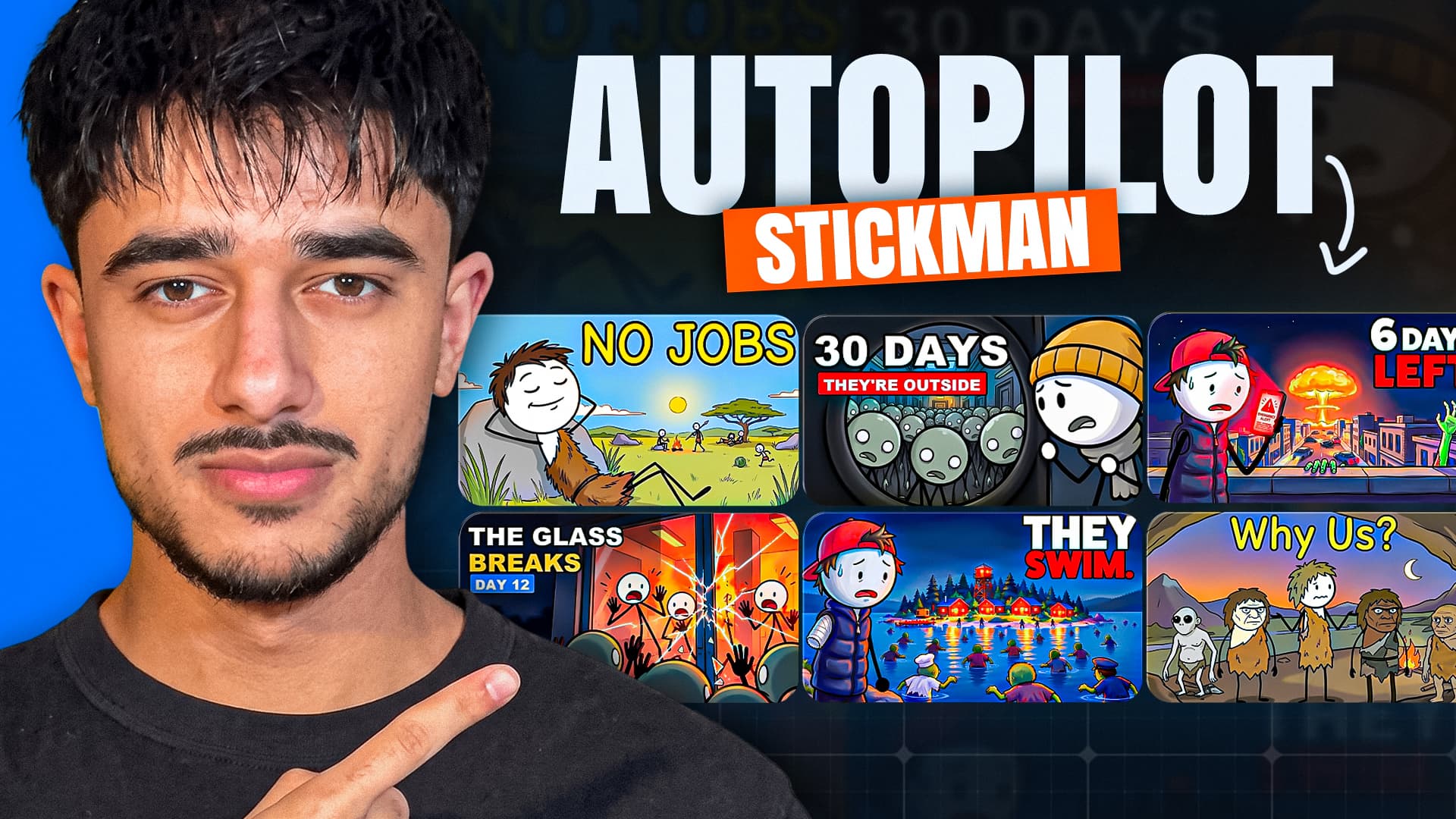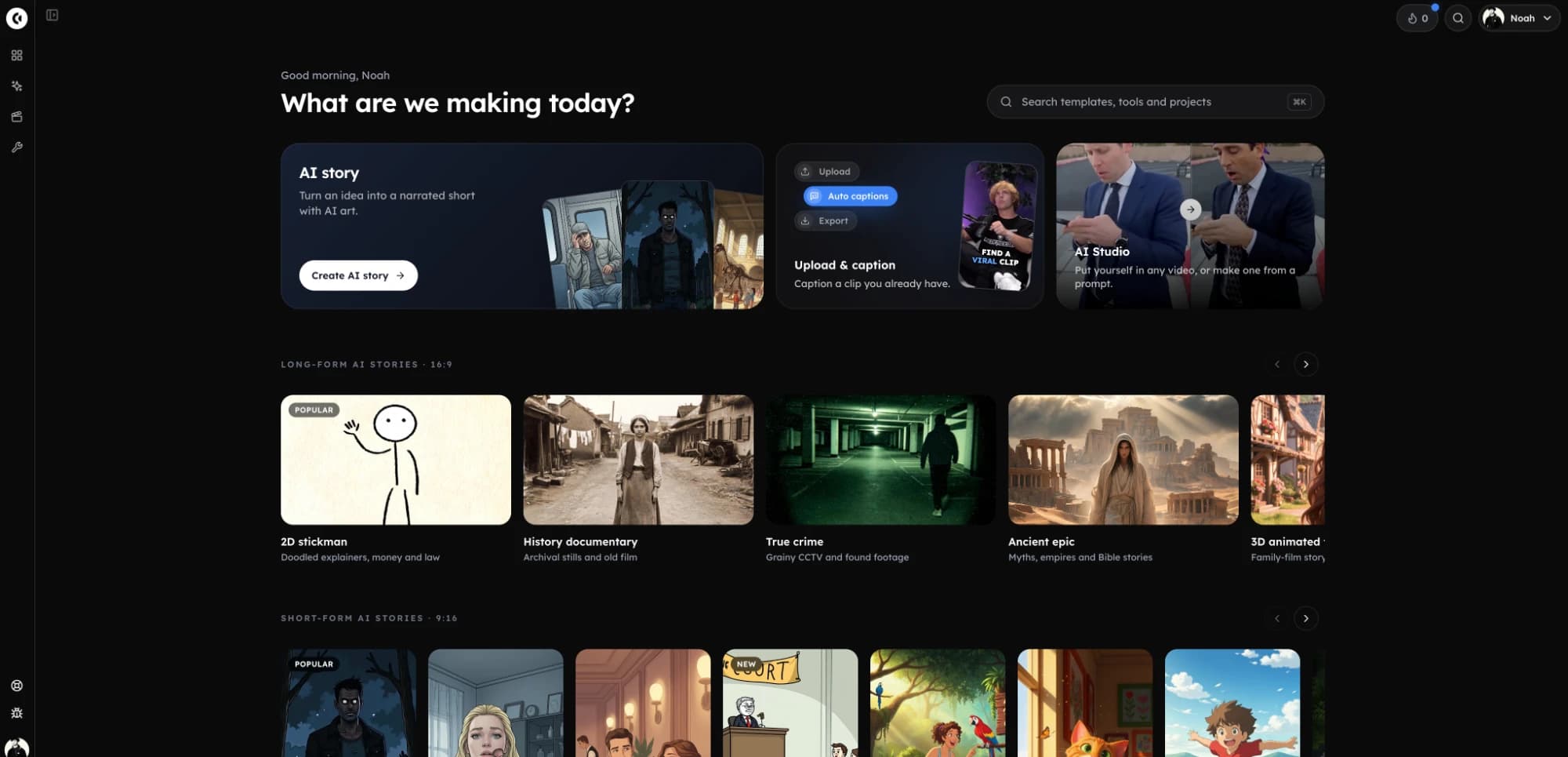
Clippie AI New Features (Nov 2026): Stickman, Characters, MCP
Every Clippie update from September to November 2026, grouped by job: talking characters, five stickman looks, 16,000+ voices, new models, more minutes.
 Emmanuel Greyco Tulabut

On this page
If you searched for Clippie AI new features, you probably noticed the editor looks different, or saw a stickman or talking-fruit video made with it and want to know what changed.
Between September 1 and November 1, 2026, the changelog logged dozens of entries: reusable characters, characters that speak on camera, five stickman looks, a 16,000+ voice library, new models, and an October 26 plan change that doubled minutes. This page groups those updates by the job they do, who each helps, and one way to use it this week.
Executive summary: A grouped roundup of Clippie's September to November 2026 updates: characters, looks and templates, voices, AI Studio, models, workflow fixes, plans and developer tools. It is for existing users catching up and creators deciding whether the update fits their channel. Each group gives dates, what changed, who it helps, one practical use and the limits.
Table of Contents
Update #1: Custom Characters, the Characters Library and Characters Talk
Update #2: Stickman Templates, Fruit Videos and AI Story Looks
Update #3: 16,000+ Voices, Voice Styles and Voice Acting
Update #4: The New AI Studio With Talking, Recast and Video Edit Tools
Update #5: Seedance 2.5, Nano Banana 2.1 and the Sora 2 Retirement
Update #6: Workflow Fixes That Save Minutes and Credits
Update #7: Plan Changes From October 26
Update #8: The Clippie MCP Server and Public API
FAQs
What to Do Next
Update #1: Custom Characters, the Characters Library and Characters Talk
Clippie AI Story now lets you define named characters, keep them consistent across scenes with an @mention, save them to a library, and, since November 1, run a whole story as characters speaking on camera with lip sync and no narrator. It is the largest change in the batch.
What changed
Custom characters (Oct 31): give a character a name, an appearance and an uploaded or drawn picture, then write
@Namein your script wherever they appear.Keep off screen (Oct 31): tick it and an unseen narrator no longer appears as a random stranger.
Characters library (Nov 1): characters are saved to a Characters page and reused via "From library". Ready-made options include fruit, a cat, a dog and stickmen.
Characters talk mode (Nov 1): every scene is one of your characters speaking on camera, lip-synced in their own voice.
Who it helps and how to use it
Series creators with a recurring cast, such as a stickman hero or talking fruit, no longer re-describe them in every prompt.
Try it: switch AI Story to Characters talk, add two library characters, assign each a voice, and paste a script in "Name: line" format, or let the AI write the scenes.
Limits: every speaking character needs a voice assigned, and talk mode replaces narration entirely, so it suits dialogue stories rather than explainers.
Update #2: Stickman Templates, Fruit Videos and AI Story Looks
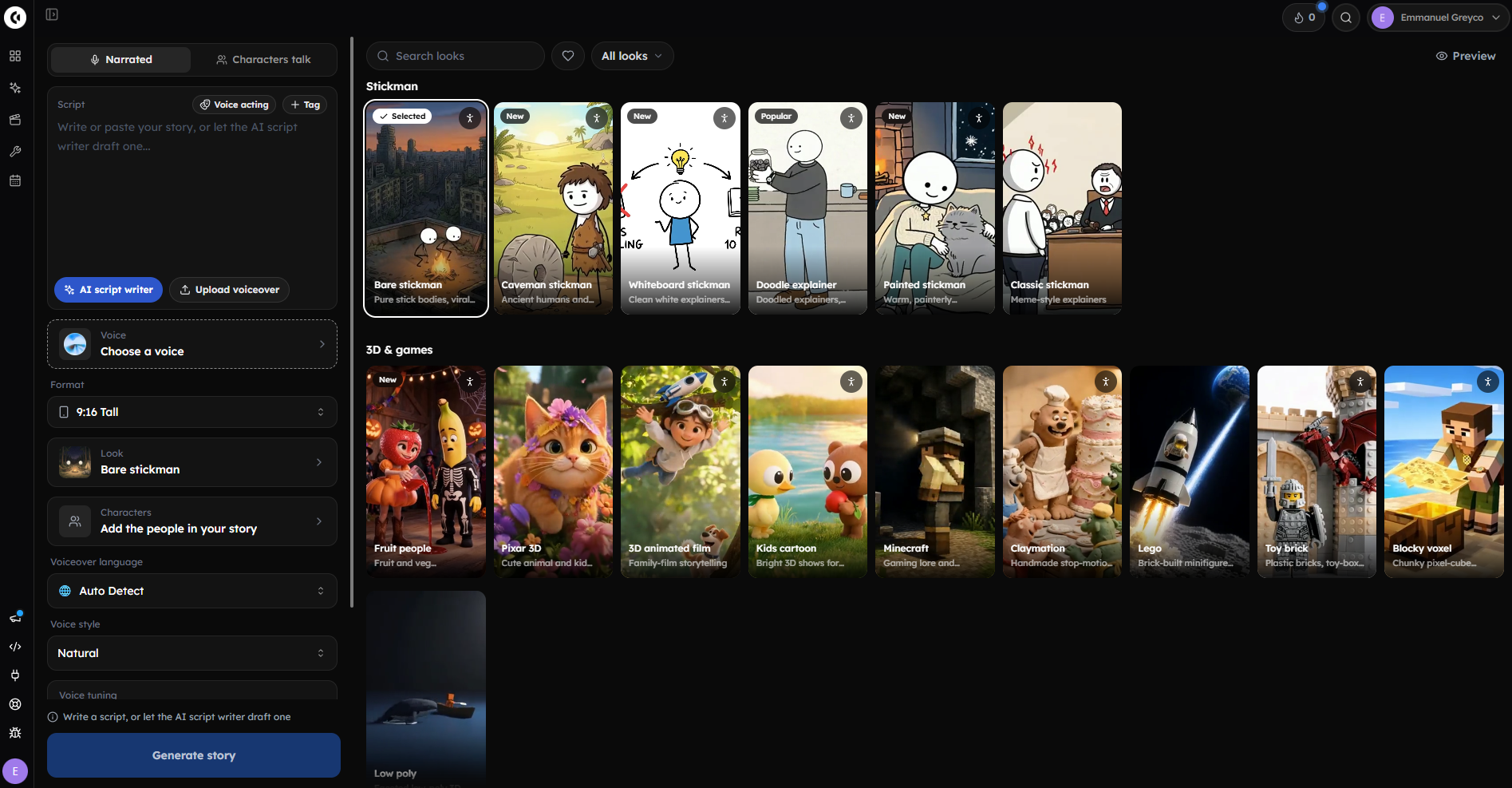
Clippie added stickman styles to AI Story on October 24, a Fruit videos template on November 1, and a single setup screen for format, look and animation amount. Choosing a look is now a gallery decision made before you generate, not a prompt you keep tuning afterwards.
What changed
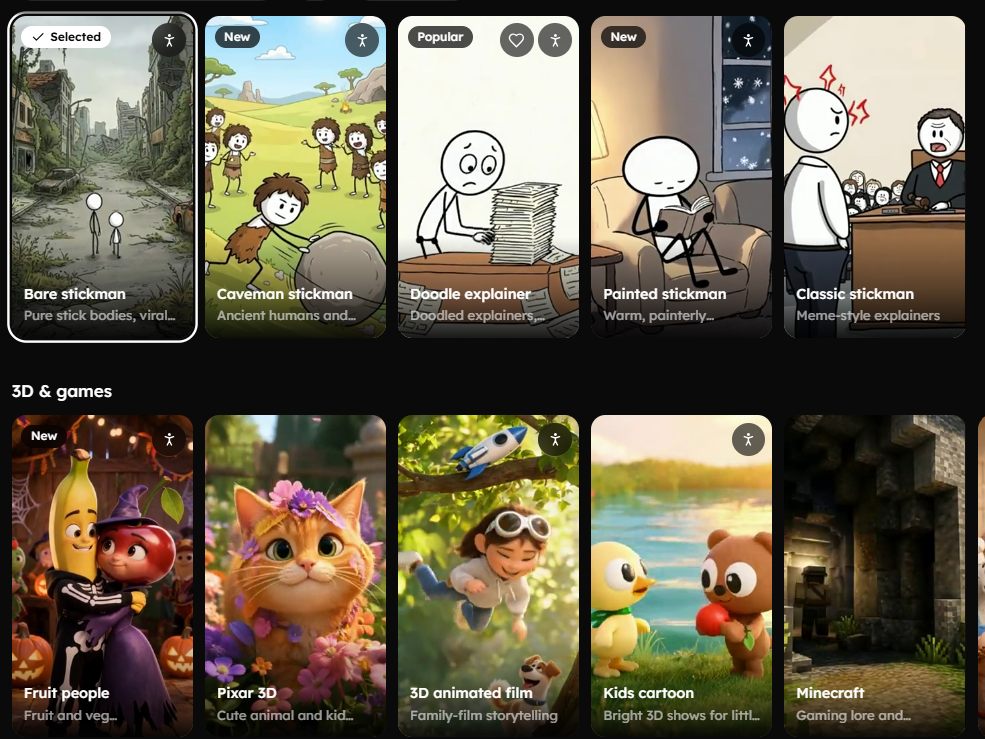
The live stickman list has five templates, all in 16:9 and 9:16:
Bare stickman: pure stick bodies for viral survival stories (uses Nano Banana 2.1)
Doodle explainer: doodled explainers for money and law topics
Caveman stickman: ancient humans and first inventions (added after the original four)
Painted stickman: warm, painterly stickman scenes
Classic stickman: meme-style explainers
Alongside them:
Fruit videos template (Nov 1): 9:16, with Strawberry, Banana, Cherry and Broccoli pre-drawn and voiced, a starter story and a Fruit look. The changelog lists it as "Fruit drama".
AI Story templates (Oct 16): ready-made templates in 16:9 or 9:16 from the dashboard.
One-screen setup (Oct 24): format, look (from a gallery of 41 styles) and animation amount in one place.
Who it helps and how to use it
Faceless channels working in the stickman survival and talking-fruit formats. Our step-by-step guide to making 2D stickman animation videos covers scripting and pacing for the format.
Try it: pick Bare stickman in 16:9 for a long-form survival story. The November 1 stickman animation walkthrough on the Clippie channel shows a build from script to upload.
Limits: a template gives you a consistent look, not a finished idea. The hook and the story still decide whether a video performs.
Update #3: 16,000+ Voices, Voice Styles and Voice Acting
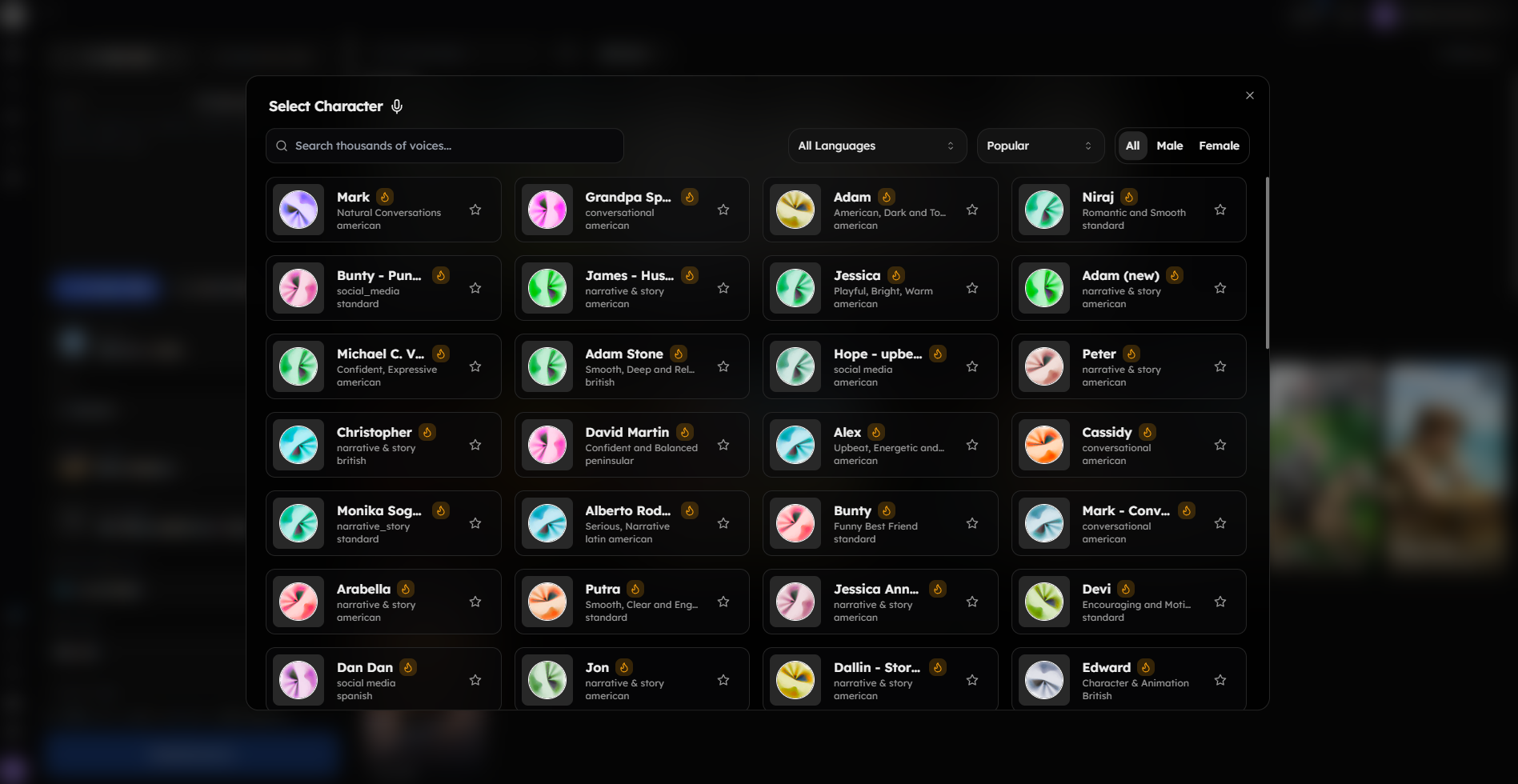
On October 24 Clippie connected the full ElevenLabs voice library, more than 16,000 voices, inside the voice picker. Two days later it added eight voice styles and bracketed voice-acting tags that are performed rather than read aloud, and the script writer now paces scripts to your voice.
What changed
16,000+ voices (Oct 24): filter by language and gender; sort by Popular, Trending, Most used or Newest.
Voice styles (Oct 26): Natural, Calm, Warm, Energetic, Dramatic, Serious, Soft or Eerie, or describe your own, in Voiceover, Reddit and AI Story.
Voice acting (Oct 26): tags such as
[whispers],[laughs]and[long pause]are performed, inserted by hand or added automatically.Script writer (Oct 29 and Oct 31): scripts fit your target length and voice, with estimated runtime shown. Wrote the script before picking a voice? Generate offers to fit it.
Who it helps and how to use it
Horror, true crime and drama narrators, where delivery carries the video.
Try it: search for a deep, older narrator voice, set the style to Eerie, and add [long pause] before your story's reveal.
Limits: more voices means more browsing; shortlist three and test them on one paragraph.
Update #4: The New AI Studio With Talking, Recast and Video Edit Tools
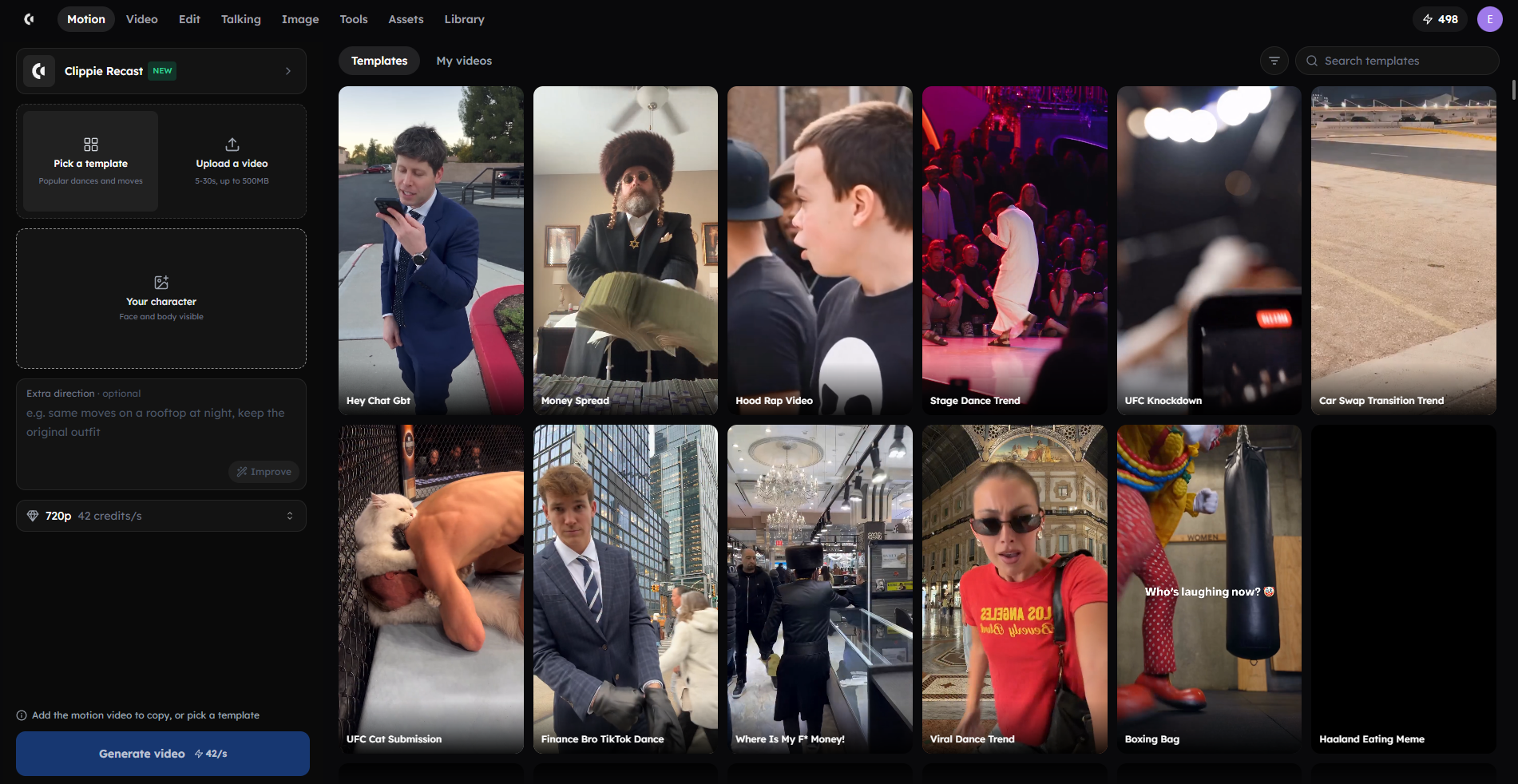
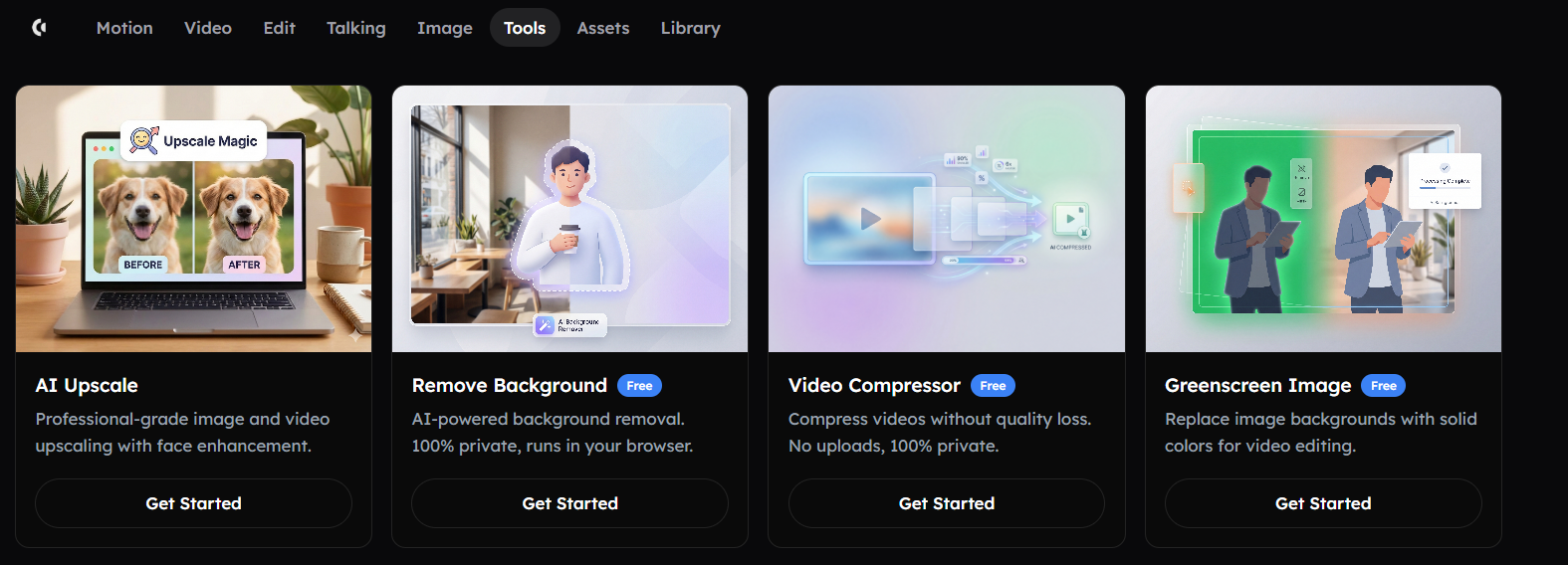
AI Studio was rebuilt on October 23 with a top bar for Video, Motion, Edit, Image, Tools and Assets, plus a Library for reusable uploads. Around it, Clippie added Talking, Recast and three video-to-video edit tools, making AI Studio the place for one-off clips outside the AI Story flow.
What changed
New layout and Library (Oct 23): reusable uploads live in one Library, and templates can be filtered by number of people.
Talking (Oct 31): a character picture, text and a voice become lip-synced speech; tags steer delivery, or upload your own recording.
Clippie Recast (Oct 23): swap a person into a trending clip or your own 5–30 second video from one photo, keeping the scene, movement and sound.
Motion Transfer, Object Swap and Restyle (Oct 13): three video-to-video tools under Edit.
Trending motion templates (Oct 15) and Explore (Oct 16), which shows every model with sample outputs.
Who it helps and how to use it
Creators who need one clip, like a talking mascot or a meme recast, without a full story.
Try it: upload your channel mascot to Talking, type a 10-second intro line, pick a voice, and use the result as your next cold open.
Limits: AI Studio spends AI credits per generation, and Clippie is not a timeline editor, so multi-track editing still belongs in a dedicated editor.
Update #5: Seedance 2.5, Nano Banana 2.1 and the Sora 2 Retirement
Clippie's model lineup changed in three ways: Seedance 2.5 arrived on September 1, Seedream 5.0 Flash on October 1 and Nano Banana 2.1 on October 13. Sora 2 was retired on October 3, with the changelog naming Veo 3.1 and Seedance as the alternatives for similar work.
What changed
Seedance 2.5 (Sep 1): text- and image-to-video, 4–30 seconds, 480p to 1080p, with audio; 10 seconds costs 348 credits at 720p or 782 at 1080p. Since October 13 it takes up to 30 reference images and 10 reference videos or audio clips.
Seedream 5.0 Flash (Oct 1): a fast image model.
Nano Banana 2.1 (Oct 13): text- and image-to-image at 1K, 2K and 4K, up to 14 reference images, at 5, 7 or 16 credits.
Sora 2 retired (Oct 3): Sora 2, Sora 2 Pro and Sora 2 Pro 1080p are gone from AI Studio.
Who it helps and how to use it
Anyone animating scenes: Seedance 2.5 suits longer, reference-guided clips; Veo 3.1 (4, 6 or 8 seconds) suits short shots.
Try it: before spending, open AI Studio's Explore page to compare every video and image model with sample outputs and starting credit costs.
Limits: Kling is not in Clippie's model list. If your workflow depends on Kling, use it directly.
Update #6: Workflow Fixes That Save Minutes and Credits
The quieter October updates fix the costliest mistakes in AI Story: redoing visuals no longer means redoing the voiceover, you choose which scenes to animate with the cost shown first, and pasted prompts or screenplay notes are no longer read aloud as part of your narration.
What changed
Redo pictures (Oct 29): regenerate a finished story's visuals while keeping words, voiceover and timing. No voiceover minutes are used.
Choose scenes to animate (Oct 26): pick scenes or use quick picks (first 10s, 30s, 1 minute or whole video), with cost shown upfront.
Prompt detection (Oct 29): paste "write a 3-minute story" into the script box and AI Story offers to write it instead of narrating your request.
Screenplay formatting (Oct 29 and Oct 31): speaker names, scene and camera notes and timestamps are no longer read aloud.
Scene instructions (Oct 26): visual direction for all or some scenes, up to 2,000 characters since October 31.
Templates elsewhere: save a Top 5 video (Oct 19) or your Reddit look (Oct 27) as a template.
Who it helps and how to use it
High-volume posters: each fix removes a reason to regenerate a whole video.
Try it: animate only the first 10 seconds, where the hook lives. New to the core flow? This full AI Story video tutorial walks through it (recorded December 2025, before the new setup screen).
Limits: Redo pictures changes visuals only. A script change still needs a new voiceover.
Update #7: Plan Changes From October 26
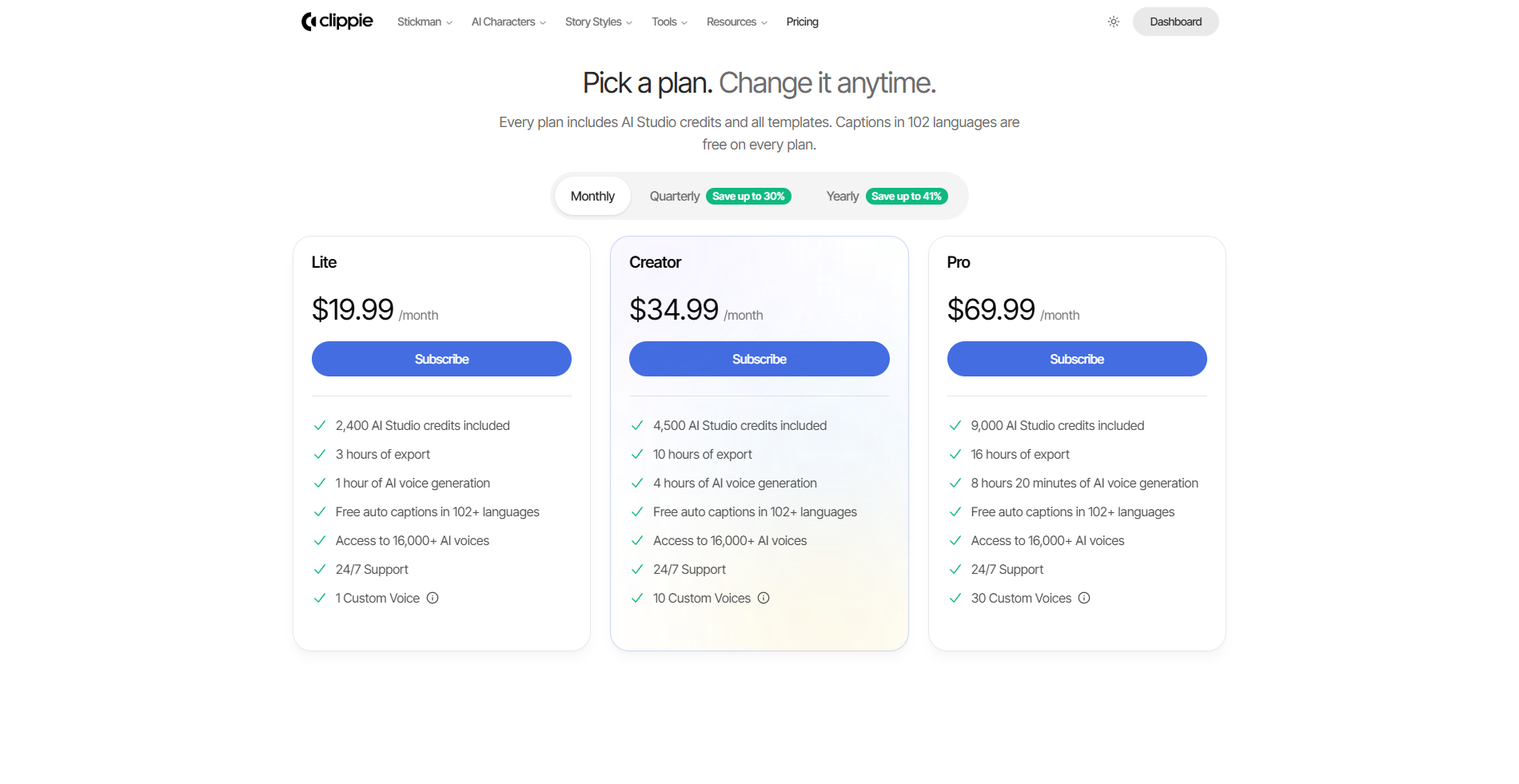
On October 26, 2026 Clippie doubled export and voiceover minutes on every plan to 60, 240 and 500 a month, raised monthly AI credits to 800, 1,500 and 3,000, removed the image generation cap, and stopped captions counting against plan minutes, within fair use.
What changed
Lite: 3 hours of export, 1 hour of AI voice, 2,400 AI Studio credits, 1 custom voice
Creator: 10 hours of export, 4 hours of AI voice, 4,500 AI Studio credits, 10 custom voices
Pro: 16 hours of export, 8 hours 20 minutes of AI voice, 9,000 AI Studio credits, 30 custom voices
All plans: captions in 102+ languages that don't use plan minutes, the 16,000+ voice library and 24/7 support. AI credit top-ups never expire.
Streaks: streak rewards add credits and minutes, and since October 26 they are claimed automatically when an export finishes.
Who it helps and how to use it
Long-form creators most. With minutes doubled, a Lite plan now fits six 10-minute stories a month instead of three.
Plans start at $19.99 a month, with discounts on longer billing; check the pricing page for current rates. All plans are paid, with no trial tier.
Limits: animating scenes with video models still spends AI credits, so heavy animation can run out before minutes do.
Update #8: The Clippie MCP Server and Public API
Since October 24, paid Clippie plans include an MCP server and a public REST API. Claude, ChatGPT, Cursor, VS Code or your own code can create AI Story, captions, Reddit and Roblox videos, preview them and render them, using the same credits and minutes as the app.
What changed
MCP server: add
https://api.clippie.ai/mcpin Claude or ChatGPT connector settings and sign in with your Clippie account. In Claude Code, runclaude mcp add --transport http clippie https://api.clippie.ai/mcpwith an API key header.REST API: base URL
https://api.clippie.ai/v1.Tools include
create_ai_story_video,preview_video,render_video,write_script,generate_videoandrecast_video.Cost control: dry runs show cost before spending; no API surcharge.
Who it helps and how to use it
Creators who draft scripts in an AI assistant, and developers building batch pipelines. Our guide on how to make videos with Claude using the Clippie connector walks through setup.
Try it: ask Claude to write a 60-second stickman survival script, create it in Bare stickman, and show preview stills before rendering.
Limits: 120 requests a minute and 5 running jobs per account, and access requires an active paid subscription.
FAQs
Does Clippie still have Sora?
No. Sora 2, Sora 2 Pro and Sora 2 Pro 1080p were retired from AI Studio on October 3, 2026. The changelog points to Veo 3.1 and Seedance as the alternatives. Seedance 2.5 handles clips up to 30 seconds with audio, while Veo 3.1 makes 4, 6 or 8 second clips at 720p or 1080p.
How many voices does Clippie have now?
More than 16,000. Since October 24, 2026 the full ElevenLabs voice library is searchable in the voice picker, with filters for language and gender and sorting by Popular, Trending, Most used or Newest. Every plan includes it, and you can add voice styles and voice-acting tags to any voice.
Can I use Clippie from Claude or ChatGPT?
Yes, on a paid plan. Add the MCP server URL, https://api.clippie.ai/mcp, in Claude or ChatGPT connector settings and sign in with your Clippie account. The assistant can then write scripts, create AI Story videos, show previews and render them, drawing on your normal credits and minutes.
Does Clippie have stickman templates?
Yes. AI Story has five: Bare stickman, Doodle explainer, Caveman stickman, Painted stickman and Classic stickman, each in 16:9 and 9:16. Four arrived on October 24, 2026 and Caveman stickman followed. Ready-made stickman characters also sit in the Characters library, so a recurring hero stays consistent.
How do I make characters talk in Clippie?
There are two ways. In AI Story, switch to Characters talk mode, add characters, assign voices and paste "Name: line" dialogue or let AI write it. For a single clip, use Talking in AI Studio: upload a character picture, type the line, pick a voice, and it lip-syncs the result.
Did Clippie's plan limits change in October 2026?
Yes. On October 26, 2026 export and voiceover minutes doubled to 60, 240 and 500 a month on Lite, Creator and Pro. Monthly AI credits rose to 800, 1,500 and 3,000, image generation is no longer capped, and captions no longer use plan minutes, within fair use.
What to Do Next
Pick the update that matches what you make:
Recurring cast: save characters to the library and test Characters talk on one short dialogue story.
New stickman or fruit channel: make three test videos with Bare stickman or Fruit videos before committing.
Scripting in an AI assistant: connect the MCP server and preview before every render.
Burning credits: animate only hook scenes and use Redo pictures instead of regenerating.
The Clippie changelog holds the full dated list.
Build the story step by step
How to storyboard a Stickman survival video
Build a Stickman survival story around one difficult choice, with an original six-scene script, visual instructions and a practical production checklist.
How to plan ancient-human Stickman stories
Plan an ancient-human Stickman video with a clear story, a consistent setting and an explicit distinction between researched history and fictional scenes.
Stickman animation prompts and video ideas you can build on
Original stickman prompts for survival stories, what-if videos, explainers and horror, with separate script, scene and animation instructions for Clippie.
Try it in Clippie
Make a stickman video
Turn a script into Stickman scenes, narration and captions in 16:9 or 9:16. Add AI animation to the moments that need motion.
Make a stickman video