Whiteboard explainer videos, drawn and narrated by AI.
Paste a script and Clippie draws a white-page picture for every line, with stickman figures, simple icons and short hand-lettered labels, then adds a narrator and captions. Each picture is a finished drawing that holds still. Nothing is sketched on screen line by line.
- LookWhiteboard stickman
- PicturesHold still, cut on the line
- Frame16:9 or 9:16
Short answer
Clippie makes whiteboard explainer videos from a script, with one thing to know first: every scene is a finished drawing that holds still, not a hand sketching it. Open AI Story, pick the Whiteboard stickman look in the Stickman group, and paste or generate a script. Clippie draws one white-page picture per line, with stickman figures, icons, ticks, crosses, arrows and short labels, then narrates and captions it in 16:9 for YouTube or 9:16 for Shorts.
If you need the drawing to appear stroke by stroke under a hand, a whiteboard animation app is the right tool, and Clippie is not.
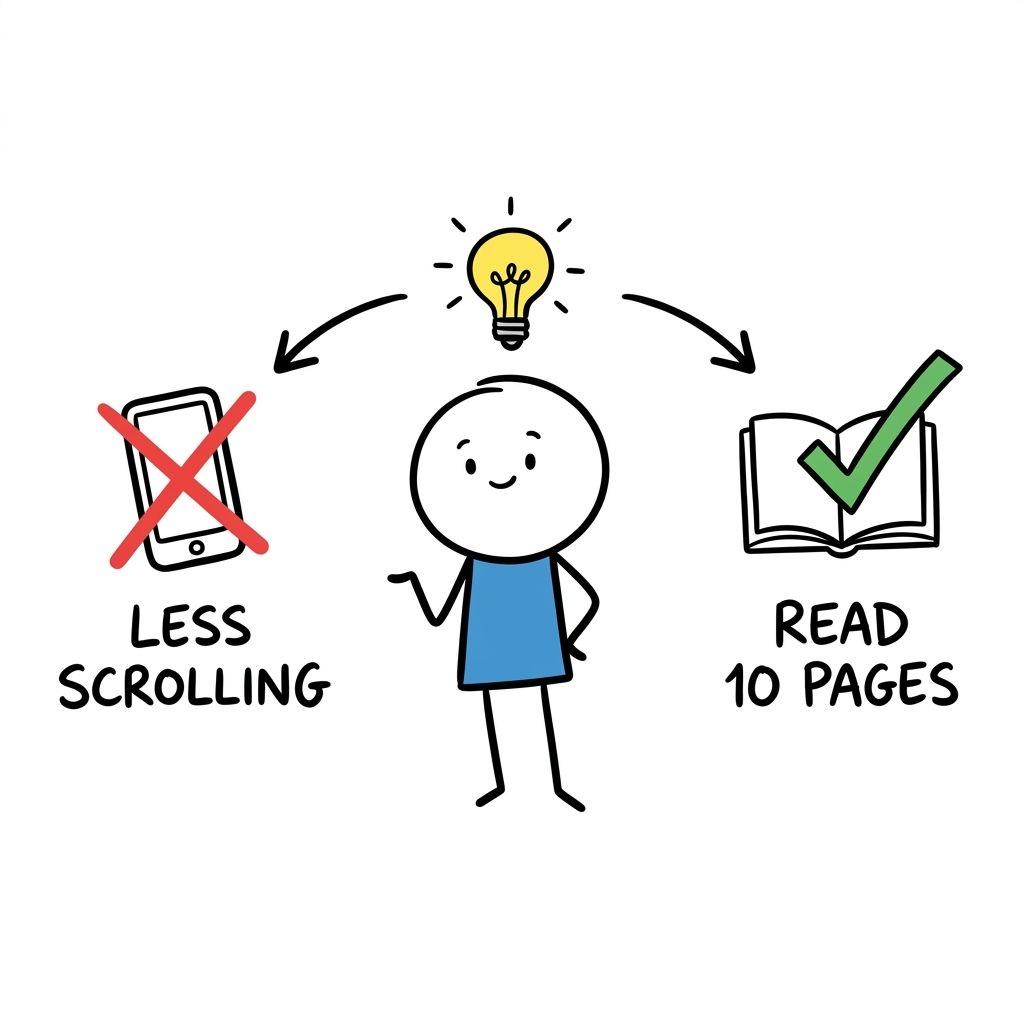
One scene drawn in the Whiteboard stickman look. It shows the artwork and the labels; it is not a clip from a finished narrated video.
How to make a whiteboard explainer video. Four steps.
- 1
Pick Whiteboard stickman in AI Story
Open the look gallery, go to the Stickman group and choose Whiteboard stickman. Set the frame to 16:9 for YouTube or 9:16 for Shorts, TikTok and Reels.
- 2
Paste or generate the script
Paste your own script, or have the AI writer draft one from a topic, from 30 seconds to 10 minutes. Short sentences with one idea each draw best.
- 3
Check each picture and its labels
Clippie draws a picture for every line. Read the labels, redraw any scene that is wrong or cluttered, and change a line if the picture does not match it.
- 4
Add the voice and captions, then export
Pick a narrator, set the caption style and export an MP4, or publish it to YouTube from a paid plan.
Two looks for explainers. Pick by how much white you want.
Both draw stick figures and one idea per picture. They differ in the page behind the figures and in whether words appear in the drawing.
Whiteboard stickman
A pure white page with no scenery. Stickman figures with round white heads and flat colour shirts, the key objects as simple icons, red crosses, green ticks, curved arrows and short labels in hand-lettered capitals.
Best for: health, money, habits and study explainers that need labels.
Doodle explainer
Marker doodles with slightly wobbly lines and flat, muted colours on a plain paper background. Its scenes are drawn without words, so labels go in the captions.
Best for: money, law and psychology explainers with more of a scene behind the figure.
Plan a whiteboard explainer. A worked example and the rules behind it.
A whiteboard explainer works when each sentence can be drawn as one simple picture. Here is one planned from start to finish.
A worked example: compound interest in six pictures
The script below runs about 30 seconds. Each line is one scene, and the note under it says what the picture shows and which label it carries. Write your own plan the same way before you generate.
- “You put 100 dollars in an account that pays 7 percent a year.”: A stickman drops a coin into a jar. Label: $100.
- “After one year you have 107. It does not feel like much.”: The same jar, a little fuller, and the stickman shrugging. Label: YEAR 1.
- “But next year you earn interest on the 107, not on the 100.”: A curved arrow from a small pile of coins back into the jar. Label: INTEREST ON INTEREST.
- “After ten years the 100 has roughly doubled.”: Two jars side by side, the second twice as full. Labels: TODAY and YEAR 10.
- “After thirty years it is about 760.”: A tall stack of coins with the stickman looking up at it. Label: YEAR 30.
- “The money did not work harder. It just had more time.”: A clock with a green tick next to a rushing stickman with a red cross. Labels: TIME and NOT SPEED.
This plan was written for this page and is not the script behind the sample picture above. The sums are 100 dollars growing at 7 percent a year: about 197 after ten years and about 761 after thirty. Check the numbers in your own script the same way, because the drawing will repeat whatever the line says.
Which look to pick, and one to check first
Whiteboard stickman is the look made for this format. It is in the Stickman group of the AI Story look gallery, and it is the only look that asks for short labels inside the picture. Doodle explainer is the neighbour: the same stick figures on a paper-coloured background with muted colour, and no words in the drawing.
The gallery also lists a look named Whiteboard in the Cartoon group. Its preview clips show detailed satirical cartoon scenes, such as a boardroom and a sales chart, not marker drawings on a white page. Watch its preview before you choose it for an explainer.
What moves in the video, and what does not
Whiteboard stickman pictures hold still in both 16:9 and 9:16. A zoom would crop the labels at the edge of the page, so the look leaves it off. The video moves by cutting to the next picture as the narrator reaches the next line, with captions timed word by word on top.
You can animate a scene with AI as a separate, optional step that uses AI credits. That makes the figures in the picture move for a few seconds. It does not make the drawing appear stroke by stroke. Read the labels again after animating a scene, or keep the scenes that carry text as stills.
If the effect you want is a hand holding a marker while the drawing builds up, use a whiteboard animation app such as VideoScribe. Clippie is for narrated explainers where the picture changes with each line.
Write a script that draws well
One idea per sentence, and one sentence per picture. A line such as “interest is paid on the interest” gives the look something to draw. A line with three clauses gives it three things, and the picture gets crowded.
Name the object, not the concept: a jar of coins rather than “savings”, a bed rather than “rest”. Keep labels to two or three words, and put anything longer in the narration and captions. After generating, read every label, and redraw a scene when a word is misspelled.
Aim for a new picture every few seconds. A 60-second explainer at a normal speaking pace is roughly 150 words, which is about ten to fifteen short sentences.
Plan the production. Guides for the steps above.
What people make with it. And what the look gives you.
Health and habits
Sleep, focus, diet and exercise explained with a do and a do not in each picture.
Money explained
Interest, inflation, budgets and debt, with the numbers as labels.
Study notes and book summaries
One idea per picture, in the order the book or the lesson gives them.
Labels in the picture
Short hand-lettered words next to the icons, so the drawing reads with the sound off.
125 AI voices
Pick a calm narrator for explainers and regenerate any line.
Shorts or long-form
The same look in 9:16 and 16:9, from 30-second scripts to 10 minutes.
Frequently asked questions.
Does Clippie draw the picture on screen, like a hand-drawn whiteboard video?
No. Each scene appears as a finished drawing and the video cuts to the next one as the narration moves on. Whiteboard stickman pictures hold still by default. AI animation is optional and moves the figures in a picture; it does not sketch the picture stroke by stroke.
What does the Whiteboard stickman look draw?
A white page with no scenery, stickman figures with round white heads and flat colour shirts, the key objects as simple icons, red crosses, green ticks, curved arrows and short labels in hand-lettered capitals. It is in the Stickman group of the AI Story look gallery.
Can the pictures include labels and text?
Yes, short ones. Whiteboard stickman is the look that asks for labels inside the drawing. Keep them to two or three words, read each one after generating and redraw the scene if a word is wrong. Longer text belongs in the captions.
How long can a whiteboard explainer be?
The AI writer drafts scripts from 30 seconds to 10 minutes, and you can paste a longer one. Pick 9:16 for Shorts, TikTok and Reels or 16:9 for YouTube.
Can I keep the same stickman in every scene?
Yes. Save a character once with a name and a picture, give it one signature detail such as a shirt colour, and check the first few scenes. The consistent stickman characters guide walks through it.
Can I monetize whiteboard explainer videos on YouTube?
YouTube’s monetization rules do not ban AI tools or faceless channels. They exclude mass-produced or repetitive content, so the script needs your own research and angle. YouTube asks you to disclose realistic altered or synthetic content; clearly illustrated drawings like these are not realistic in that sense. Check YouTube Help for the current rules before you publish.
Do styles cost extra?
No. Scene pictures are included in your plan, in every look and both frame shapes. The voiceover uses your plan’s AI voice minutes and exporting uses its export minutes. Animating scenes with AI is optional and uses AI credits, shown before you start.
Guides from the Clippie blog.
How to Start a Faceless AI Explainer Channel on YouTube in 2026 (Science, Tech, and Futurism)
Learn how to start a faceless AI explainer channel on YouTube in 2026 covering science, tech, and futurism, sub-niche selection, research system, Clippie AI production guide, growth roadmap, and revenue stack.

How to Create Explainer Videos for SaaS and Tech Companies in 2026
Create SaaS explainer videos in 2026: Why videos drive 40-65% higher conversion, 6 formats converting trials to customers, scripts reducing churn 30%, repurpose across 8+ channels & produce 70% faster with Clippie AI.