How to Make Quiz Videos for YouTube With AI in 2026
Build two-option rounds and narrated trivia with countdowns and reveals, compare Canva, FlexClip and CapCut, fact-check answers and use 10 quiz ideas.
 Emmanuel Greyco Tulabut
On this page
If you searched for how to make quiz videos for YouTube, you want a working method, not another list of question ideas. Quiz videos draw heavy YouTube search demand heading into late 2026, and general knowledge and trivia quiz searches keep climbing.
The catch is production. A good quiz Short needs a hook question, a countdown, a clean reveal and answers that are actually right. This guide shows two ways to build one with AI in Clippie, compares Canva, FlexClip and CapCut fairly, and gives you 10 quiz ideas, a fact-checking routine and the originality rules that decide monetization.
Executive summary: This is a practical tutorial for faceless creators who want to make quiz videos for YouTube Shorts, TikTok, Reels or long-form YouTube. It covers the four quiz formats that work, timing for hooks, countdowns and reveals, two step-by-step AI workflows, other quiz video makers and their limits, 10 ideas, fact-checking and YouTube's originality rules. You finish ready to publish your first quiz.
Table of Contents
What Is a Quiz Video? The 4 Formats That Work
Quiz Video Structure and Timing
Route A: Make a Two-Option Quiz in the Would You Rather Generator
Route B: Make a Narrated Trivia Quiz in AI Story
Other Ways to Make Quiz Videos: Canva, FlexClip and CapCut
10 Quiz Video Ideas for Shorts and Long-Form
How to Fact-Check Quiz Answers
Originality and Monetization Rules for Quiz Channels
Quiz Video Mistakes to Avoid
FAQs
What to Do Next
What Is a Quiz Video? The 4 Formats That Work
A quiz video asks a question, gives the viewer a few seconds to answer in their head, then reveals the answer. It needs no face or presenter: the question is the hook and the guess becomes the comment. Four formats cover most quiz channels, and the format decides the tool.
Format #1: Multiple Choice With a Countdown
A question, three or four options, a timer, then the right option lights up. Best for general knowledge rounds and long-form compilations.
Format #2: Two-Option Quiz
Two pictures side by side: "Which is older?" "Which one is real?" It's the would you rather quiz video layout with a right answer; for the opinion-poll version, see how to make would you rather videos with Clippie AI.
Format #3: True or False
One statement, a pause, a TRUE or FALSE stamp and a one-line reason. Best for myth-busting.
Format #4: Guess the... With Clues
Clues revealed vague to obvious, then the answer. Write clues yourself instead of using logos or film stills.

Quiz Video Structure and Timing
A quiz video that holds viewers follows five beats: a hook question in the first second, a 3–5 second countdown, a clear reveal, a score prompt and a comment call to action. Shorts usually run 30–80 seconds; long-form 16:9 quizzes stack 20 or more questions into themed rounds.
The five beats:
Hook (0–1s): open on your best question, not a title card.
Countdown (3–5s): long enough to think, short enough not to scroll.
Reveal (1–2s): a color change, a sound cue and one line explaining why.
Score prompt: "Keep count: how many did you get?"
Comment CTA: ask for something easy to type, like a score out of 10.
Shorts vs long-form: Shorts (9:16) need 6–10 questions and no intro; long-form (16:9) works as themed rounds that get harder.
Example: countdown quizzes share the timed-reveal logic of rankings, so Clippie's full tutorial on creating top 5 ranking videos is useful pacing practice.
Route A: Make a Two-Option Quiz in the Would You Rather Generator
The fastest way to make a two-option quiz video with AI in Clippie is the Would You Rather generator. AI drafts the pairs, each option gets a picture, a countdown runs before the reveal, and you export in 9:16 or 16:9. It suits factual rounds, not just would-you-rather.
Step 1: Generate Your Question Pairs
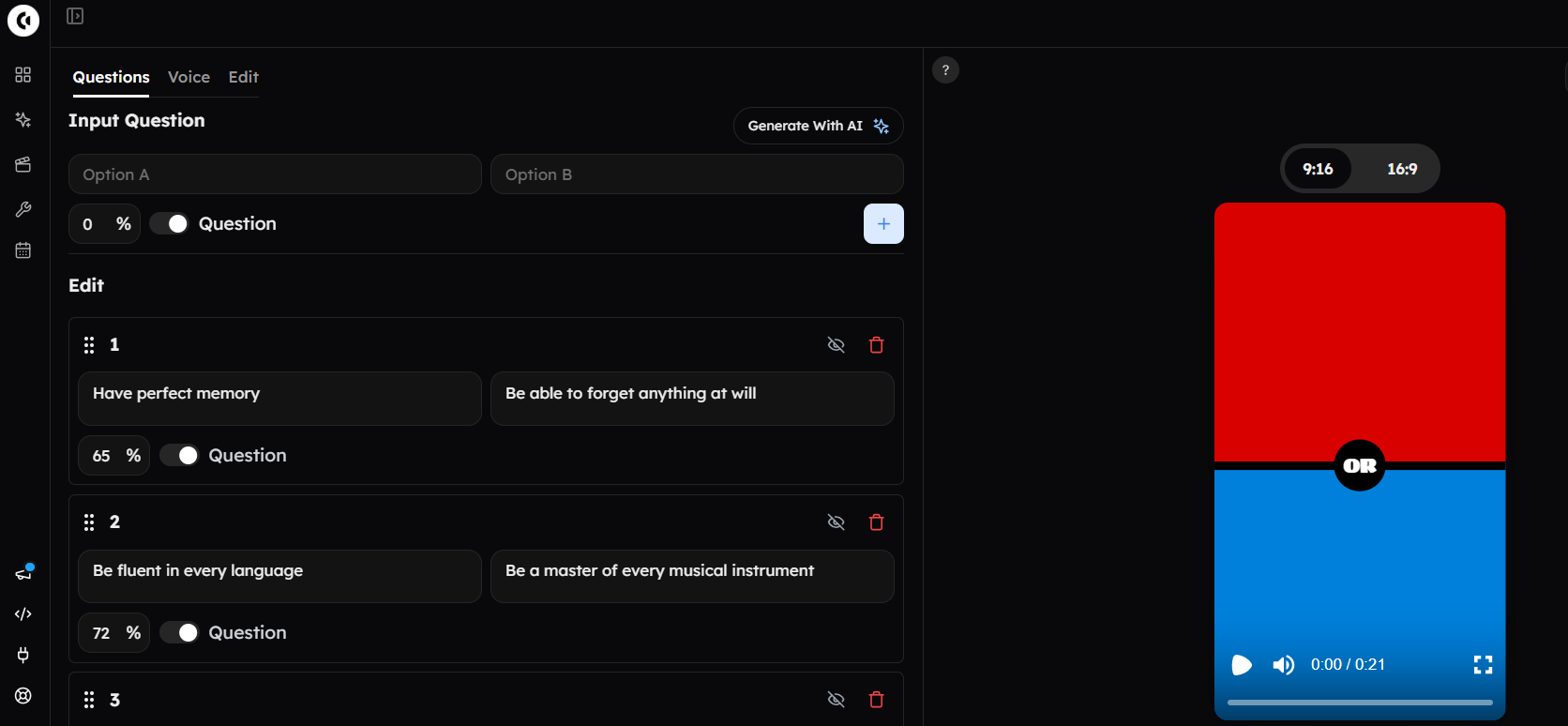
Open the Would You Rather video generator, click Generate with AI and enter a theme, such as "inventions vs historic events: which came first?"
Edit, reorder or switch off any pair.
Add a comment row after a pair to show text between questions, such as the answer and one line of why.
Step 2: Set the Reveal
The editor reveals a percentage for each side and marks the winner. You set option A's share; B gets the rest.
For a fact quiz, set the correct side to 100% and say in your hook that the highlighted side is right. Never present invented percentages as real poll results.
Step 3: Add Pictures, Voice and Countdown
The AI draws one picture per option. Replace any with your own upload when accuracy depends on the image.
Pick one voice for every question, from presets or a search of the ElevenLabs library.
The countdown is off by default. Turn it on: each question gets a 3-second countdown and a 1-second reveal, about 8 seconds in total.
Step 4: Style and Export
Set font, size, bold, italics, capitals and stroke separately for option text, result text and the "OR".
Add custom colors or an image background for a recognizable look.
Export at 1080x1920 or 1920x1080. Six to ten questions make a 50–80 second Short.
Where it falls short: it only does two options, so A/B/C/D multiple choice needs another tool. It isn't a timeline editor, and exporting needs a plan or topped-up minutes.
Route B: Make a Narrated Trivia Quiz in AI Story
For narrated trivia, where the question, countdown and reveal are all voiced, use Clippie's AI Story. Write or generate a quiz script, pick a voice and a look, and AI Story turns it into scenes with voiceover and captions, in 9:16 for quiz Shorts or 16:9 for long-form trivia.
Step 1: Write the Quiz Script
Use the AI script writer (it writes to a target length) or paste your own.
Keep one pattern per question: "Question 3. Which planet has the shortest day? [long pause] Jupiter. It spins once in about 10 hours."
Step 2: Use Voice Tags for the Countdown
Tags like [long pause] are performed, not read aloud, so the pause becomes thinking time.
Choose from 16,000+ voices and a voice style: Energetic for fast rounds, Calm for long-form.
Step 3: Pick a Look and a Recurring Host
Choose a template or art style before generating.
Create a character and mention it with @ in the script so the same quiz host appears in every episode.
Step 4: Review and Export
Check every caption against your verified answer sheet.
If a picture is off, Redo pictures regenerates visuals while keeping the words, voiceover and timing.
Clippie's homepage has also listed a Quiz Videos template (question, countdown, reveal); check whether it's in your dashboard.
Where it falls short: the countdown is a voice beat, not a ticking timer graphic, and AI images can misrender text, so let captions carry the question.
Other Ways to Make Quiz Videos: Canva, FlexClip and CapCut
Canva, FlexClip and CapCut can all make quiz videos, and each is the better choice in some situations. Canva suits slide-by-slide design control, FlexClip offers ready quiz templates with timers, and CapCut suits editors who want fully custom animation and keyframed reveals.
Tool #1: Canva
How it works: pick a quiz video template, add an animated timer from Elements and put the answer on the next page.
Batching: Bulk Create fills a template from a data list. It needs a paid Canva plan.
Free plan: MP4 downloads up to 1080p; a watermark appears only if you use Pro elements.
Where it falls short: you time every slide, timer and reveal by hand, and narration is a separate job.
Tool #2: FlexClip
How it works: quiz templates (general knowledge, geography, "would you prefer"), countdown timers, AI text-to-speech and AI subtitles.
Pricing: the free plan exports 720p with a watermark; paid plans start around $12 a month billed annually.
Where it falls short: template-led videos can look like everyone else's, which works against YouTube's originality rules.
Tool #3: CapCut
How it works: a full editor with countdown templates, keyframes and text animation for any layout.
Pricing: the standard version costs nothing; Pro (about $19.99 a month, varying by region) unlocks premium templates and AI tools.
Where it falls short: every question is built manually, and Pro assets can trigger a Pro prompt at export.
Which to pick: Canva or FlexClip for four-option multiple choice, CapCut for custom motion, Clippie for AI-drafted, voiced quizzes.
10 Quiz Video Ideas for Shorts and Long-Form
The best quiz video ideas ask viewers to compare, estimate or decode rather than recall trivia, because reasoning invites comments. Each idea names its format and a sample question with a verified answer. Rotate several so your uploads never feel interchangeable.
Idea #1: Which Came First? (Two-Option)
Oxford University or the Aztec city of Tenochtitlan? (Oxford: teaching from around 1096. Tenochtitlan: founded around 1325.)
Idea #2: Higher or Lower (Two-Option)
Is Challenger Deep (nearly 11,000 meters) deeper than Everest (8,849 meters) is tall? (Yes.)
Idea #3: Which Is Heavier? (Two-Option)
A liter of water or a liter of olive oil? (Water; olive oil is less dense.)
Idea #4: Real or Fake Fact (True or False)
Botanically, a banana is a berry. (True; a strawberry, oddly, is not a true berry.)
Idea #5: Myth or Fact (True or False)
Lightning never strikes the same place twice. (False; tall buildings are struck many times a year.)
Idea #6: Three Clues, One Animal (Guess the...)
Three hearts. Blue blood. Eight arms. (An octopus.)
Idea #7: Guess the City (Guess the...)
More than 100 small islands, canals, gondolas. (Venice.)
Idea #8: Guess the Dish (Guess the...)
Basil, pine nuts, garlic, Parmesan, olive oil. (Pesto.)
Idea #9: Easy to Impossible Ladder (Multiple Choice)
Level 1: Australia's capital? (Canberra.) Level 5: Which city hosted Parliament before it? (Melbourne.)
Idea #10: Closest Guess Wins (Narrated Trivia)
How many countries are in Africa? (54 UN member states.) Pin the closest comment.
Niche spin: for a sports version, see these faceless football trivia quiz video formats.
How to Fact-Check Quiz Answers
Fact-check every quiz answer against at least two reliable sources before publishing, and treat AI-written questions as drafts. One wrong answer fills your comments with corrections and makes viewers doubt every other video, so accuracy is the cheapest growth tactic a quiz channel has.
How to apply it:
Use reference sources: NASA for space, statistics offices for populations, UN lists for countries.
Check AI drafts line by line.
Kill ambiguous questions. "When did Canberra become the capital?" has more than one defensible answer; "Which city hosted Parliament before Canberra?" has one.
Date volatile answers with "as of 2026".
Keep an answer sheet with a source per question; pin a correction if you slip.
Originality and Monetization Rules for Quiz Channels
Quiz channels can earn through the YouTube Partner Program, but templated quizzes are exactly what YouTube's inauthentic content policy targets. Fresh questions, varied formats and a short explanation at each reveal separate a monetizable quiz channel from a mass-produced one.
What YouTube says (checked Nov 2026):
The YouTube channel monetization policies say channels shouldn't be "mass-produced, generic, repetitive, or manipulative."
Content that "looks like it's made with a template" is flagged, including "AI-generated content made with generic or unoriginal templates."
Thresholds: ad revenue currently needs 1,000 subscribers plus 4,000 watch hours in 12 months or 10 million Shorts views in 90 days. YouTube has announced Partner Program updates from February 1, 2027, so check the YouTube Partner Program eligibility page before planning around these numbers.
How to apply it: write new questions every upload, rotate formats and add a one-line "why" to each reveal.
Example: see how faceless formats compare in Clippie's breakdown of the top 5 monetizable faceless niches for 2026. Earnings vary widely by niche, audience and country.
Quiz Video Mistakes to Avoid
Most quiz videos that flop make one of four mistakes: unverified answers, a slow hook, look-alike templates or borrowed copyrighted material. Each one is easy to fix before you publish, and fixing them protects both your retention and your monetization review.
Mistake #1: Publishing Unchecked AI Answers
Verify every answer with two sources and keep the answer sheet.
Mistake #2: Opening With a Title Card
Start on the most surprising question.
Mistake #3: Using the Same Template Every Time
Vary topics, formats and visuals so uploads aren't interchangeable.
Mistake #4: Guess-the-Logo or Movie-Still Quizzes
Logos and film stills can draw claims; write clue-based versions.
FAQs
How do I make quiz videos for YouTube with AI?
Pick a format, then let AI draft the questions and build the video. In Clippie, the Would You Rather generator makes two-option rounds with a countdown, and AI Story makes narrated trivia with voiceover and captions. Verify every answer, open on a hook question and export in 9:16 or 16:9.
What is the best quiz video maker?
It depends on your format. Canva and FlexClip suit four-option multiple choice built from templates, CapCut suits custom animated layouts, and Clippie suits AI-drafted two-option rounds and narrated trivia. Match the tool to your layout, then judge how fast it produces a week of uploads.
How long should a quiz Short be?
Most quiz Shorts land between 30 and 80 seconds. In Clippie's Would You Rather generator each question runs about eight seconds, so six to ten questions fit. TikTok's Creator Rewards Program pays only for videos over one minute, so make TikTok cuts slightly longer.
Can I make quiz videos in Canva?
Yes. Canva has quiz video templates, animated timers in Elements and Bulk Create for filling templates from a data list, though Bulk Create needs a paid plan. The trade-off is manual work: you time each question, timer and reveal yourself, and add narration separately if you want a voiceover.
Can AI write quiz questions and answers?
Yes, AI script writers can draft a whole quiz round in seconds, but treat it as a first draft. AI can state wrong dates, numbers and records confidently. Check each answer against two reliable sources, rewrite ambiguous questions and date anything that changes, such as populations or world records.
Can quiz channels be monetized in 2026?
Yes, if they meet YouTube Partner Program thresholds and pass review. YouTube's inauthentic content policy excludes mass-produced, template-made videos, so original questions, varied formats and a short explanation at each reveal matter. YouTube has announced Partner Program updates from February 1, 2027, so check the eligibility page first.
What to Do Next
Make one quiz this week rather than planning thirty; a finished video teaches pacing faster than any guide.
Step 1: Choose one format and topic from the 10 ideas.
Step 2: Write or generate 10 questions and verify every answer.
Step 3: Build it with Route A (two-option) or Route B (narrated trivia).
Step 4: Post a 9:16 Short, then compile your best rounds in 16:9.
Clippie plans start at $19.99 a month, with discounts on longer billing; check the pricing page for current options.
Try it in Clippie
Make faceless videos with Clippie
Type an idea or paste a script. Clippie writes, voices, illustrates and captions a video you never have to appear in.
See the faceless video formats