
Best AI Video Tools for Faceless Content in 2026
The right tool depends on what you make: story shorts, prompt-to-video, repurposing, captions or avatars. Honest picks for each, plus where each one fails.

If you searched for the best AI video tools for faceless content, you've hit a market where every tool claims to be the one. The useful answer is narrower: the best tool depends on what you're actually making, and the categories barely overlap.
Faceless video covers very different jobs. Narrated Reddit stories, prompt-generated clips, blog-to-video, captioning and avatar presenters all need different software. This guide sorts the options by use case, says where each one falls short, and includes where Clippie fits and where it doesn't.
Executive summary: This guide compares the leading faceless video tools in 2026 by use case rather than crowning a single winner. It covers what actually matters when choosing, honest profiles of seven options including Clippie, InVideo AI, Pictory, Submagic, Revid, AutoShorts, HeyGen, Synthesia and OpusClip, quick picks by content type, the speed-versus-quality trade-off, what to check on any pricing page, and the mistakes that cost creators months.
Table of Contents
What Actually Matters When Choosing a Faceless Video Tool
The Best AI Video Tools for Faceless Content in 2026
Clippie: Pre-Built Short-Form Story Formats
InVideo AI: Prompt-to-Video From Scratch
Pictory: Blogs, Scripts and URLs Into Video
Submagic: Captions and Short-Form Polish
Revid and AutoShorts: Hands-Off Automation
HeyGen and Synthesia: AI Avatar Presenters
OpusClip: Long Videos Into Shorts
Best Tool by Use Case (Quick Picks)
Speed vs Quality: How to Decide
What to Check Before You Subscribe
Mistakes to Avoid When Choosing a Tool
FAQs
What to Do Next

What Actually Matters When Choosing a Faceless Video Tool
Five things decide whether a tool survives contact with your schedule: format fit, voice quality, caption quality, speed at volume, and how easily you can change one scene without rebuilding the whole video. Brand reputation and feature-list length decide none of them, which is why the most-reviewed tool is often the wrong one.
Format fit. Story shorts, prompt-generated clips, blog-to-video, captioning and avatar presenters are separate jobs, and few tools do more than one of them well.
Voice quality. Mechanical narration is the fastest way to lose a viewer in the first seconds, and it's the hardest thing to fix later.
Captions. Most short-form is watched with the sound off, so clean, well-timed captions aren't a nice-to-have.
Speed at volume. A tool that takes half an hour per video is fine for one video a week and impossible for one a day.
Edit flexibility. Repetitive stock footage is the most common complaint about AI video. Being able to swap a single clip or scene saves hours.
One thing tool marketing skips: making a video and distributing it are separate problems. Most tools generate, far fewer post for you, and that gap is where a lot of new workflows stall.

The Best AI Video Tools for Faceless Content in 2026
No tool wins every category, so these profiles say what each is genuinely best at and where it isn't the pick. Prices move constantly, so check each vendor's current plans before subscribing rather than trusting any figure in a blog post.
Clippie: Pre-Built Short-Form Story Formats
What it does: Clippie is built around ready-made faceless formats: Reddit stories, Twitter and X threads, fake-text stories, AI story videos, top 5 rankings and would-you-rather. It includes 50+ AI voices with custom voice slots, captions in 102+ languages, and AI image generation.
Best for: channels running narrated story or list content across TikTok, Shorts and Reels, where the same structure repeats and the output needs to stay consistent.
Where it isn't the pick: it's designed for short-form rather than cinematic text-to-video or long-form editing. A long-form pipeline still needs a conventional editor alongside it.
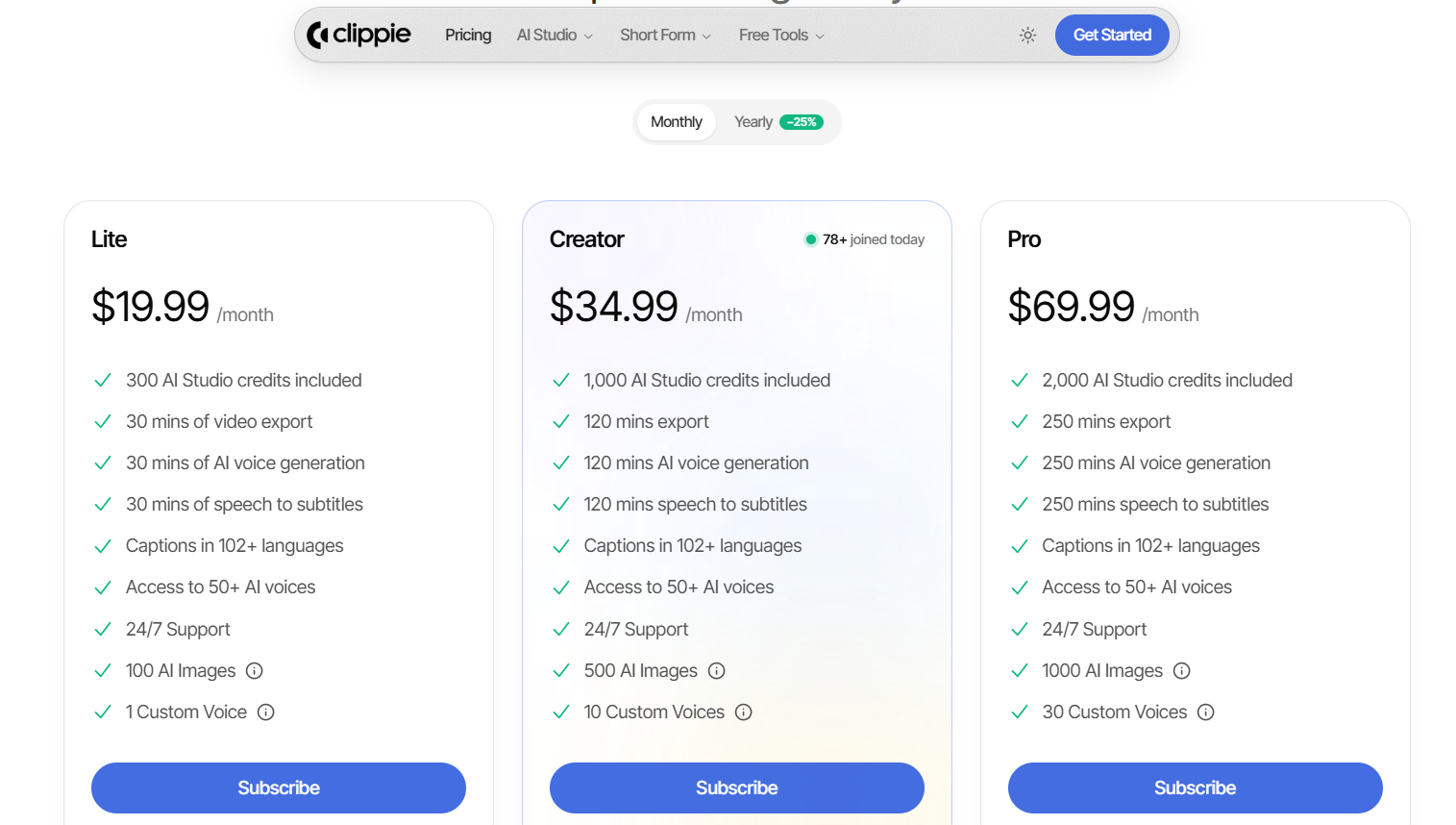
Plans: Lite $19.99, Creator $34.99 and Pro $69.99 a month, with 30, 120 and 250 minutes of export. You can see the workflow in this animated AI story tutorial, or try the AI story video generator.
InVideo AI: Prompt-to-Video From Scratch
What it does: describe a video and it assembles the script, stock footage, voiceover and captions, with access to generative models and a large stock library.
Best for: starting from a topic rather than a script, and for creators who want one tool that covers a wide range of styles.
Where it isn't the pick: output can read as generic if you accept the first version, and credit consumption climbs quickly at volume. It also isn't built around the repeating story structures that faceless channels rely on.
Pictory: Blogs, Scripts and URLs Into Video
What it does: paste an article, script or URL and it produces a captioned video with matched stock footage.
Best for: repurposing written content, and for longer horizontal pieces aimed at YouTube rather than vertical feeds.
Where it isn't the pick: it's less short-form native than the specialists, so vertical story content usually takes more manual work than it should.
Submagic: Captions and Short-Form Polish
What it does: it isn't a base-video generator. It's the layer that adds high-accuracy animated captions, B-roll and sound effects to clips you already have.
Best for: creators who already produce video and want the finishing stage to stop eating their evenings, especially across multiple languages.
Where it isn't the pick: you still need something to make the video first, so it sits alongside another tool rather than replacing one.
Revid and AutoShorts: Hands-Off Automation
What they do: configure a channel once and they generate and post short videos on a schedule.
Best for: creators whose bottleneck is consistency rather than creative control, and anyone running several channels at once.
Where they aren't the pick: less fine control over each video, and the output can drift toward sameness, which is exactly what platform originality rules now target. If you use them, review what goes out rather than trusting the schedule.
HeyGen and Synthesia: AI Avatar Presenters
What they do: create videos with a lifelike AI presenter, which is still faceless in the sense that it isn't you on camera, with strong multilingual support.
Best for: training, explainer and corporate content, and for brands that want a consistent on-screen host without filming.
Where they aren't the pick: narrated-story and list content, which is what most faceless channels publish. They also cost more per video at high volume, and an avatar presenting advice on health, finance or law can't be monetized on YouTube.
OpusClip: Long Videos Into Shorts
What it does: finds the clip-worthy moments in long videos and cuts them into vertical shorts with captions.
Best for: creators who already publish podcasts, streams or webinars and want short-form distribution without producing anything new.
Where it isn't the pick: it's a repurposing tool, so it needs source material. If you have no long-form library, there's nothing for it to work with.

Best Tool by Use Case (Quick Picks)
If you only read one section, read this one. Match what you publish to the category below, pick the tool listed beside it, and ignore every recommendation built for a different job. Most tool regret comes from buying across categories rather than from choosing the wrong brand inside one.
Reddit, Twitter or text-story short-form → Clippie, for the pre-built story formats and captions.
A full video from a topic prompt → InVideo AI.
Blog, article or script into video, or longer YouTube pieces → Pictory.
Captions, B-roll and polish on clips you already have → Submagic.
Turning long videos into shorts → OpusClip.
A fully automated, auto-posted daily series → AutoShorts or Revid.
An on-screen AI host or multilingual training video → HeyGen or Synthesia.
Once the tool is settled, the harder question is what to make and how it earns. Our guide to how faceless YouTube channels make money covers the payout routes, and Clippie's top 5 monetizable faceless niches for 2026 covers where there's still room.

Speed vs Quality: How to Decide
The trade-off is real, and the right answer depends on your format rather than on your standards. Short-form volume rewards speed with a good-enough quality bar, while long-form and brand content reward the opposite. Applying the wrong one to your format wastes months and a fair amount of money.
For short-form volume, speed plus a strong hook beats slow perfection, because you need enough output to find out what lands.
For long-form, educational or brand content, polish earns trust that a rushed video won't, and one good video outlasts twenty forgettable ones.
The practical middle: a fast tool for the bulk of your short-form, and a slower, higher-control tool for the occasional flagship piece.
What not to do: buy a cinematic generator to make daily story videos, or try to build a brand explainer on a template designed for volume. Both are expensive ways to learn which category you were in.
If you're building a full YouTube channel rather than picking one tool, our stage-by-stage guide to the AI tools for faceless YouTube channels covers research and thumbnails too, which this page deliberately leaves out.

What to Check Before You Subscribe
Five things decide whether a plan is actually good value, and none of them appears in the headline price: what the plan meters, whether exports are capped separately from generation, watermarking and output resolution, the billing terms behind the advertised rate, and whether the tool publishes for you at all.
What the plan meters. Credits, exports, minutes and seats are different units. Convert every plan to the same one, usually finished minutes you publish a month, before comparing.
Whether exports are capped separately. Some tools cap generation and exports independently, so you can run out of one with plenty of the other left.
Watermarks and resolution. Check what the entry plan actually outputs before assuming it's publishable.
Billing terms. Headline prices are usually annual. Start monthly, and switch only after three consistent months.
Publishing. Most tools export a file and stop. If hands-off posting matters, confirm it specifically rather than assuming.
Pricing pages are written to be skimmed, so read the plan comparison rather than the headline, and price the tier you'd actually need at your posting volume rather than the one you hope to start on.

Mistakes to Avoid When Choosing a Tool
Most tool regret traces to a handful of decisions: buying the wrong category, tolerating a poor voice, skipping captions, and cloning a single template at volume. Every one of them is cheap to avoid at the start and expensive to discover three months and one annual subscription later.
Mistake #1: Buying the wrong category. An avatar tool won't make narrated story content, and a captioning tool won't generate your base video. Match the category first, the brand second.
Mistake #2: Settling for a robotic voice. It costs you retention on every video, and no amount of visual polish compensates.
Mistake #3: Skipping captions. Vertical feeds default to muted playback, so uncaptioned clips quietly underperform.
Mistake #4: Cloning one template at volume. Interchangeable uploads can lose monetization under platform originality rules, whichever tool produced them.
Mistake #5: Forgetting distribution. Generating a video isn't publishing it. Decide how you'll post consistently before you commit to a subscription.
Mistake #6: Switching tools to avoid a content problem. If nobody watches, the script is usually the issue, and a new generator won't fix a weak idea.
FAQs
What's the best faceless video tool for beginners in 2026?
The one that matches your format with the shortest learning curve. For narrated stories and list content, a pre-built tool gets you publishing in an afternoon. For building a video from a prompt, InVideo AI is approachable. Pick one, ship ten to twenty videos, and switch only if the format clearly doesn't fit.
What does a no-cost test week look like?
Entirely doable. Use a mobile editor such as CapCut for assembly, an AI assistant's no-cost plan for scripts, and a basic design plan for thumbnails, then publish five videos and read the retention on each. You'll learn more about your format in that week than any tool comparison can tell you.
Do I need different tools for short-form and long-form?
Usually yes. Short-form story tools are built for vertical clips of roughly one to three minutes, while article-to-video tools suit longer horizontal pieces, and repurposing tools need existing long-form to work from. Most creators run one tool for volume and add a second only when they genuinely publish a second format.
Which tool has the best AI voice?
Voice quality is close among the leaders now, and several use or match the same underlying engines. What matters more than the brand is choosing a natural voice, keeping it consistent across the channel so viewers recognize you, and checking every export for mispronounced names, numbers and place names.
Can these tools post to TikTok and YouTube for me?
Some can. Automation-first tools like AutoShorts and Revid are built to generate and publish on a schedule, and social schedulers connect to several platforms. Many generation tools only export the file and leave posting to you. If hands-off publishing is the reason you're buying, confirm it before subscribing.
Are AI faceless videos allowed to be monetized?
Yes, on every major platform, provided the content carries original input rather than being mass-produced or reposted. YouTube's 2026 rules target templated and reused uploads, not AI use itself, and explicitly allow AI used to edit scripts or visualize a narrative you invented.
What to Do Next
Step 1: Name your format first. Story shorts, prompt-to-video, repurposing, captioning or avatars. The category decides the tool.
Step 2: Shortlist two tools from that category only, and ignore every recommendation aimed at a different job.
Step 3: Produce the same script in both and compare time, voice quality and how much manual fixing each needed.
Step 4: Check the five subscription details in section five before paying, especially what the plan meters.
Step 5: Commit monthly, review after three months, and cancel anything covering a stage another tool already handles.
Read more

The Psychology Behind Viral Short-Form Videos, Minus the Myths
Viewers decide fast, but not for the reasons most guides repeat. Seven patterns behind videos people finish, plus how to read your own retention curve.

Are AI Story Videos Still Worth Making in 2026?
Two AI story videos can use the same tool and get opposite results. What changed in 2026, which formats hold attention, and what YouTube won't monetize.

How to Create YouTube Shorts Faster Using AI (2026 Workflow)
AI can take a YouTube Short from script to export in one sitting. Here's the six-step workflow, the 2026 specs, and what to keep manual as volume rises.