
How to make top 5 videos that people watch to number 1.
Pick a topic with a real best and worst, collect one clip per entry, rank them, label them, add a voice, music and captions, and export in 9:16. This guide covers every step, the fast way in Clippie and the long way in a video editor.
- Steps7
- Fonts127
- AI voices16,000+
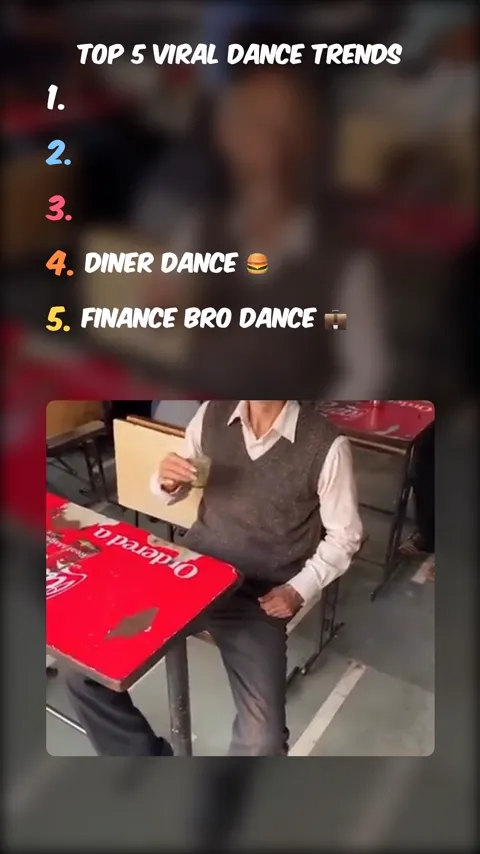
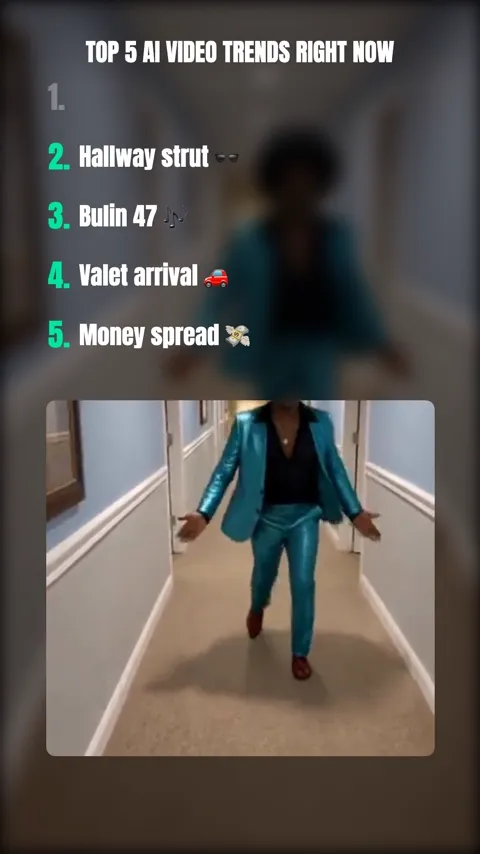
Top 5 videos made in Clippie, following the steps below.
How to make a top 5 video. Seven steps.
- 1
Pick a topic with a clear number 1
The best top 5 topics have entries people can compare on one scale and argue about: fastest, scariest, most expensive, funniest. Save the strongest entry for number 1.
- 2
Collect one clip per entry
Film it, screen-record your own gameplay, generate it with AI, or use stock footage that allows reuse. Five clips of 4 to 7 seconds each is plenty.
- 3
Rank the clips
Order them from number 5 to number 1 so the video builds. If two entries are close, put the more surprising one later.
- 4
Write the title and the labels
A title that names the list and a 2 to 4 word label per entry. Readable at a glance, with an emoji if it fits the channel.
- 5
Add a voiceover and transitions
An AI voice reads the title, and a bass drop or a spoken “number 3…” marks each new entry. This is what gives the format its rhythm.
- 6
Add music and captions
A track under the whole video, the clip audio muted or ducked, and word-timed captions for people watching on mute.
- 7
Export and post
Export in 1080x1920, post with the title as the caption, and ask a question about the ranking so people answer in the comments.
The full guide. Everything that goes into a top 5 video.
What the format is, how to get each part right, and how to make one in minutes or by hand.
The short answer
To make a top 5 video, choose a topic with a clear best and worst, collect one clip for each entry, upload the clips to a top 5 video maker, drag them into order from number 5 down to number 1, type a title and a short label for every entry, add a voiceover, music and captions, then export in 9:16 for TikTok, Reels and YouTube Shorts.
You can build the same thing in any video editor by stacking text, a blurred background and the clips by hand, which takes an hour or two per video. A top 5 video maker like Clippie builds the list, the numbers, the transitions and the captions for you, so the time goes into choosing good clips and a good order instead.
What a top 5 video looks like
The format is consistent across TikTok, Reels and Shorts, which is part of why it works: people know what they are getting in the first second. A typical top 5 video has:
- A title at the top: in a bold display font, naming the list: “Top 5 fastest cars ever made”.
- A numbered list: from 1 to 5 under the title. Entries fill in as the countdown reaches them, or show as faded placeholders so people can see how many are left.
- A clip window: in the lower half, with a blurred copy of the clip behind it filling the frame.
- A hit between entries: a bass drop, a sound effect or a voice saying “number 4”, often with a black frame, so each entry lands.
- A voiceover and captions: the title read aloud at the start, and captions for anyone watching on mute.
The countdown runs from number 5 to number 1. That order is the whole trick: every entry promises a better one, and most people stay to see what you put first.
Step 1: pick a topic people will argue about
A top 5 works when the entries can be compared on one scale and viewers have their own opinion. “Top 5 goals of the season” works; “Top 5 things in my room” does not. Three checks before you start:
- One scale: fastest, biggest, scariest, funniest, most expensive. If you cannot say what number 1 beats the others at, the list has no order.
- A debatable number 1: the comments come from people who would have ranked it differently. A list everyone agrees with gets watched once and forgotten.
- Clips you can get: every entry needs a clip. Pick topics you can film, record, generate or license, not ones that only exist in other people’s videos.
Stuck for a topic? The top 5 video ideas page has 100 of them, grouped by niche.
Step 2: collect one clip per entry
Four to seven seconds per clip is enough. Longer clips drag; shorter ones feel like a slideshow. Trim each clip to the moment that proves the entry belongs on the list: the goal going in, the jump landing, the reveal. Where the clips come from matters as much as how good they are:
- Your own footage: phone recordings, drone shots, product shots. Always safe to use and the easiest to rank honestly.
- Screen recordings: your own gameplay, your own app, your own designs. Record at the device’s native vertical resolution if you can.
- AI-generated clips: generate a clip per entry in Clippie’s AI Studio, or make a narrated version in the AI story editor with an image or animated scene per entry. No footage to license.
- Stock and Creative Commons: footage whose licence allows reuse in your own videos. Check the licence, not just the download button.
- Not other creators’ videos: reposting clips from other channels, with or without credit, is the fastest way to lose a ranking video to a copyright claim or a reused-content strike.
Step 3: rank the clips from 5 to 1
Put the weakest entry at number 5 and the strongest at number 1, so the video keeps getting better. Two refinements: if two entries are close, put the more surprising one later, and if one entry is the obvious winner, consider leaving it at number 2 and putting a defensible surprise at number 1. The second version gets more comments.
In Clippie you upload in any order and drag the clips into place; the numbers update as you go.
Step 4: write the title and the labels
The title names the list and is the hook: “Top 5 scariest places on Earth”, not “Scary places”. Say the number, say the scale, say the subject. The labels are the two to four words next to each number: “Snake Island 🐍”, “Aokigahara forest”. They are read in a glance while the clip plays, so keep them short and in the same style for every entry.
Use a heavy display font (Komika Axis, Anton, Bangers and Bebas Neue are the usual choices) and give number 1 a different colour from the rest so it reads as the winner.
Step 5: add a voiceover and transitions
The classic top 5 videos use a text-to-speech narrator reading the title and announcing each number, and that is still the sound people expect from the format. In Clippie you pick a voice, generate the title voiceover, and optionally add a transition voiceover before any clip: the video freezes on the clip’s first frame while the voice says “number 3, the diner dance”, then plays.
Between clips, turn on the bass boost transition for a one-second black frame with a bass drop, or add a sound effect to an entry. One of these per entry is enough; the format should feel punchy, not noisy.
Step 6: music and captions
Add one track under the whole video from the music library or your own file, and set its volume so the voiceover sits on top. Mute clips whose own audio does not add anything, and keep it on for the ones where the sound is the point.
Generate captions from the voiceovers so the title and the announcements are readable on mute, and style them to match the labels. Most short-form video is watched without sound at first, and a top 5 with no captions loses the people who never turn it on.
Step 7: export and post
Export in 1080x1920. Post it with the title as the caption and a question that invites a different ranking: “What should have been number 1?”. Replies to comments count as engagement too, so answer the first few.
If you plan to post top 5 videos regularly, save the finished video as a template. The fonts, colours, music, voice and the label and animation for every position are kept, so the next video is only new clips.
Making a top 5 video by hand
If you would rather build it in a video editor, the structure is the same; you just place every element yourself. In CapCut, Premiere Pro, DaVinci Resolve or Final Cut:
- Start a 1080x1920 project and import your five clips, trimmed to 4 to 7 seconds each.
- Duplicate each clip onto a lower track, scale it to fill the frame and blur it heavily. This is the background.
- Scale the original clip to about 80% width and sit it in the lower half of the frame with rounded corners.
- Add a title text layer at the top and five text layers for the numbered list, with the labels hidden until their clip starts.
- Add a one-second black clip with a bass sound effect between entries, and a text-to-speech or recorded voiceover for the title.
- Add a music track, generate or type captions, and export as MP4.
Expect an hour or two for the first one, and 30 to 45 minutes once you have saved a project to copy. Clippie does the same layout in a few minutes; the trade-off is less freedom over where things go.
Mistakes that make top 5 videos flop
The videos that stall tend to make the same errors:
- Clips that run too long: seven seconds is the ceiling for most entries. Trim to the moment.
- A list nobody can disagree with: if the order is obvious, there is nothing to comment on.
- Labels you cannot read: thin fonts, long labels, low contrast. Heavy font, short words, white on blur.
- No transitions: without a hit between entries the countdown turns into a slideshow.
- Other people’s footage: it gets claimed, and the video and the channel pay for it.
- A slow start: the title should be on screen and spoken in the first second. No intro, no logo.
Top 5 how-tos and ideas. Pick what you want to make.
 Free to tryOpen the Top 5 video makerUpload your clips, type the labels and export a 1080p countdown. No editing skills needed.
 How-toHow to make ranking videosCountdowns, tier lists and “ranked” formats that get people arguing in the comments.
 How-toHow to make top 10 videosNarrated top 10 lists for YouTube, and the countdown Short that sends people to them.
 IdeasTop 5 video ideas100 ranked-list ideas by niche, from gaming and sports to true crime and money.
Everything a top 5 video needs. In one editor.
Top 2 to top 9
Pick how many items the countdown has. The list on screen, the numbers and the colours follow.
Your clips, in order
Upload MP4, MOV, AVI, MKV or WebM clips, trim each one, drag them into rank order, mute or replace any clip.
Title and transition voiceovers
An AI voice reads the title, and can announce every entry over a freeze frame before the clip plays. 16,000+ voices.
Fonts, colours and animations
127 fonts including Komika Axis, Anton and Bangers, a colour and stroke for every number, and ten entrance animations.
Music, bass boost and SFX
Background music from the library or your own file, a bass-drop transition between clips, and a sound effect on any entry.
Captions and blur
Word-timed captions generated from the voiceovers, and a blurred copy of each clip as the background.
Save it as a template
Keep the look, music, voice and labels. The next video only needs new clips.
1080p vertical export
1080x1920 at 30 fps, ready for TikTok, Reels and YouTube Shorts.
Frequently asked questions.
How do you make a top 5 video?
Choose a topic with a clear best and worst, collect one clip per entry, rank the clips from number 5 to number 1, write a title and a short label for each entry, add a voiceover, music, transitions and captions, and export in 9:16. A top 5 video maker like Clippie builds the numbered list, the transitions and the captions for you from the clips and labels.
Can I make top 5 videos for free?
By hand, yes: CapCut and DaVinci Resolve are free, and you place every element yourself. In Clippie you can open the Top 5 editor and see the format for free; uploading clips and exporting needs a plan.
What is the best app to make top 5 videos?
For the countdown format on TikTok, Reels and Shorts, a dedicated top 5 video maker like Clippie is fastest, because the list, numbers, transitions, voiceover and captions are built in. For full control over every layer, CapCut on a phone or Premiere Pro and DaVinci Resolve on a computer.
How do I make a top 5 video on my phone?
Open Clippie in your phone’s browser, pick the Top 5 template, upload the clips from your camera roll, drag them into order, type the labels and export. Or build it layer by layer in CapCut.
What is a top 5 video?
A top 5 video is a short countdown: a title like “Top 5 scariest places on Earth”, a numbered list on screen, and one clip for each entry, played from number 5 down to number 1. Each entry’s label appears as its clip plays, often with a bass hit or a voice announcing the number. The format is popular on TikTok, Reels and YouTube Shorts because every entry gives people a reason to keep watching to number 1.
Where do I get clips for a top 5 video?
Use footage you own or have permission to use: your own recordings, screen recordings of your own gameplay, clips you generate with AI, or stock and Creative Commons footage that allows reuse. Re-uploading other creators’ videos is the fastest way to get a ranking video taken down or demonetized, even with credit.
How long should a top 5 video be?
Between 20 and 45 seconds for TikTok, Reels and Shorts: 4 to 7 seconds per clip, plus a second for each bass transition. Trim every clip to its best moment rather than letting it run. Top 10 videos for YouTube are a different format and usually run 5 to 12 minutes, narrated.
Can I add music and sound effects?
Yes. Pick a track from Clippie’s music library or upload your own and set its volume, turn on the bass boost transition for a one-second bass drop between clips, and add a sound effect to the title or any entry. Each clip’s own audio can stay on or be muted.
Can I make a top 5 video without filming anything?
Yes. Generate the five clips with AI in Clippie’s AI Studio, or make a narrated version in the AI story editor, where every entry gets an AI image or animated scene. Both avoid using footage that belongs to someone else.
How much does it cost to make a top 5 video in Clippie?
You can open the Top 5 editor and see the format without an account. Uploading clips and exporting the finished video needs a Clippie plan: exports use the plan’s export minutes, the title and transition voiceovers use its AI voice minutes, and captions are free. Plans are listed below.

