
Best Viewmax Alternative in 2026 for Viral Faceless Content
Looking for a Viewmax alternative? See where Viewmax's Sora 2 suite shines, where its credit-based pricing frustrates creators, & why Clippie AI wins on predictable minutes, 102+ caption languages, custom voices, and transparent pricing from $19.99/month.

If you're searching for a Viewmax alternative (or Viewmax.io alternative), you've probably run into the same thing most creators do: the Sora 2 output looks great, but the credit system, the annual-billing bundles, and paying for generations that fail start to add up. This guide answers that search directly, what Viewmax genuinely does well, where it frustrates faceless creators in 2026, and why Clippie AI is the alternative that trades credit anxiety for predictable, multi-language production. It matters now because viral faceless content only pays off when your output is consistent, and consistency is exactly what a credit-metered workflow makes hard to plan.
Executive summary: Viewmax is a capable, Sora 2–powered AI video suite bundled with creator education. It's a real tool, not a weak one, but its value depends heavily on how its credits, export caps, and voiceover limits play out for your usage, and independent reviews flag that failed generations still burn credits. This blog compares Viewmax and Clippie AI on the factors that decide whether you can scale profitably: pricing predictability, voice identity, multilingual reach, and reliability. You'll get a fair feature-by-feature breakdown, real 2026 pricing, a step-by-step way to switch without losing content, and a clear plan recommendation.
Table of Contents
What Viewmax Does Well (and Who It's Built For)
Where Viewmax Frustrates Faceless Creators in 2026
Why Clippie AI Is a Strong Viewmax Alternative
Viewmax vs Clippie AI: Feature-by-Feature Breakdown
Pricing Compared: Credits vs Predictable Minutes
How to Switch From Viewmax to Clippie AI (Step-by-Step)
Which Clippie AI Plan Should You Choose?
Frequently Asked Questions

1. What Viewmax Does Well (and Who It's Built For)
What it is. Viewmax (Viewmax.io) is an all-in-one AI suite for short-form, viral-style video, aimed squarely at TikTok, Reels, and faceless YouTube channels.
Why it matters. Being fair about a competitor builds better decisions. Viewmax is not a weak tool, and pretending otherwise helps no one.
Where Viewmax genuinely earns its place:
Sora 2 integration. It's one of the few creator-facing tools putting OpenAI's Sora 2 (and Kling-class models) behind a simple dashboard, with no watermark on output.
Full workflow, not just generation. AI scripting, AI voiceovers, auto-captions, plus caption and watermark removal in one place.
Flexible assembly. Import your own clips, mix them with AI-generated scenes, and switch aspect ratios inside a single project.
Creator education bundled in. Tutorials and a "zero-to-viral" style program, with weekly calls, workshops, and channel reviews on the top tier.
Low headline price. Entry plans start cheap, which is genuinely attractive for testing.
Who it suits. Creators whose #1 priority is cutting-edge AI-generated footage and who want a course-plus-community wrapped around it, and who are comfortable managing a credit system.

2. Where Viewmax Frustrates Faceless Creators in 2026
What it is. The gap between an impressive demo and a predictable, profitable weekly workflow. That gap is why "Viewmax alternative" is a search at all.
Why it matters. Viral faceless content is a volume game. Anything that makes your cost-per-video unpredictable makes scaling a gamble.
The friction points creators report most:
Failed generations still cost you. Independent reviews note that when a render fails, credits are still deducted, so a bad prompt or a glitch can quietly burn your budget.
Real cost is hard to predict. Pricing bundles credits, export quotas, and character-based voiceover caps, so your true monthly spend depends on behavior, not the headline number.
Voiceover is capped by characters. Allowances run roughly from 100,000 characters/month on entry plans up to ~450,000 on the top tier, fine for casual use, tighter at scale.
Support and reliability complaints. The public sample is limited, but recent reviews mention bugs and slow support, and reviewers advise reading the pricing and refund terms carefully before subscribing.
No clear ongoing free tier. Plans are largely annual-billing, so testing means committing.
Example. A creator batching 20 clips a week can't easily forecast Viewmax spend: a run of failed generations, a longer voiceover month, or an export-heavy week all move the real cost, even though the plan price never changed. That unpredictability is the exact thing serious channels try to design out.

3. Why Clippie AI Is a Strong Viewmax Alternative
What it is. Clippie AI is a faceless-video platform built around predictable production, the opposite of credit anxiety.
Why it matters. The three things creators tend to want after Viewmax are: a cost they can plan, a voice that's theirs, and multi-language reach without extra tools. Clippie is built on all three.
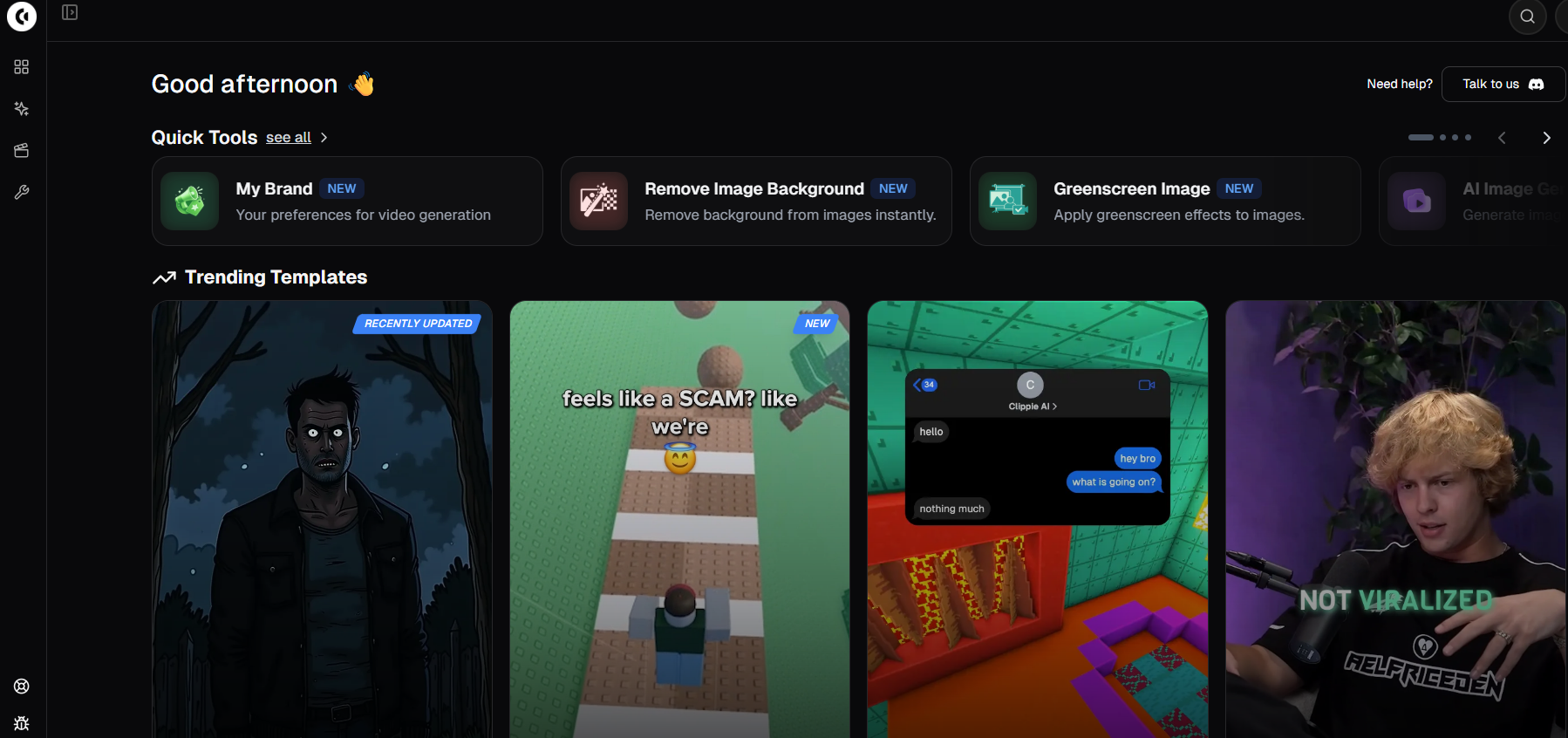
How Clippie closes the gap:
Minute-based export, not credit roulette. You get a clear monthly export allowance (30 / 120 / 250 minutes by plan), you always know what you're buying.
Transparent monthly pricing. Three published tiers, no bundled-credit math, starting at $19.99/month.
50+ AI voices plus custom voice cloning. Build a signature channel voice, 1 clone on Lite, 10 on Creator, 30 on Pro, instead of a shared library.
Captions in 102+ languages, natively. Turn one video into many markets without leaving the tool.
AI image generation and speech-to-subtitles built in, 100 to 1,000 AI images by plan.
24/7 support on every plan, not gated to the top tier.
An honest caveat. If raw, cinematic Sora 2 footage is your single most important feature, weigh that carefully, Viewmax leads there. Clippie's strength is a reliable, voice- and language-rich production system for faceless channels at scale, not a single flashy generator. Want to see that workflow first? Explore Clippie's AI video generator built for faceless channels.

4. Viewmax vs Clippie AI: Feature-by-Feature Breakdown
What it is. A straight comparison on what actually decides channel growth. Where a fact isn't clearly documented, it's flagged rather than guessed.
AI video / footage
Viewmax: Sora 2 (and Kling-class) generation, strong on generative footage quality.
Clippie: AI video plus AI image generation, on a predictable minute-based allowance.
Voices
Viewmax: AI voiceovers, capped by characters (~100k–450k/month); custom cloning not documented.
Clippie: 50+ AI voices, plus 1 / 10 / 30 custom cloned voices by plan.
Languages / localisation
Viewmax: auto-captions and caption removal.
Clippie: captions in 102+ languages, built in.
Pricing model
Viewmax: credit + export bundles, largely annual billing (reported ~$14–$49/mo); real cost varies with usage.
Clippie: transparent monthly tiers - $19.99, $34.99, $69.99.
Cost of a failed generation
Viewmax: credits are still deducted when a generation fails.
Clippie: you're spending against export minutes, not per-attempt credits.
Extras
Viewmax: watermark/caption removal, plus a bundled creator course and coaching on higher tiers.
Clippie: AI images, speech-to-subtitles, and multi-language captioning as standard.
Support
Viewmax: help resources; some recent complaints about bugs and response times.
Clippie: 24/7 support on every plan.
Best for
Viewmax: creators who want Sora 2 footage and a course, and don't mind managing credits.
Clippie: creators who want predictable costs, a signature voice, and multi-language output at scale.

5. Pricing Compared: Credits vs Predictable Minutes
What it is. The real difference isn't just the number — it's how you're charged.
Why it matters. Credit systems make your cost-per-video move around. Minute-based plans don't. Here's exactly what Clippie publishes:
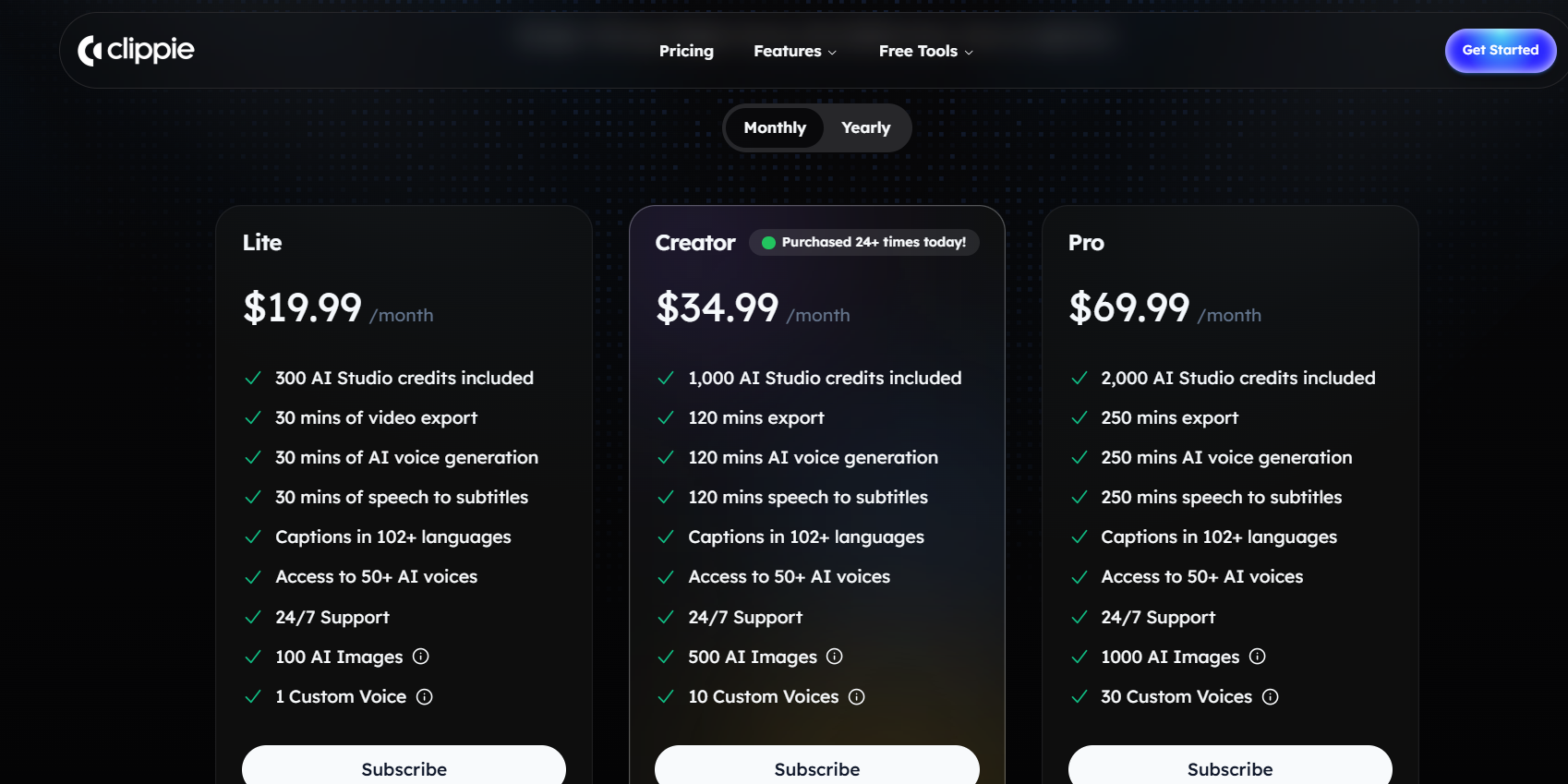
Clippie Lite, $19.99/month
30 mins video export, 30 mins AI voice generation, 30 mins speech-to-subtitles
Captions in 102+ languages, access to 50+ AI voices, 24/7 support
100 AI images, 1 custom voice
Clippie Creator, $34.99/month (most popular)
120 mins export, 120 mins AI voice generation, 120 mins speech-to-subtitles
Captions in 102+ languages, access to 50+ AI voices, 24/7 support
500 AI images, 10 custom voices
Clippie Pro, $69.99/month
250 mins export, 250 mins AI voice generation, 250 mins speech-to-subtitles
Captions in 102+ languages, access to 50+ AI voices, 24/7 support
1,000 AI images, 30 custom voices
How to read it against Viewmax. Viewmax's entry price can look lower on paper, but you're buying credits, export caps, and character limits that all interact, and failed renders still spend credits. With Clippie, 120 minutes on Creator maps directly to how much you can publish, and a re-render doesn't cost you a "video." For high-volume creators, predictability usually beats a low headline price. See the full field in our best faceless-video tool alternatives for 2026.

6. How to Switch From Viewmax to Clippie AI (Step-by-Step)
What it is. A low-friction migration you can finish in an afternoon, without losing anything.
Why it matters. Fear of losing work is the main reason creators hesitate. Videos you've already exported from Viewmax are yours to keep, so switching tools doesn't touch your back catalogue.
Step 1: Export and save. Download your existing Viewmax clips and reusable scripts.
Step 2: Pick your Clippie plan. Match it to your real posting volume (see Section 7). Most switchers start on Creator.
Step 3: Clone your channel voice. Set a custom voice so every future video sounds like your channel, not a stock library.
Step 4: Rebuild one proven video first. Remake a clip that already performed, add captions in your target languages, and compare before you batch.
Step 5: Batch and localise. Once the format works, produce in volume and export multi-language caption versions from the same source.
Example. A true-crime creator remade three past winners in Clippie, cloned a single narrator voice for continuity, and added Spanish and German captions, turning three scripts into nine market-specific posts, with a cost they could actually forecast.
7. Which Clippie AI Plan Should You Choose?
What it is. A quick guide so you don't over- or under-buy.
Why it matters. Matching the plan to your output avoids wasted spend and mid-month limits.
Choose Lite ($19.99/mo), if you're testing the switch or posting 3–5 videos a month in one language. One custom voice is enough to start an identity.
Choose Creator ($34.99/mo), if you're serious about viral output, roughly 8–12 videos a month, multiple languages, and 10 custom voices for more than one channel or format. This is the right starting point for most creators leaving Viewmax.
Choose Pro ($69.99/mo), if you're running high-volume or multi-channel production and want the 250-minute ceiling, 1,000 AI images, and 30 custom voices.
What to do next. Pick the plan that matches your volume, clone your channel voice, and rebuild one proven video in your target languages. If you're unsure, start on Creator, it's built for the predictable, multi-language, custom-voice workflow that made you look past Viewmax in the first place. Ready to trade credit anxiety for a plan you can forecast? Start creating with Clippie AI's Creator plan today.
8. Frequently Asked Questions
Is Clippie AI a good alternative to Viewmax?
Yes, especially if Viewmax's credit system and unpredictable costs are your main frustration. Clippie uses transparent monthly pricing and minute-based exports, adds custom voice cloning and captions in 102+ languages, and offers 24/7 support on every plan. If your top priority is raw Sora 2 footage, Viewmax still leads on that specific feature.
How does Viewmax pricing compare to Clippie AI?
Viewmax's plans are reported around $14–$49/month on annual billing, but they bundle credits, export quotas, and character-based voiceover caps, so your real cost depends on usage. Clippie publishes three flat monthly tiers ($19.99, $34.99, $69.99) with clear export minutes, so you can forecast spend before you commit. Always check Viewmax's current pricing page for exact figures.
Does Viewmax charge me if a video generation fails?
According to independent reviews, yes, credits are still deducted when a generation fails on Viewmax, which can quietly increase your cost per usable video. Clippie's plans are based on export minutes rather than per-attempt credits, so re-rendering a clip doesn't cost you a "video's worth" of budget.
Can Clippie AI make faceless videos in multiple languages?
Yes. Clippie supports captions in 102+ languages natively, which lets you turn one source video into several market-specific versions without extra tools, a common reason multilingual creators switch.
Does Clippie AI offer custom AI voices?
Yes. Every plan includes custom voice cloning, 1 on Lite, 10 on Creator, and 30 on Pro, alongside 50+ AI voices. This lets you build a consistent, recognisable channel voice, which a shared voice library can't provide.
Which Clippie AI plan is best for a creator switching from Viewmax?
The Creator plan at $34.99/month suits most switchers. Its 120 minutes of export supports a real weekly schedule, 10 custom voices cover multiple channels or formats, and 500 AI images handle visuals at that volume. Start on Lite only if you're producing a handful of videos a month while you evaluate.
Make an AI story video
Write a script or let AI write one. Clippie turns it into a narrated video with AI scenes, voiceover and captions.
Read more

How to Make Top 5 Ranking Videos in 2026 (Step-by-Step)
Build ranking Shorts that can still earn: pick a debatable topic, set clear criteria, source clips you may use, script the countdown, add your commentary.

How to Create Short-Form Videos Using AI: 8 Steps (2026)
A beginner workflow for AI videos on TikTok, Reels and Shorts: pick a format, script a hook, add visuals, voice and captions, export at 9:16, label AI.

7 Free CapCut Alternatives for Short-Form Video (2026)
Compare Edits, YouTube Create, VN, Clipchamp, Canva, DaVinci Resolve and Shotcut: what each gives free users, what it caps first and where it falls short.