
Best Luma AI Alternatives in 2026 for Short-Form and Faceless Video
Comparing Luma AI alternatives? See how Runway, Kling, Veo 3.1, Hailuo, Pika and Seedance stack up on price, credits, clip length and commercial rights.

If you searched for Luma AI alternatives, you probably like what Ray models can do but want a cheaper entry plan, more seconds per month, or a workflow that fits daily Shorts and TikToks.
That question matters more in October 2026 because Luma has moved from the old Dream Machine app to Luma Agents, a multi-model workspace that starts at $30 a month. This guide breaks down seven alternatives, what each costs on its own pricing page, where each beats Luma, and where each falls short, so you can pick a tool that matches the videos you actually publish.
Executive summary: This post compares seven Luma AI alternatives for faceless and short-form creators: Runway, Kling, Google Veo 3.1 in Flow, Hailuo, Pika, Seedance, and a template-based workflow option. Each pick covers what the tool is, who it suits, hedged 2026 pricing, and its weak spots. It is for creators who post vertical video regularly and want to choose a generator by budget, clip length, and commercial-use terms.
Table of Contents
What Luma AI Offers in 2026
Why Creators Look for Luma AI Alternatives
How We Chose These Luma AI Alternatives
Alternative #1: Runway
Alternative #2: Kling AI
Alternative #3: Google Veo 3.1 in Flow
Alternative #4: Hailuo AI by MiniMax
Alternative #5: Pika
Alternative #6: Seedance in Dreamina and CapCut
Alternative #7: Clippie AI
Which Luma AI Alternative Fits Your Workflow
FAQs
What to Do Next

What Luma AI Offers in 2026
Luma AI now runs as Luma Agents, a browser and iOS workspace that generates video, images, and audio. Its own video models are Ray3.2, released June 2026, and Ray3.14. Paid plans start at $30 a month, and the app also hosts third-party models such as Kling, Veo, and Seedance.
What it is: Dream Machine branding no longer leads Luma's product and pricing pages. Instead, Luma sells an agent-style app where you brief a project and it plans, generates, and refines assets. Luma's own model notes describe Ray3.2 as built for frame-level direction and continuity across cuts.
Current plans (from lumalabs.ai/pricing, October 2026):
Plus: $30/month or $25/month billed yearly, 10,000 credits, commercial use listed
Pro: $90/month or $75/month billed yearly, 40,000 credits
Ultra: $300/month or $250/month billed yearly, 150,000 credits
Team and Enterprise: contact sales
Why it matters: One credit pool covers Ray3.2, Kling 3.0, Veo 3.1, Seedance, and MiniMax H3. That makes it a strong hub, but its pricing reflects agency work more than solo short-form output.

Why Creators Look for Luma AI Alternatives
Most creators leave Luma for one of four reasons: a $30 minimum before commercial use, credits that expire each billing cycle, a feature set aimed at ad agencies, and older Dream Machine outputs that carried watermarks and personal-use limits. Each alternative below solves at least one.
The common friction points:
Entry price: Runway and Pika list entry tiers at $15 and $10 a month, and Kling's is reported near $10, against Luma's $30.
Expiring credits: Luma's pricing page says monthly credits reset each cycle and unused credits do not carry over.
Legacy licensing: Luma's licensing guide states that Free and Lite generations on the old plans were personal use only and watermarked, and that upgrading later does not remove the watermark.
Product direction: Luma's 2026 news centers on agencies, ad variants, and enterprise teams, not daily vertical uploads.
How to apply this: Name the one constraint that hurts most, such as cost, seconds per month, or licensing, and judge every alternative on it first.

How We Chose These Luma AI Alternatives
We picked tools that a short-form creator could realistically switch to in October 2026. Every pick has a public pricing page or official plan details, supports vertical or reframed output, and offers commercial-use terms on at least one paid tier. Nothing here was ranked by hands-on testing.
Selection criteria:
Active product: still sold to individual creators in October 2026 (this is why OpenAI's Sora is excluded; see the FAQs)
Transparent pricing: a first-party pricing page, or clearly sourced plan details where the official page would not load
Short-form fit: clip lengths and aspect ratios that suit Shorts, Reels, and TikTok
Commercial terms: a paid plan that allows monetized use
Distinct strength: each pick beats Luma on at least one practical axis
Alternative #1: Runway
Runway is the closest like-for-like Luma AI alternative. It offers its own Gen-4.5 model plus third-party models in one credit system, with a cheaper entry plan at $15 a month. It suits creators who want strong editing tools around generation, not just a prompt box.
What it is: A creative suite combining Runway's Gen-4.5 with models such as Kling 3.0, Nano Banana Pro, and, on higher tiers, Seedance 2.5 and Wan 3.0.
Best for: Generation, upscaling, and editing in one place at half Luma's entry cost.
Pricing (runway.com/pricing, October 2026):
Free: 125 one-time credits
Standard: $15/month ($12 billed yearly), 625 credits, no watermarks
Pro: $35/month, 2,250 credits, adds Seedance 2.5
Max: $95/month, 9,500 credits, credits roll over up to one month
Luma AI vs Runway: Runway is cheaper to start and ships a broader editing toolkit. Luma's Ray3.2 leans harder into shot-level direction and its agent workflow. If you want a deeper Runway breakdown, see our guide to Runway ML alternatives for faceless creators.
Where it falls short: Runway's own page says Standard's 625 credits equal about 52 seconds of Gen-4.5 a month, which is thin for daily posting.
Alternative #2: Kling AI
Kling AI is a strong Luma alternative for realistic human motion at a low entry price. Its paid plans have started around $10 a month in 2026 roundups, and Kling's homepage now headlines Kling 4.0 alongside the widely available Kling 3.0.
What it is: Kuaishou's video and image generator for text, image, and reference-driven clips.
Best for: Story, drama, and character-led shorts where believable movement matters most.
How to apply it: Generate 5 to 10 second hero shots in Kling, then add narration and captions elsewhere.
Pricing (hedged): Kling shows plan prices inside its app, so treat these ranges from 2026 pricing guides as a starting point:
Free: a small daily credit allowance, watermarked, no commercial rights
Paid tiers: roughly $10 to $180 a month, with commercial rights and watermark removal from the entry tier
Where it falls short: Subscription credits reportedly expire monthly, and Kling 4.0 is rolling out in stages, with early access going to top-tier subscribers first.
Alternative #3: Google Veo 3.1 in Flow
Google Veo 3.1 is the best Luma alternative for clips with built-in sound. You reach it through Google Flow, which lists Veo 3.1 with 50 daily credits even without a subscription, and Google AI plans add monthly credits from $4.99 to $199.99.
What it is: Google DeepMind's video model, generating video with native audio such as dialogue, sound effects, and ambience. Google's model page cites 8-second clips that can be extended.
Best for: Talking scenes and POV shorts where synced audio saves editing time.
Pricing (labs.google Flow page, October 2026):
No subscription: 50 daily credits, Veo 3.1 included
Google AI Plus: $4.99/month, adds 200 monthly credits
Google AI Pro: $19.99/month, adds 1,000 monthly credits
Google AI Ultra: $99.99 or $199.99/month, adds 10,000 or 25,000 credits
How to apply it: Use Ingredients to Video for consistent characters and Extend for longer scenes.
Where it falls short: Features vary by market and plan, Flow is 18+ only, and each generation is short.
Alternative #4: Hailuo AI by MiniMax
Hailuo AI is a budget-friendly Luma alternative from MiniMax, now running its MiniMax H3 model. Paid plans have ranged from about $8 to $15 a month for the Standard tier in 2026, depending on promotions, which suits creators testing AI clips at volume.
What it is: A web generator for text-to-video and image-to-video, with social templates and an Omni Reference input for guiding a shot with a reference image.
Best for: High-volume B-roll, meme-style clips, and quick visual hooks.
Pricing (hedged): Hailuo shows plan prices at checkout, and 2026 roundups that cite its terms list:
New accounts: a one-time credit grant, watermarked downloads
Standard: about $8 to $15 a month for 1,000 credits, varying with promotions
Higher tiers: up to about $200 a month
How to apply it: Generate several 6-second variations of one hook shot and keep the best.
Where it falls short: Prices shifted repeatedly in 2026, and its terms give MiniMax a broad license to use your content to promote the service.
Alternative #5: Pika
Pika is a practical Luma alternative for creators who want a low entry price and many models in one app. Its Starter plan is $10 a month, but commercial rights begin on the $35 Creator plan, which matters for monetized channels.
What it is: Pika now pairs its own Pika 2.5 and Pikaframes with Seedance 2.5, MiniMax H3, Wan 3.0, image models, and built-in speech and music tools.
Best for: Playful effects and creators who want audio tools beside video.
Pricing (pika.art/pricing, October 2026):
Free: no monthly credits, credit packs only
Starter: $10/month, 900 credits, no commercial licence
Creator: $35/month, 3,150 credits, commercial licence
Fancy: from $95/month
How to apply it: Learn prompts on Starter, then move to Creator before publishing monetized work.
Where it falls short: The cheapest plan you can legally monetize from costs more than Luma's Plus, so Pika is only cheaper if you stay non-commercial.
Alternative #6: Seedance in Dreamina and CapCut
Seedance is ByteDance's video model family, and it is the strongest Luma alternative for creators already editing in CapCut. Seedance 2.0 reached US CapCut users in April 2026 with clips up to 15 seconds, and Dreamina offers daily credits to try it.
What it is: A text, image, and reference-to-video model with synced audio. Seedance models also appear inside Runway, Luma, and Pika.
Best for: Generation and editing in one ecosystem, especially explainer shorts with on-screen text.
Pricing (hedged): Dreamina's own Seedance pages show heavy introductory discounts in September and October 2026 and say regular prices and credit allowances appear at checkout and vary by country.
How to apply it: Generate in Dreamina or CapCut, then cut and caption in CapCut. For a model-by-model view, read our Seedance 2.0 vs Veo 3 vs Runway comparison.
Where it falls short: CapCut's rollout restricted real-face inputs at launch and adds visible AI watermarks and Content Credentials. Promo-led pricing also makes long-term costs hard to predict.

Alternative #7: Clippie AI
Clippie AI is a workflow layer rather than a model competitor. Its AI Studio runs models including Seedance, Veo, and Flux, then drops clips into ready-made short-form templates with voiceover and captions. It fits faceless creators who need finished vertical videos, not raw footage.
What it is: A template-based short-form platform. AI Studio generates video, images, and voiceovers, and the output slots into formats such as AI Story Videos, Reddit Videos, and Quiz Videos. The AI video generator for script-to-short workflows turns a script into scenes, voiceover, and captions.
Best for: Faceless channels publishing story or Reddit shorts on a schedule.
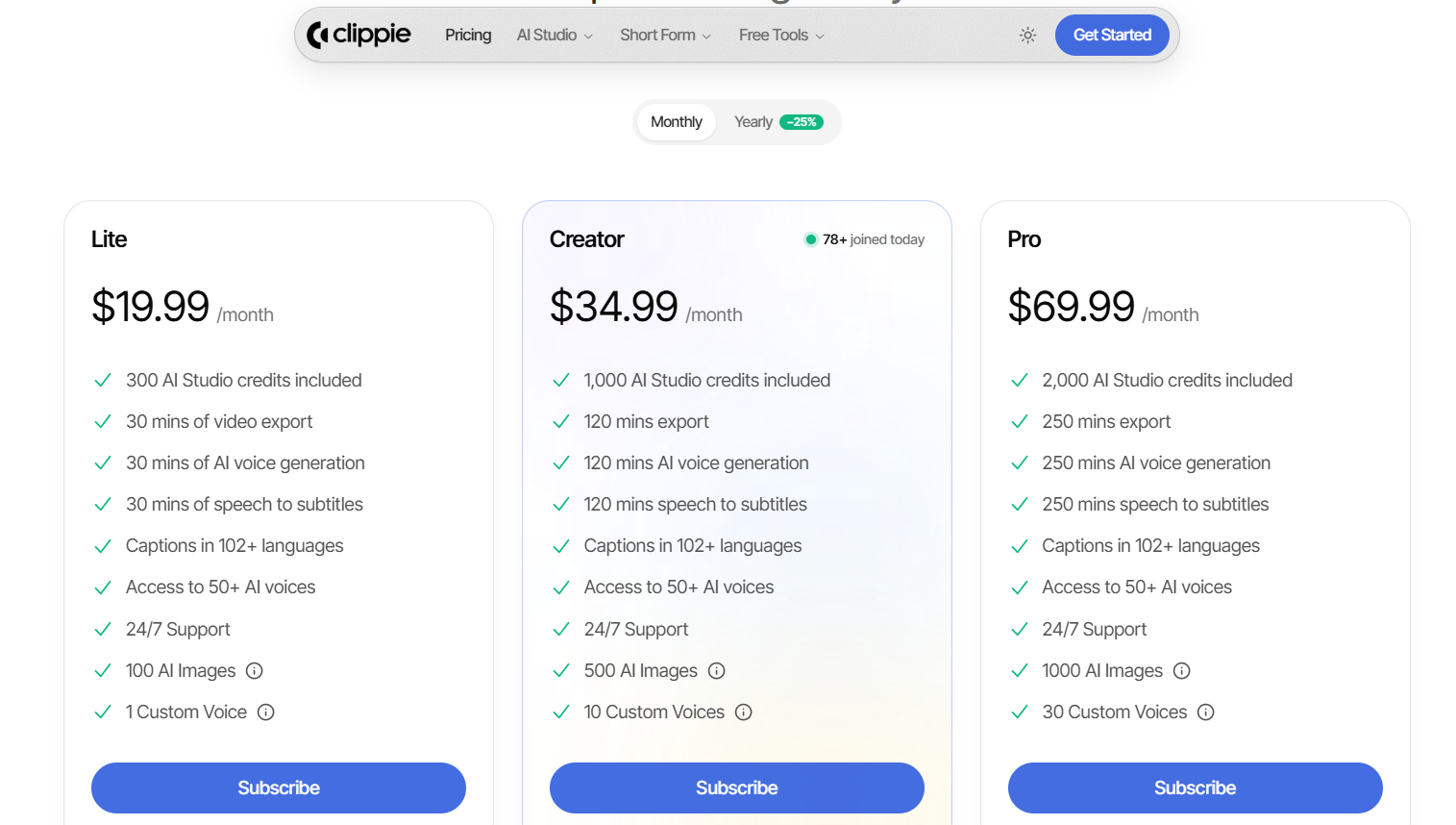
Pricing (monthly):
Lite: $19.99, 300 AI Studio credits
Creator: $34.99, 1,000 AI Studio credits
Pro: $69.99, 2,000 AI Studio credits
How to apply it: Follow the Veo 3.1 video tutorial in Clippie AI to generate a clip, then place it in a template.
Where it falls short: It is not a timeline editor and does not offer frame-level direction. For cinematic sequences, Luma, Runway, or Flow is the better choice.

Which Luma AI Alternative Fits Your Workflow
The right Luma AI alternative depends on the job, not the leaderboard. Match the tool to your format, monthly budget, and licensing needs first. Most short-form creators need one generator plus one assembly tool, rather than a single expensive all-in-one plan.
Pick by job:
Cheapest commercial start with editing tools: Runway Standard
Realistic people and motion: Kling AI
Clips with dialogue and sound built in: Veo 3.1 in Flow
High-volume hooks and B-roll on a budget: Hailuo AI
Effects and audio tools in one app: Pika Creator
Already editing in CapCut: Seedance
Finished faceless story shorts: Clippie AI, shown in this animated AI story video walkthrough
Shot-level direction and agency-style briefs: stay on Luma
Example: A daily horror-story channel might generate atmosphere shots in Hailuo and a character scene in Veo, then assemble the narrated short in a template tool.
FAQs
Is there a free Luma AI alternative?
Yes, with limits. Google Flow lists Veo 3.1 with 50 daily credits without a subscription, Runway gives 125 one-time credits, and Dreamina offers daily credits for Seedance. Free outputs on most tools carry watermarks or restrict commercial use, so check each tool's terms before monetizing.
Is Luma Dream Machine still available?
Luma's 2026 product is Luma Agents, a multi-model workspace at app.lumalabs.ai with Plus, Pro, and Ultra plans. Dream Machine branding no longer appears on Luma's main product pages. Its current in-house video models are Ray3.2 and Ray3.14, alongside third-party models such as Kling, Veo, and Seedance.
Is Runway better than Luma AI?
It depends on the job. Runway costs less to start at $15 a month and bundles editing and upscaling. Luma focuses on Ray3.2's shot-level direction and agent workflows for teams. For solo short-form creators on a budget, Runway is usually the easier entry point.
Can I use Luma AI alternatives for monetized YouTube Shorts?
Usually, on paid plans. Pika grants commercial use from its $35 Creator plan, Kling and Hailuo from their paid tiers, and Luma from Plus. Free tiers often exclude commercial use. YouTube and TikTok also ask creators to disclose realistic AI-generated content.
Is OpenAI Sora still a Luma AI alternative?
No. OpenAI's help center says the Sora web and app experience was discontinued on April 26, 2026, and the Sora API was scheduled to end on September 24, 2026. That is why Sora is not on this list. Veo 3.1 and Seedance cover similar realistic, audio-enabled clips.
Which AI video generator is most like Luma?
Runway is the closest match. Both combine an in-house model with third-party models in one credit system, both target creative professionals, and both offer editing beyond raw generation. If you mainly want Luma's model variety, Pika also bundles Seedance, MiniMax, and Wan models in one app.
What to Do Next
Pick your main constraint and test the two alternatives that solve it best this week.
Step 1: Run one identical prompt on Flow, Runway, or Dreamina using their free credits.
Step 2: Check the commercial-use terms on the plan you would actually buy.
Step 3: Estimate the seconds you need monthly and compare each plan's credit math.
Generate it in AI Studio
Create videos with Seedance and Veo, or copy any dance onto your own character with Motion Control.
Read more

How to Create Short-Form Videos Using AI: 8 Steps (2026)
A beginner workflow for AI videos on TikTok, Reels and Shorts: pick a format, script a hook, add visuals, voice and captions, export at 9:16, label AI.

7 Free CapCut Alternatives for Short-Form Video (2026)
Compare Edits, YouTube Create, VN, Clipchamp, Canva, DaVinci Resolve and Shotcut: what each gives free users, what it caps first and where it falls short.

Pictory vs Clippie AI (2026): Which Fits Your Video Workflow?
Compare Pictory and Clippie AI on workflow, 2026 pricing, voices and templates to see which one suits article repurposing and which suits faceless shorts.