
Pictory vs Clippie AI (2026): Which Fits Your Video Workflow?
Compare Pictory and Clippie AI on workflow, 2026 pricing, voices and templates to see which one suits article repurposing and which suits faceless shorts.

You searched for Pictory vs Clippie AI, so you probably already know both tools turn text into video and want to know which one matches the videos you actually make. That matters in October 2026 because both platforms have added AI-generated visuals, and their pricing models now work very differently.
This comparison answers the question directly. You will see what each tool is built for, how the workflows differ step by step, what the plans cost on each official pricing page, and a clear verdict on who should pick Pictory and who should pick Clippie AI.
Executive summary: This is a side-by-side comparison of Pictory and Clippie AI for creators, marketers and small teams choosing a script to video AI tool in 2026. It covers core strengths, workflow, verified pricing, voices, captions and templates. Pictory fits repurposing articles, slides and long recordings into branded stock-footage videos. Clippie AI fits template-driven faceless short-form formats. You will finish knowing which tool suits your output.
Table of Contents
Pictory vs Clippie AI: The Short Answer
What Pictory Does Best
What Clippie AI Does Best
Workflow Compared: Repurposing vs Template-First Short-Form
Pricing Compared in 2026
Voices, Captions, Visuals and Templates
Who Should Use Pictory and Who Should Use Clippie AI
FAQs
What to Do Next

Pictory vs Clippie AI: The Short Answer
Pictory is the better choice if you repurpose existing material, such as blog posts, scripts, slide decks or webinars, into branded videos with stock footage. Clippie AI is the better choice if you produce faceless short-form videos in proven formats like Reddit stories, fake texts and Top 5 rankings.
The core difference is the starting point.
Pictory starts from content you already have. Paste a script or URL, upload slides or a recording, and it builds scenes around that material.
Clippie AI starts from a format. Pick a template, add a script, story or clips, and it assembles a vertical video in that style.
Quick verdict by use case:
Turning a company blog into weekly explainer videos: Pictory
Running a faceless TikTok or YouTube Shorts channel built on story formats: Clippie AI
Team of three or more sharing brand kits: Pictory
Batching gameplay-backed voiceover clips or split-screen podcast clips: Clippie AI
If your work spans both, the tools can coexist. Most solo creators will only need one.

What Pictory Does Best
Pictory does its best work converting existing written or recorded content into polished, brand-consistent videos. Its strengths are multiple input types, a large licensed stock library, ElevenLabs voices, brand kits and team plans, which makes it a solid fit for marketers and businesses.
What it is: A browser-based video creator that splits text into scenes and matches each scene with visuals, a voiceover and captions.
Why it matters: If you already publish articles, decks or webinars, Pictory lets you turn them into video without writing from scratch.
Strengths verified on Pictory's site (October 2026):
Multiple inputs: script to video, URL to video, PDF to video, PPT to video, audio to video and images to video.
Edit video using text: upload a recording, edit the auto-generated transcript, and filler words and silences can be removed.
Stock library: Pictory's text-to-video page cites 18 million+ stock assets, with Getty Images and Storyblocks named as partners. Its pricing page shows a smaller library on Starter.
AI Studio: generates images and short 5 to 10 second clips, with models including Flux and Veo 3.1.
AI avatars: presenter avatars are live, billed in AI credits.
Business features: brand kits, team plans, an API, and Make and Zapier connections.
Example use case: A SaaS marketer pastes a 1,500-word blog URL, picks a brand kit, swaps a few stock clips, and exports a 16:9 version for LinkedIn plus a 9:16 cut for Reels.
Where it falls short: Pictory is built around scene-by-scene stock matching, so outputs can look like generic corporate B-roll. Its site doesn't advertise ready-made templates for viral faceless formats such as fake text chats, Reddit stories over gameplay or would-you-rather polls.
What Clippie AI Does Best
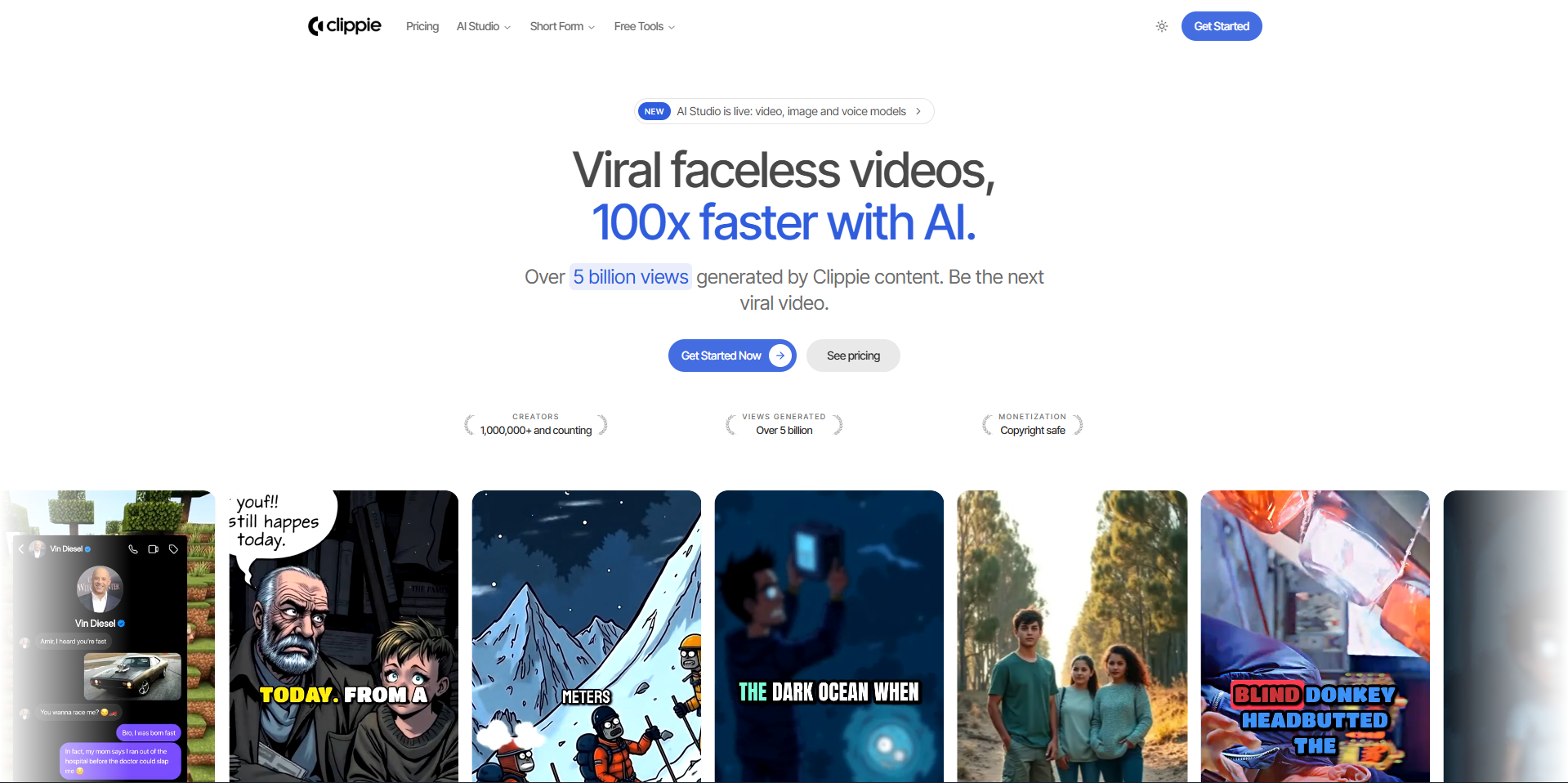
Clippie AI does its best work producing faceless short-form videos in specific, repeatable formats. Instead of matching stock footage to text, it gives you templates for styles that already perform on TikTok, Shorts and Reels, plus an AI Studio for generated visuals.
What it is: A faceless short-form video maker built around templates rather than a timeline editor.
Why it matters: Faceless channels usually grow by repeating one format consistently. Templates remove most of the setup work per video.
Templates listed on Clippie's homepage:
Fake Text Videos and Twitter Videos for conversation and post-style content
Reddit Videos: paste a Reddit URL or write your own script
AI Story Videos for narrated, AI-illustrated stories
Would You Rather and Quiz Videos (question, countdown, reveal)
Top 5 Moments: a ranking compilation from your uploaded clips, with 2 to 9 items
Split Videos: podcast clip on top, background clip below, captions added
Voiceover Video, Auto-Captions and Roblox Rant Videos
How to apply it: If your channel runs on narrated commentary, the AI voiceover video generator with gameplay backgrounds pairs a generated voice with background footage and styled captions in one step.
Example use case: A creator runs a "Reddit confessions" channel. They paste a thread URL, choose a voice, and output a captioned vertical video over gameplay footage.
Where it falls short: Clippie is not a timeline editor, so fine-grained cuts and multi-track edits aren't its job. It doesn't advertise article, PDF or slide-deck inputs, and its published plans don't include a seat-based team tier.

Workflow Compared: Repurposing vs Template-First Short-Form
The workflows differ at the first step. Pictory asks what content you already have and converts it into scenes. Clippie AI asks what format you want to publish and fills that format with your script, story or clips. That choice shapes everything after it.
Pictory workflow (repurposing-first):
Step 1: Choose an input: script, URL, PDF, PPT, audio, images or an uploaded video.
Step 2: Pictory splits the text into scenes, roughly one per sentence or line break.
Step 3: Review auto-matched stock visuals and swap weak ones, or generate replacements in AI Studio.
Step 4: Apply a brand kit, pick a voice, style the captions.
Step 5: Export in 16:9, 9:16 or 1:1.
Clippie AI workflow (template-first):
Step 1: Pick a template, such as Reddit Videos, Fake Text or Top 5 Moments.
Step 2: Add the content the template needs: a Reddit link, a script, a text conversation or uploaded clips.
Step 3: Choose an AI voice and background footage, or drop in AI Studio visuals.
Step 4: Adjust the caption style and preview.
Step 5: Export a vertical short.
Why it matters: Repurposing tools save time when the source content is the asset. Template tools save time when the format is the asset. For a deeper walkthrough of the script stage, see this step-by-step guide to turning a script into video with AI.
Example use case: To see the template-first flow end to end, watch the Reddit story video tutorial showing each step.

Pricing Compared in 2026
Pictory lists four tiers, with Starter at roughly $25 to $29 a month depending on billing. Clippie AI lists three monthly plans from $19.99 to $69.99. Pictory lists much larger video-minute allowances per plan; Clippie bundles AI voice, subtitle and AI image allowances aimed at short-form output.
Pictory plans (from pictory.ai/pricing, checked October 15, 2026; promotions change often):
Starter: about $25/mo billed yearly or $29 month to month. 1 user, 200 video minutes a month, 60 ElevenLabs voice minutes, 1 brand kit.
Professional: about $35/mo billed yearly or $59 month to month. 600 video minutes, 120 ElevenLabs voice minutes, voice cloning, custom avatars, 5 brand kits.
Team: about $119/mo billed yearly or $199 month to month. 3+ users, 1,800 video minutes, 240 ElevenLabs voice minutes, 10 brand kits.
Enterprise: custom pricing for 10+ users.
Note on AI credits: AI Studio clips and avatars draw on a separate credit pool. Pictory's own estimate puts Starter at about 1 minute of AI-generated video a month.
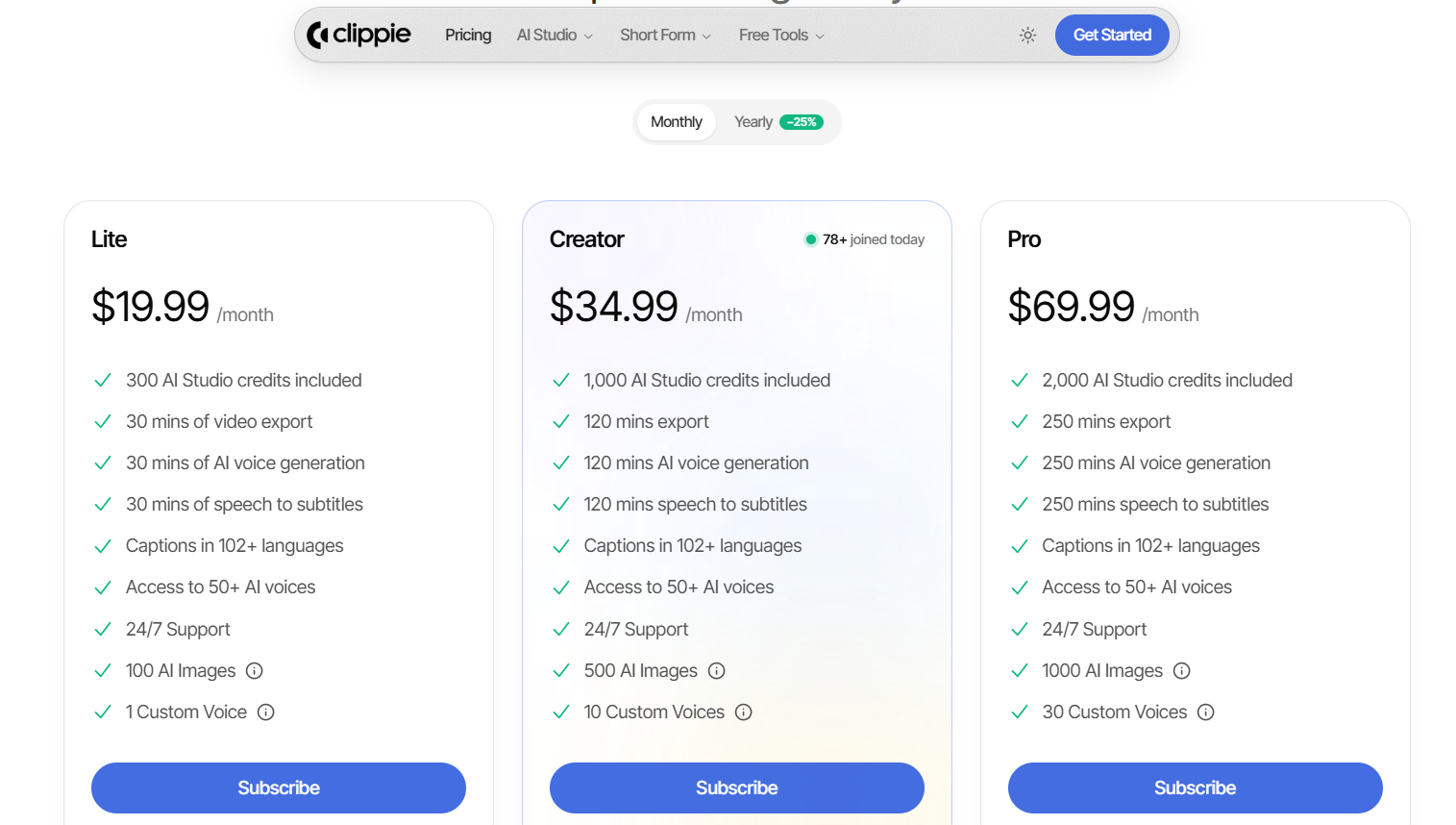
Clippie AI plans (monthly, renew until cancelled):
Lite, $19.99/mo: 30 min video export, 30 min AI voice, 30 min speech-to-subtitles, 100 AI images, 1 custom voice, 300 AI Studio credits.
Creator, $34.99/mo: 120 min each of export, AI voice and subtitles, 500 AI images, 10 custom voices, 1,000 AI Studio credits.
Pro, $69.99/mo: 250 min each, 1,000 AI images, 30 custom voices, 2,000 AI Studio credits.
All plans: captions in 102+ languages, 50+ AI voices, 24/7 support. AI Studio credits can be topped up.
How to apply it: Estimate your monthly output in finished minutes. A 45-second short is under a minute, so 120 minutes covers well over 100 shorts. If you produce long explainers or need team seats, Pictory's minute allowances and Team tier are the better value.
Where each falls short on price: Pictory's AI-generated video allowance is thin on lower tiers. Clippie's entry plan has far fewer export minutes than Pictory Starter.

Voices, Captions, Visuals and Templates
Both tools cover AI voiceovers and automatic captions. Pictory leans on ElevenLabs voices, licensed stock and brand kits. Clippie AI leans on caption-heavy vertical templates, custom voices and AI Studio models. The right fit depends on whether your videos sell a brand or a story.
Voices:
Pictory: ElevenLabs voices; its text-to-video page cites 170+ voices in 29+ languages, plus voice cloning on Professional and Team.
Clippie AI: 50+ AI voices on every plan, with 1 to 30 custom voices depending on the plan, managed in Voice Studio.
Captions:
Pictory: automatic captions synced to the voiceover, styled to your brand kit.
Clippie AI: speech-to-subtitles minutes on every plan, captions in 102+ languages, and a dedicated Auto-Captions template.
Visuals:
Pictory: licensed stock from Getty Images and Storyblocks, plus AI Studio clips and images.
Clippie AI: AI Studio generates video, images and voiceovers using models including Seedance, Veo and Flux, and the output drops into any template. For a practical demo, see the
full tutorial on creating animated AI story videos
.
Templates:
Pictory: smart templates, layout themes, and 16:9, 9:16 and 1:1 outputs.
Clippie AI: format templates built for short-form, such as Would You Rather, Quiz Videos and Split Videos.
Example use case: A brand explainer wants consistent fonts, logos and stock visuals, which suits Pictory. An AI horror story series wants an illustrated narrative and bold captions, which suits Clippie.

Who Should Use Pictory and Who Should Use Clippie AI
Choose Pictory if your raw material is written or recorded content and your audience expects a branded, business-style finish. Choose Clippie AI if you run a faceless short-form channel and want repeatable viral formats without editing. Neither tool is universally better; each is stronger for a different job.
Pictory is the better fit if you:
Repurpose blogs, newsletters, slide decks or webinars into video
Need brand kits, multiple seats or an API connection
Publish horizontal explainers and long-form YouTube as well as shorts
Want licensed stock footage rather than AI-generated visuals
Clippie AI is the better fit if you:
Run a faceless TikTok, Shorts or Reels channel
Publish Reddit stories, fake texts, Top 5 rankings, quizzes or would-you-rather videos
Want gameplay-backed voiceovers or split-screen podcast clips
Prefer picking a format over arranging scenes
When to look elsewhere: If neither fits, for example you need a full timeline editor or avatar-led training videos, compare more options in this roundup of Pictory AI alternatives for faceless creators.
Where the comparison is close: Both tools now offer AI-generated visuals, captions and vertical exports. If you make only a few simple narrated shorts a month, either will do the job, and the deciding factor is which workflow feels faster to you.
FAQs
Is Pictory or Clippie AI better for YouTube Shorts?
For faceless Shorts built on formats like Reddit stories, fake texts or Top 5 rankings, Clippie AI is the closer fit because those formats are ready-made templates. Pictory exports 9:16 video and works well for repurposed explainer clips, but it doesn't advertise templates for those viral story formats.
Is Pictory good for faceless YouTube channels in 2026?
Pictory can run a faceless channel, especially explainer, listicle or educational content built on stock footage and an AI voiceover. Its limitation is that stock-heavy videos can look similar to other channels using the same libraries. Plan to swap visuals or use AI Studio clips to keep your channel distinctive.
Does Pictory have a trial or a no-cost plan?
Pictory's pricing page advertised a 14-day trial in October 2026, and its FAQ describes the trial as limited to three video projects. The page doesn't clearly describe an ongoing no-cost plan, so check the current terms on Pictory's site before relying on one.
How much does Clippie AI cost in 2026?
Clippie AI has three monthly plans: Lite at $19.99, Creator at $34.99 and Pro at $69.99. They differ by video export, AI voice and subtitle minutes, AI images, custom voices and AI Studio credits. All plans include captions in 102+ languages and 50+ AI voices.
Can Clippie AI turn a blog post into a video like Pictory?
Clippie AI doesn't advertise a blog URL or article import. You can paste your own script into templates like Voiceover Video or AI Story Videos, and the Reddit template accepts a Reddit URL. If converting article links directly is your main workflow, Pictory is the better match.
Which tool is better for teams and agencies?
Pictory is better for teams. It offers a Team plan for three or more users, multiple brand kits, an Enterprise tier for larger organizations, plus an API with Make and Zapier connections. Clippie AI's published plans are single-account tiers aimed at individual creators producing short-form content.
What to Do Next
Start by naming your main input. If it's existing articles, decks or recordings, Pictory's repurposing workflow will save you the most time. If it's a short-form format you want to publish repeatedly, a template-first tool will.
Step 1: List the last 10 videos you made or want to make, and note each one's input and format.
Step 2: Count how many are repurposed content versus template-style shorts.
Step 3: Estimate monthly finished minutes and compare them against each tool's plan allowances.
Step 4: Recheck both pricing pages before you subscribe, since plans and promotions change.
If most of your list is Reddit stories, fake texts or ranking videos, Clippie AI's templates are worth testing on your next batch.
Make an AI story video
Write a script or let AI write one. Clippie turns it into a narrated video with AI scenes, voiceover and captions.
Read more

How to Create Short-Form Videos Using AI: 8 Steps (2026)
A beginner workflow for AI videos on TikTok, Reels and Shorts: pick a format, script a hook, add visuals, voice and captions, export at 9:16, label AI.

7 Free CapCut Alternatives for Short-Form Video (2026)
Compare Edits, YouTube Create, VN, Clipchamp, Canva, DaVinci Resolve and Shotcut: what each gives free users, what it caps first and where it falls short.

Best Luma AI Alternatives in 2026 for Short-Form and Faceless Video
Comparing Luma AI alternatives? See how Runway, Kling, Veo 3.1, Hailuo, Pika and Seedance stack up on price, credits, clip length and commercial rights.