
Clippie AI vs VSub: Which Tool Is Better for Faceless Creators in 2026?
Complete comparison of Clippie AI vs VSub for faceless content creation. Detailed analysis of features, pricing, performance, and which tool best suits your creator needs in 2026.

The explosion of faceless content across TikTok, YouTube Shorts, and Instagram Reels has created unprecedented demand for efficient video production tools that enable creators to produce professional content without appearing on camera, filming original footage, or possessing advanced editing skills. This faceless content revolution, encompassing story videos, educational explainers, compilation content, AI-narrated tutorials, and automated social media clips, has transformed from niche approach into mainstream creator strategy as audiences increasingly value information and entertainment over personality-driven content, AI tools democratize professional production quality, and platform algorithms reward consistent high-volume posting that manual workflows struggle to sustain.
Two platforms have emerged as leading solutions specifically designed for faceless content creators seeking efficient automated workflows: Clippie AI, positioning itself as comprehensive end-to-end video production platform handling everything from script generation through final platform-optimized export, and VSub, focusing specifically on caption generation and subtitle enhancement as its core differentiator with additional supporting features built around this central capability. Both tools address genuine creator needs and have cultivated substantial user bases, yet they represent fundamentally different philosophies about optimal workflow design, integrated comprehensive solution versus specialized best-in-class component, creating meaningful differences in which creators each platform serves best.
Understanding these differences matters enormously for creators making platform decisions because tool choice directly determines production efficiency affecting content volume and consistency, workflow complexity influencing burnout risk and sustainability, output quality impacting engagement and algorithmic performance, cost structure affecting profitability and business viability, and learning curve determining time-to-productivity for new users. Choosing the wrong platform wastes substantial time and money while potentially handicapping channel growth through suboptimal workflow, while choosing the right platform accelerates production, improves quality, and enables sustainable scaling from solo creator to potential team operation or multi-channel business.
Why This Comparison Matters in 2026
The competitive landscape for faceless content creation tools has evolved substantially since these platforms launched, making informed tool selection more critical than ever.
The faceless content market maturation shows this format transitioning from experimental niche to proven mainstream strategy as hundreds of thousands of creators now operate successful faceless channels, platforms have legitimized and promoted faceless content rather than penalizing it, monetization opportunities have expanded to match or exceed camera-on content, and competitive intensity requires professional production quality to stand out. This maturation means tool selection affects not just personal workflow preferences but actual competitive positioning and business viability in increasingly professional space.
The AI capability acceleration has dramatically raised what's possible from automated tools where 2023-2024 saw revolutionary improvements in voice synthesis, caption accuracy, and video generation that fundamentally changed creator capabilities, 2025 brought further refinements making AI-generated content increasingly indistinguishable from human-created alternatives, and 2026 represents consolidation phase where platforms either innovate continuously or risk obsolescence. Choosing platforms that actively develop and improve becomes crucial as capabilities advance rapidly, yesterday's cutting-edge quickly becomes today's table stakes.
The workflow efficiency imperative intensifies as algorithms increasingly reward posting frequency creating pressure for daily or multiple-daily uploads, creator burnout from unsustainable manual workflows leads to channel abandonment, successful channels scale through systematic efficient production rather than heroic individual effort, and competitive landscape means less efficient creators lose audience share to more efficient competitors posting more frequently with comparable or better quality. Tool selection directly determines whether creators can sustain competitive posting frequencies without sacrificing quality or burning out completely.
The economic considerations have shifted substantially as both free and paid tools proliferate creating complex cost-benefit analysis, subscription costs compound quickly when using multiple specialized tools requiring careful ROI evaluation, channels monetizing successfully can justify higher tool investments that newer channels cannot, and opportunity costs of inefficient workflows often exceed direct tool costs making efficiency optimization highest-ROI investment. Understanding which tools provide best value for your specific situation prevents both underspending (using inadequate free tools hampering growth) and overspending (paying for capabilities you don't need or use).
What This Comprehensive Comparison Covers
This analysis provides detailed objective comparison enabling informed platform selection based on your specific needs rather than marketing claims or surface-level feature lists.
The platform overview section establishes foundation understanding what each platform actually is including Clippie AI's comprehensive integrated approach and core capabilities, VSub's specialized caption-centric design and feature set, their respective positioning and target audiences, and their development trajectories and platform maturity. This context prevents misunderstanding what each platform aims to accomplish and enables appropriate expectation setting.
The feature comparison conducts deep dive across critical capabilities including editing features and automation levels comparing what each platform can do without manual intervention, caption generation and accuracy examining quality of each platform's core text capabilities, voice and narration options available through each platform, visual customization and styling possibilities, workflow integration and efficiency comparing end-to-end production time, and output quality and platform optimization ensuring final videos perform well. This detailed functional analysis reveals practical capability differences beyond marketing descriptions.
The pricing breakdown analyzes economic value comparing subscription tiers and what's included at each level, cost per video or content volume examining actual production economics, hidden costs or limitations in "free" tiers preventing nasty surprises, value assessment for different creator sizes from beginners to established channels, and ROI calculations showing when each platform investment pays for itself. Economic analysis grounds tool selection in business reality rather than just features.
The platform performance section examines real-world results on major platforms including TikTok optimization and performance showing how each tool's outputs perform algorithmically, YouTube Shorts and traditional video support comparing results on YouTube's ecosystem, Instagram Reels compatibility and performance metrics, and cross-platform efficiency evaluating how well each tool supports multi-platform distribution. Platform-specific performance matters enormously since tools performing well on one platform may underperform on others.
The final verdict synthesizes analysis into actionable recommendations identifying who Clippie AI serves best and specific use cases where it excels, who VSub serves best and scenarios where it's optimal choice, hybrid approaches combining both tools strategically, and decision framework helping you determine which platform matches your specific situation. This practical guidance translates analysis into decision-making tools.
By the end of this comparison, you'll have complete clarity on which platform, or combination of platforms, best serves your faceless content creation needs, workflows, budget, and growth objectives.
Table of Contents
Overview of Clippie AI and VSub
Feature Comparison: Editing, Captions & Automation
Pricing Breakdown and Creator Value
Performance on TikTok, YouTube & Instagram
Final Verdict: Who Is Each Tool Best For?
FAQs
Conclusion
1. Overview of Clippie AI and VSub
Establishing clear understanding of each platform's design philosophy, core capabilities, and strategic positioning.
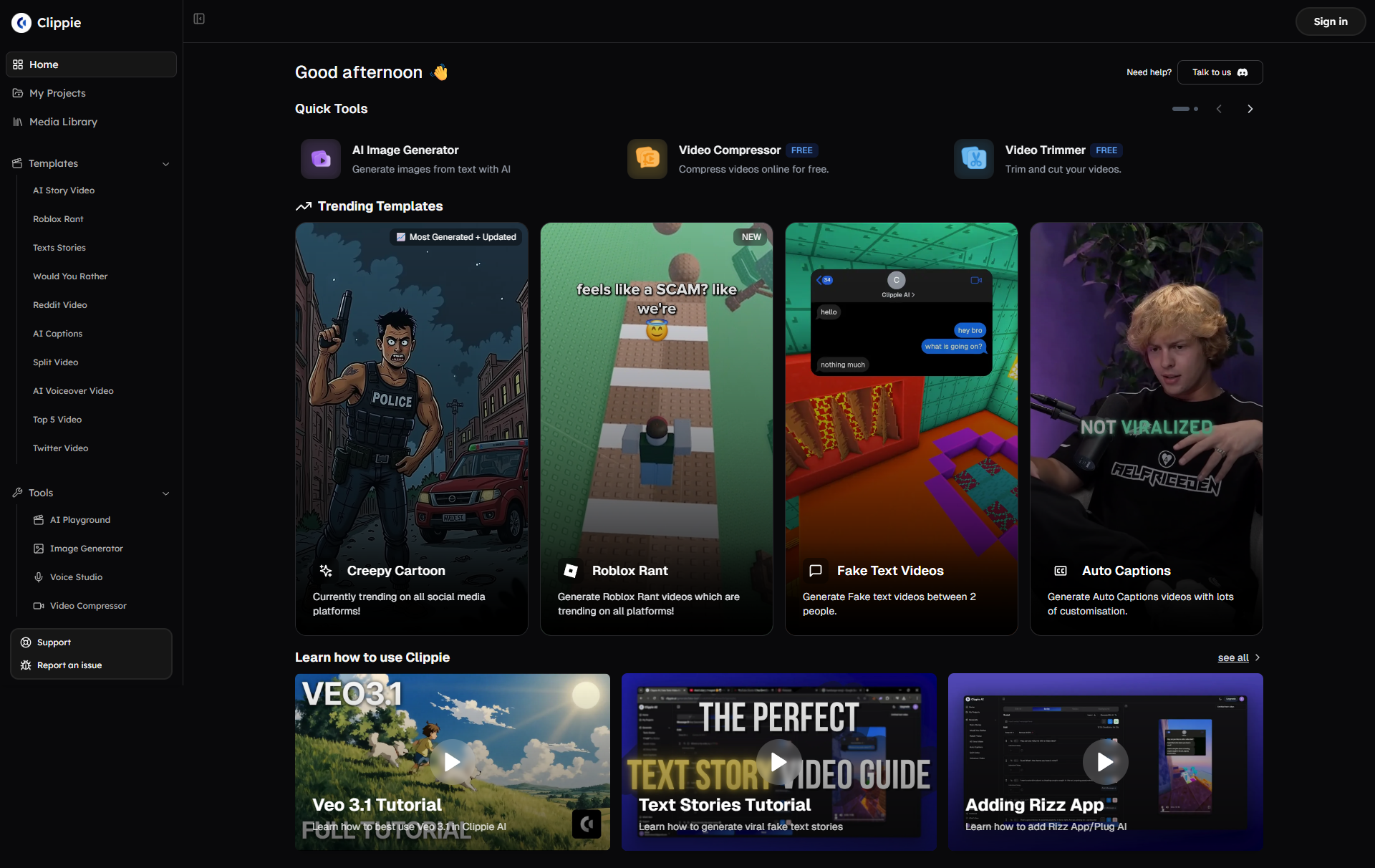
Clippie AI: The Comprehensive Production Platform
Clippie AI positions itself as end-to-end solution for complete video production workflow from initial concept through final platform-ready export.
The integrated workflow philosophy shapes Clippie's entire design around handling every production stage in single platform including AI-assisted script generation and content ideation, automated video assembly and editing, voice synthesis and narration with natural-sounding AI, caption generation and synchronization, B-roll and stock footage integration, music and sound design, platform-specific optimization and export, and thumbnail creation completing full production cycle. This integration eliminates the context-switching overhead and manual file management that plague multi-tool workflows where you're constantly exporting from one tool, importing to another, managing asset libraries across platforms, and dealing with compatibility issues between different systems.
The target audience Clippie serves includes solo faceless creators producing educational content, story videos, or tutorial material seeking efficient all-in-one solution, content agencies creating videos for multiple clients requiring systematic scalable workflows, educators and businesses producing training or marketing content needing professional results without design expertise, multi-channel operators managing several content properties simultaneously benefiting from workflow consistency, and creators transitioning from manual editing to AI-assisted production wanting accessible entry point. Clippie particularly suits creators who value convenience and efficiency over absolute customization control and prefer paying for comprehensive capability rather than assembling multiple specialized tools.
Core differentiating capabilities that distinguish Clippie include end-to-end automation where you can go from text script to final video in 5-15 minutes versus 45-90 minutes with multi-tool workflows, AI Story Video feature specifically designed for narrative content creating popular story video format with minimal input, batch processing enabling creation of multiple videos efficiently for high-volume production, comprehensive stock library integration providing footage and music without external asset sourcing, and platform optimization automatically formatting and optimizing for TikTok, YouTube, Instagram without manual configuration. These capabilities serve creators prioritizing production efficiency and volume over frame-by-frame creative control.
Platform maturity and development shows Clippie as actively evolving platform with regular feature updates expanding capabilities, growing user base providing community support and shared knowledge, responsive development team incorporating user feedback, and investment in AI improvements keeping pace with technological advances. The platform has moved from early-stage tool to mature production platform over 2024-2025, suggesting stability and ongoing support rather than risk of abandonment. However, being newer than some alternatives means certain advanced features may lag more established platforms in some specific areas while excelling in others.
The workflow efficiency value proposition centers on time savings as primary benefit where traditional manual editing might require 2-4 hours per video, multi-tool AI-assisted workflows typically require 45-90 minutes, and Clippie's integrated approach commonly achieves 10-20 minutes for comparable output. This 6-10x efficiency improvement enables dramatically higher content volume from same time investment or frees substantial time for strategy, engagement, and other business activities while maintaining competitive posting frequency. For creators valuing time over money, this efficiency justifies premium positioning.
VSub: The Caption-Centric Specialist
VSub approaches faceless content from opposite direction, specializing deeply in single critical capability rather than attempting comprehensive coverage.
The specialized caption focus defines VSub's entire identity around being absolute best caption generation and styling tool available with industry-leading accuracy typically 95-98% correct requiring minimal manual correction, extensive customization enabling precise control over caption appearance, animation and styling options creating dynamic engaging text, multi-language support serving international audiences, and viral caption templates replicating successful patterns from top-performing content. This specialization means VSub excels dramatically at its core function while requiring separate tools for other production needs like editing, voiceover, or asset management.
The target audience VSub serves includes creators who already have editing workflows but need caption improvement since many editing tools have mediocre captioning, short-form content creators focused on TikTok, Shorts, and Reels where captions are critical for sound-off viewing, creators emphasizing accessibility and inclusivity through high-quality captions, content repurposers adding captions to existing video libraries, and advanced users wanting maximum caption customization control who are comfortable using multiple specialized tools. VSub particularly suits creators who already film or edit their content and primarily need best-in-class caption solution rather than complete production overhaul.
Core differentiating capabilities that distinguish VSub include caption accuracy and quality that consistently outperforms general-purpose tools and even most specialized competitors, viral template library providing ready-to-use caption styles matching successful content, extensive customization enabling precise control over fonts, colors, positioning, animation, and timing, rapid iteration allowing quick testing of different caption approaches, and focus on short-form vertical video optimization for TikTok and similar platforms. These capabilities serve creators for whom captions are make-or-break element worth optimizing extensively rather than treating as afterthought.
Platform maturity and specialization reflects VSub's focused development approach with established tool that's refined its core capability extensively, deep expertise in caption technology and best practices, proven track record with substantial user base, and sustainable business model around specialized offering. The platform has achieved product-market fit in caption niche suggesting stability, though specialization means it will never match comprehensive platforms' breadth even as it exceeds them in specific area. The question for potential users is whether best-in-class captions justify using multiple tools versus accepting good-enough captions from all-in-one platforms.
The quality-over-convenience value proposition centers on superior results in specific area where caption quality directly impacts engagement since 60-70% of social video viewed without sound initially making captions critical, caption styling differentiates content in crowded feeds drawing attention, and accessibility improves reach and inclusivity expanding potential audience. For creators whose content lives or dies by caption quality, particularly personality-driven short-form content where captions carry substantial entertainment value, VSub's specialization justifies workflow complexity of multi-tool approach.
Fundamental Philosophical Difference
The core distinction between platforms reflects different approaches to optimization problem.
Clippie's integrated efficiency philosophy optimizes for total workflow time and complexity reduction valuing ability to produce complete professional videos in 10-20 minutes without touching multiple tools, believing that good-enough quality across all capabilities beats excellent quality in one area if latter requires multi-tool complexity, and serving creators who prioritize consistency and volume over optimization of individual elements. This philosophy suits creators building businesses around efficient content production rather than craft-focused artistic creation.
VSub's specialized excellence philosophy optimizes for maximum quality in specific critical capability believing that captions matter so much that best-in-class capability justifies multi-tool workflow complexity, assuming creators already have or will acquire separate editing, voice, and asset sourcing solutions, and serving creators who view their content as requiring optimization of each component rather than acceptable baseline across all components. This philosophy suits creators who already have production infrastructure and seek to upgrade specific bottleneck or quality constraint.
Neither approach is universally superior, the right choice depends entirely on your specific situation including whether you're starting from scratch (favoring integrated solutions) or have existing workflows (favoring specialized improvement), whether your content lives or dies by caption quality (favoring VSub) or depends equally on many elements (favoring Clippie), whether you optimize for production efficiency (Clippie) or individual video quality (VSub), and whether you prefer paying for comprehensive convenience (Clippie) or assembling best-in-class components (VSub plus other tools). Understanding this philosophical difference helps clarify which platform aligns with your values and priorities rather than making decision based solely on feature lists.
2. Feature Comparison: Editing, Captions & Automation
Detailed capability analysis across critical production functions.
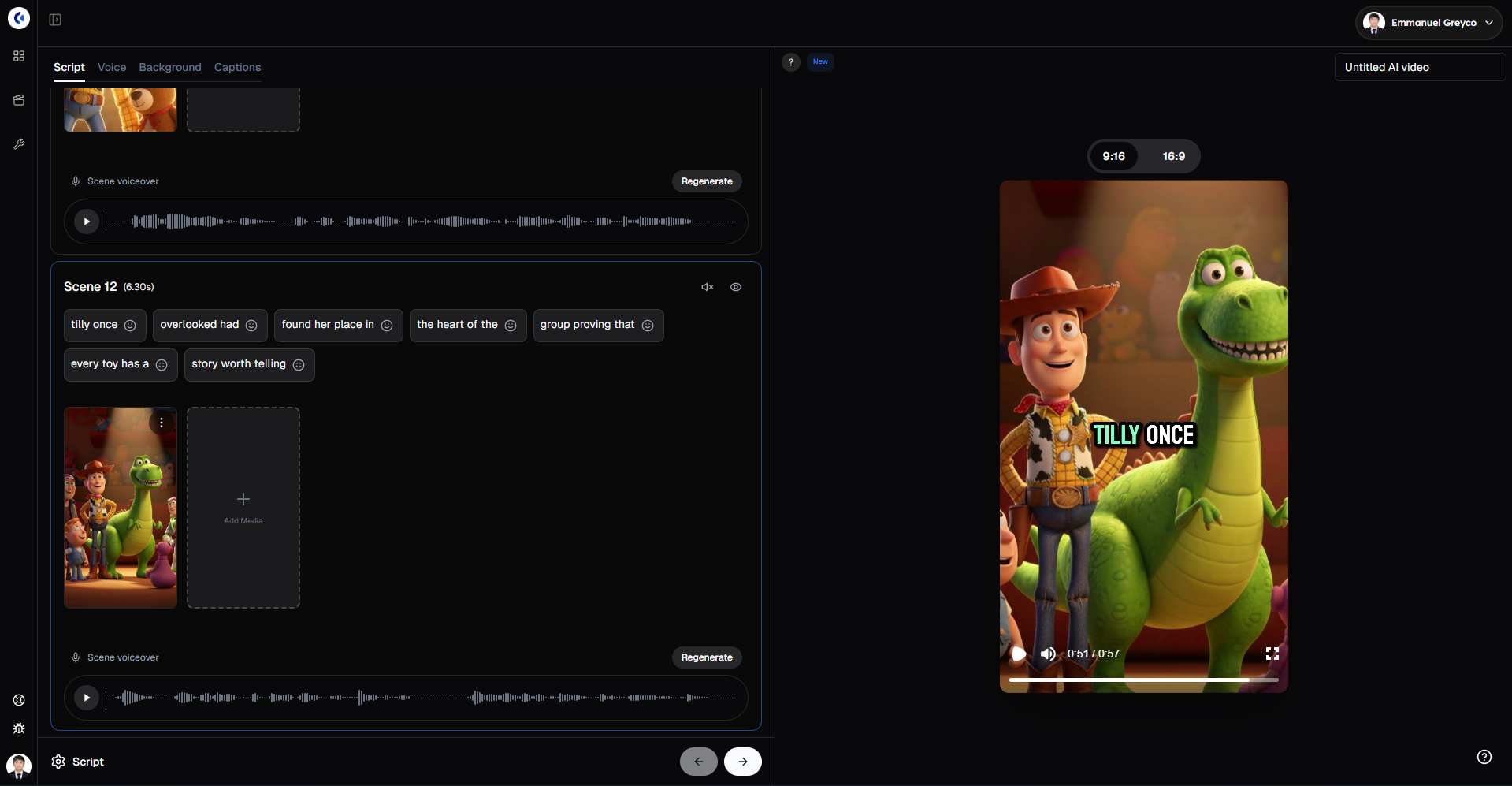
Editing Features and Automation Level
How each platform handles video assembly and editing automation.
Clippie's editing capabilities provide comprehensive automated production through AI-powered scene detection identifying logical cutting points in footage or scripts, automated cutting and trimming removing pauses, filler words, and unnecessary content, transition application adding professional transitions between scenes automatically, B-roll suggestion and integration analyzing content to place relevant supporting visuals, music selection and mixing choosing appropriate background audio and balancing levels, and pacing optimization ensuring appropriate rhythm and timing for platform and content type. The automation level is high, you can literally input script and let Clippie handle complete video assembly with minimal manual intervention. The trade-off is less frame-by-frame control than professional editing software, but dramatically faster results requiring no editing expertise.
VSub's editing approach provides minimal editing functionality as it's primarily post-production caption tool rather than editor, requiring you to provide already-edited video for caption addition, not handling video assembly, cutting, or effects, functioning as final polish layer rather than production tool, and assuming editing happens in separate tool (Adobe Premiere, CapCut, DaVinci Resolve, or another platform's editing feature). This specialization means VSub can't produce videos from scripts or raw footage, it enhances already-produced videos with superior captions. For creators needing editing, this requires either manual editing skills and tools or pairing VSub with separate editing solution.
Automation comparison reveals fundamental difference: Clippie automates 80-90% of production workflow from script to final video making it accessible to non-editors, while VSub automates 90-95% of caption creation specifically but requires manual handling of all other production steps. The relevant comparison depends on your starting point, if you need help with entire production process, Clippie's comprehensive automation is valuable. If you already edit competently and only need caption improvement, VSub's specialized automation suffices while delivering better caption results.
The workflow efficiency implications show dramatically different time investments where Clippie users producing educational or story content might spend 10-20 minutes total from concept to finished video, while VSub users might spend 30-60 minutes editing in separate tool plus 5-10 minutes adding captions in VSub for total of 35-70 minutes. However, if your content requires complex custom editing that Clippie can't automate well, manual editing plus VSub might produce better results than Clippie's automated approach. The efficiency advantage depends on content type, highly formulaic content benefits more from Clippie's automation while unique creative content might require manual editing VSub assumes.
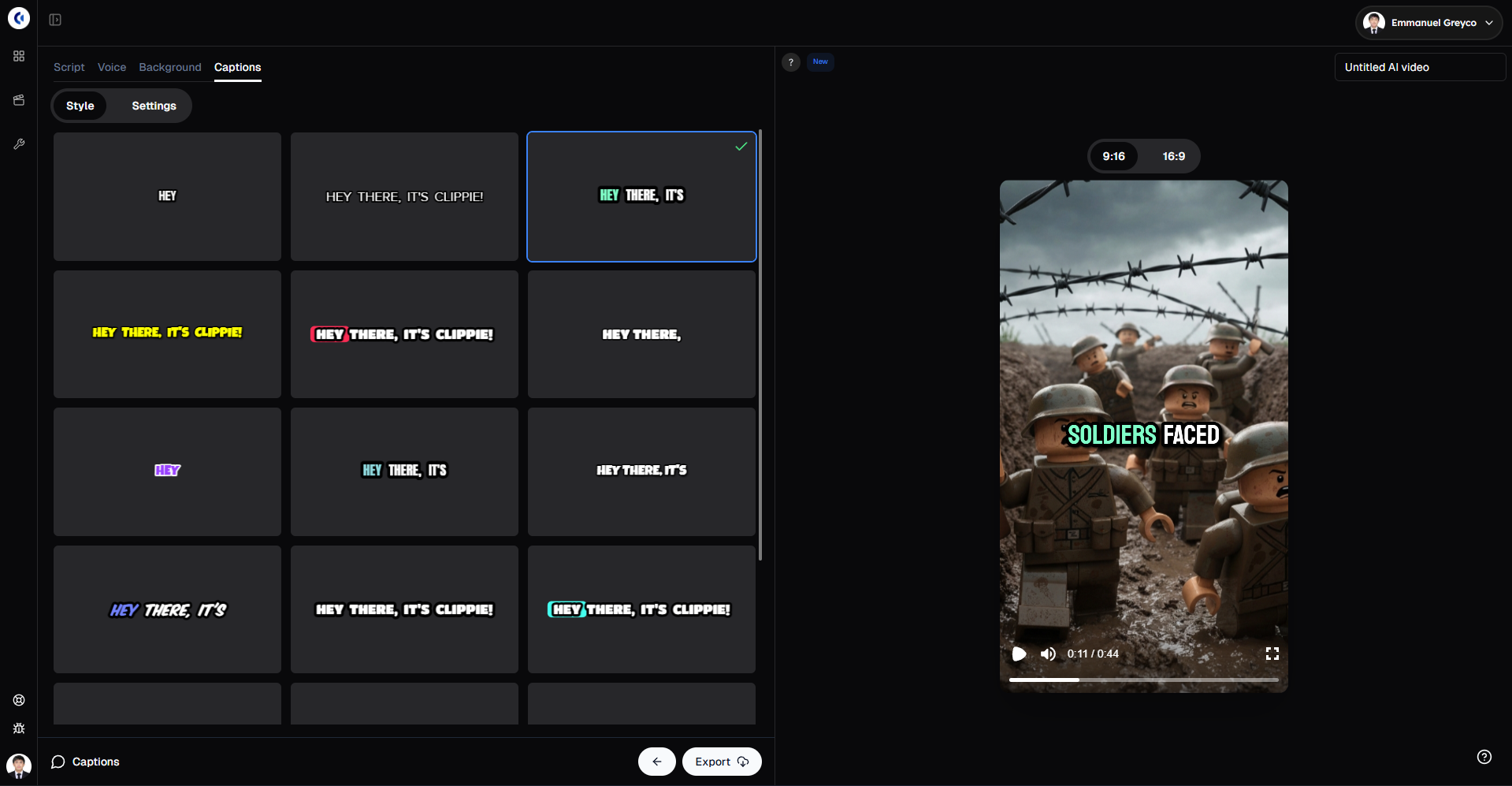
Caption Generation and Accuracy
The core capability where both platforms claim excellence.
Clippie's caption capabilities provide strong baseline functionality with 92-95% accuracy on clear audio requiring modest correction, automatic synchronization timing text to audio precisely, basic styling options covering essential formatting needs, platform-appropriate formatting for TikTok, YouTube, Instagram, and multilingual support for international content. Clippie's captions meet professional standard enabling accessible sound-off viewing without requiring extensive manual work. The caption functionality is good, substantially better than manual captioning and comparable to other AI caption tools, but not the absolute best available since Clippie optimizes for integrated workflow rather than caption specialization.
VSub's caption capabilities represent industry-leading specialized performance with 95-98% accuracy even on challenging audio requiring minimal correction, sophisticated timing controls enabling precise synchronization, extensive styling and animation options with dozens of customizable parameters, viral template library providing proven caption styles from successful content, word-by-word emphasis and highlighting drawing attention to key terms, custom font support enabling brand-specific typography, advanced positioning avoiding faces or important visual elements, and animation presets creating dynamic engaging text appearance. VSub's captions consistently outperform general-purpose tools in both accuracy and aesthetic quality, this is why the platform exists and what justifies its specialized focus.
The practical accuracy difference of 2-4 percentage points might seem minor but compounds across hundreds of videos and particularly matters for challenging audio with accents, technical terminology, multiple speakers, or background noise where Clippie might achieve 88-92% accuracy while VSub maintains 94-97% accuracy. The correction time saved adds up, even 5 minutes saved per video through better accuracy equals 10+ hours monthly for creators producing 3 videos daily. For high-volume creators, accuracy differences directly impact production economics and workflow sustainability.
The styling and customization gap is more substantial than accuracy differences where Clippie provides 5-10 preset caption styles adequate for most content, while VSub provides 50+ templates plus nearly unlimited customization creating distinctive branded captions or perfectly matching trending viral styles. For creators where caption styling is critical brand element or entertainment value (personality-driven content, entertainment channels, lifestyle content), VSub's advanced styling justifies its focused approach. For educational or informational content where captions serve primarily functional accessibility role, Clippie's simpler options likely suffice.
The viral template value VSub offers addresses specific creator need for replicating successful caption patterns from trending content. VSub's team analyzes viral videos identifying caption patterns that perform well, creates templates matching those styles, and updates library regularly as trends evolve. This insight into what's working right now provides competitive advantage for short-form creators chasing trends. Clippie provides general platform-appropriate formatting but doesn't focus on trend-chasing viral replication, acceptable for evergreen content, potential disadvantage for trend-dependent entertainment content.
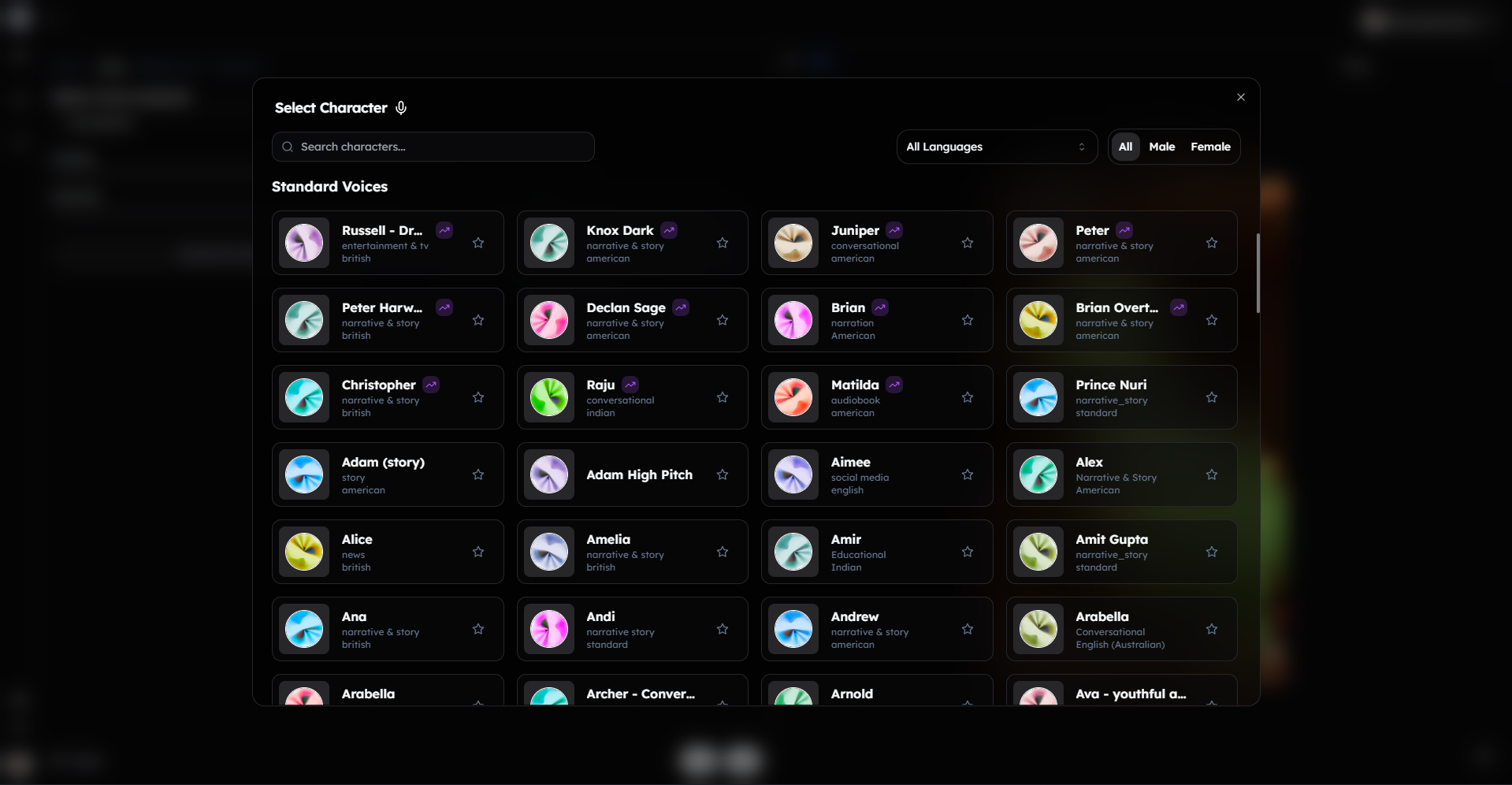
Voice and Narration Options
How each platform handles AI voice synthesis for faceless content.
Clippie's voice capabilities integrate natural-sounding AI voices directly into production workflow with diverse voice library including various genders, accents, and characteristics, voice customization allowing adjustments to speed, pitch, and emphasis, integrated text-to-speech generating narration from scripts without external tools, character consistency maintaining same voice across video series, and emotional range providing appropriate tone for different content types. Clippie's voices are good, professional quality suitable for most content types using modern neural TTS technology producing natural-sounding results. The integration advantage means narration happens seamlessly within video production rather than requiring separate generation, download, and import.
VSub's voice approach provides limited or no native voice synthesis as it's primarily caption tool rather than full production platform, typically requiring you to generate narration separately using dedicated voice tools (Eleven Labs, Murf, Play.ht, or others), then import audio to your video before adding VSub captions. This separation means you're using potentially higher-quality specialized voice tools but dealing with multi-tool workflow complexity. The assumption is creators serious enough about voice quality to use VSub are already using specialized voice tools or recording their own audio rather than relying on integrated basic solutions.
The voice quality comparison is difficult since they serve different use cases, Clippie competes with other integrated production platforms (Descript, Pictory) where bundled voice quality is comparable or slightly better, while VSub assumes you're using dedicated voice specialists where Eleven Labs or Murf exceed Clippie's bundled voices in naturalness and emotional range. The relevant comparison depends on your voice quality requirements, if Clippie's integrated voices meet your needs, the workflow convenience is valuable. If you require absolute best voice quality, you'd use external tools regardless of platform choice making VSub's lack of voice capability irrelevant.
The workflow efficiency trade-off shows integrated voice as significant time-saver where Clippie users go from script to narrated video in single workflow without file exports, imports, or synchronization, while VSub users must generate voice separately, export audio file, import to editor, synchronize with visuals, then add captions, adding 10-15 minutes of workflow overhead and multiple potential failure points. For creators producing high volumes, this efficiency matters substantially. For creators producing occasional higher-quality content, extra time investment might be worthwhile for superior voice results.
Visual Customization and Styling
How much control each platform provides over final video appearance.
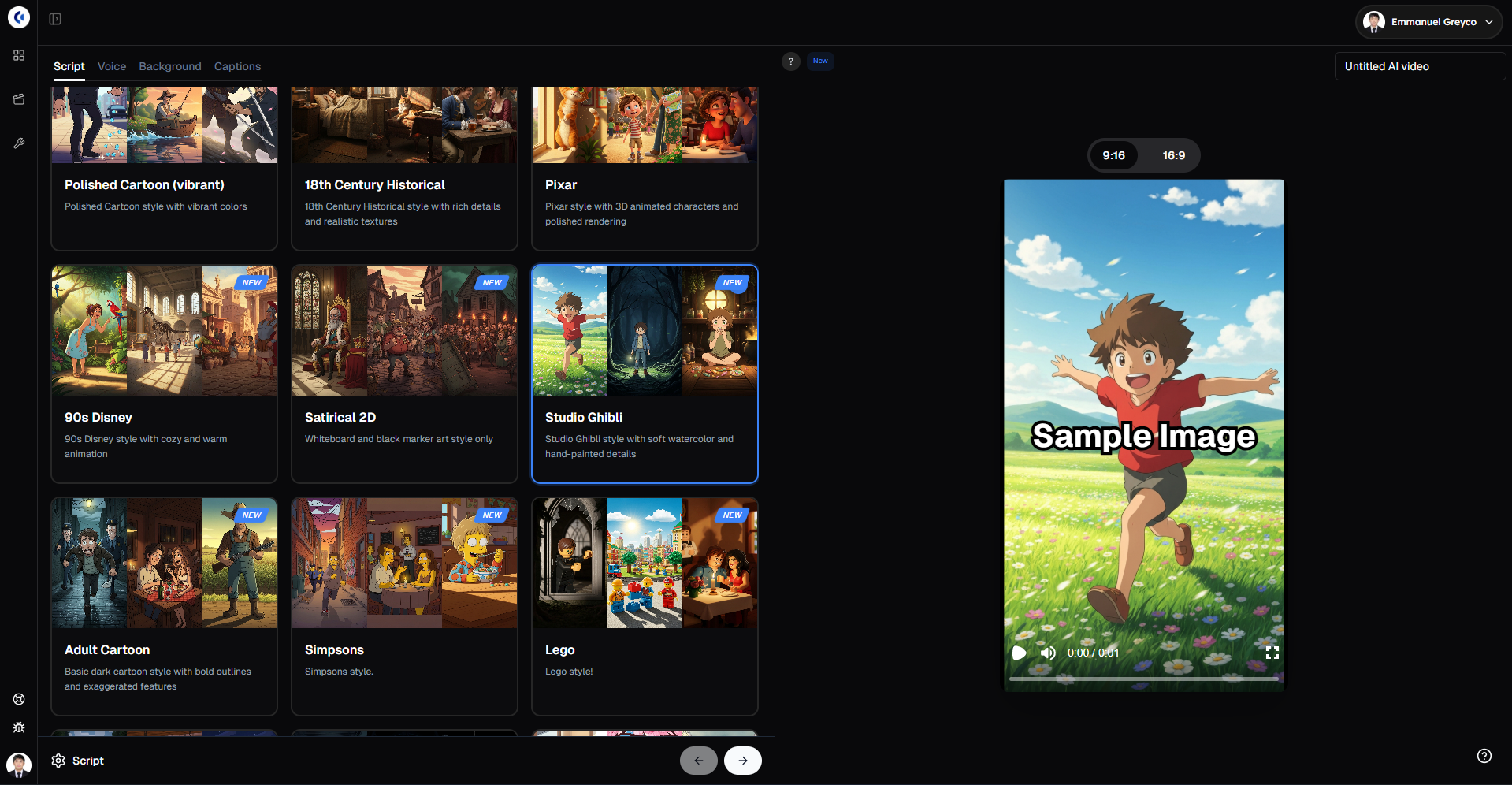
Clippie's visual customization offers balanced approach between convenience and control through art style selection for AI-generated story videos (anime, realistic, cinematic, cartoon styles), template-based designs providing professional starting points, brand kit integration maintaining consistent colors, fonts, and styling, B-roll and transition options choosing from available styles, and thumbnail generation creating platform-appropriate promotional imagery. The customization level suits creators wanting professional results without extensive design work, more control than fully automated tools, less than professional editing software. The templates and presets enable efficient production while maintaining adequate creative expression for most content types.
VSub's visual focus centers entirely on caption appearance and positioning with limited control over underlying video since it's caption layer not editing tool, extensive caption styling including fonts, colors, backgrounds, effects, positioning, and animation, but no editing of video content itself requiring that work elsewhere, and assumption that visual creativity happens in editing phase with VSub adding caption polish. The platform excels at making captions visually distinctive but doesn't attempt to compete in broader visual design or editing functionality.
The creative control spectrum positions these platforms differently where Clippie serves creators wanting reasonable creative control without complexity (60% automation, 40% customization), VSub serves creators wanting maximum caption control while handling other elements elsewhere (95% caption control, other elements in different tools), and professional editing software serves creators wanting maximum control everywhere accepting substantial complexity and time investment (20% automation, 80% manual control). Understanding where you fall on efficiency-versus-control spectrum helps identify appropriate tool.
The brand consistency consideration favors integrated platforms for systematic branding as Clippie maintains consistent styling across all video elements (captions, graphics, colors, transitions) through brand kit applied to entire production, while multi-tool workflows require manually maintaining consistency across separate tools for voice, editing, captions, and graphics creating more opportunities for inconsistency. For creators building recognizable brand through consistent visual identity, integrated platforms simplify brand maintenance substantially.
Workflow Integration and Efficiency
How each platform fits into complete production workflow and affects total production time.
Clippie's end-to-end workflow optimizes total production time through single-platform handling of all steps from ideation to export, minimal context switching preventing cognitive overhead, no file management between tools eliminating error-prone imports and exports, automated asset organization maintaining project structure, and batch processing enabling creation of multiple videos in sequence. The integrated approach commonly achieves 10-20 minute production times for typical educational or story content compared to 45-90 minutes with multi-tool workflows, a 4-6x efficiency improvement. The time savings compound across high-volume production enabling daily or multiple-daily posting that multi-tool workflows struggle to sustain.
VSub's specialized workflow assumes existing production infrastructure where editing, voiceover, and asset sourcing happen in separate tools (requiring expertise in those tools), VSub handles only caption addition typically taking 5-10 minutes per video, total workflow time depends on other tools used with manual editing adding 30-60 minutes plus voice generation adding 10-15 minutes for total 45-75 minutes including VSub, and complexity requires managing multiple tool subscriptions, file transfers, and compatibility. The specialized approach makes sense only if you're already competent with editing tools and specifically need caption improvement or if your content requires custom editing that automated tools can't handle adequately.
The scalability implications differ substantially where Clippie's integrated workflow scales efficiently enabling one person to produce 5-15 videos daily sustainably, while multi-tool workflows including VSub typically scale to 2-5 videos daily before time investment becomes unsustainable requiring hiring editors or accepting lower volume. For creators prioritizing growth through volume and consistency, Clippie's scalability advantage often outweighs VSub's quality advantages. For creators prioritizing individual video quality over volume, multi-tool approaches including VSub remain viable accepting lower production capacity.
The learning curve consideration affects time-to-productivity where Clippie requires learning single platform with relatively intuitive interface achieving first videos within 1-2 hours, while VSub plus supporting tools requires learning editing software (20-40 hour investment for competency), voice generation tools (2-4 hours), asset sourcing (5-10 hours), and VSub itself (1-2 hours) for total 30-60 hour learning investment before achieving efficient production. For creators with existing production expertise, VSub adds minimal learning burden. For creators starting from scratch, Clippie's integrated simplicity provides much faster path to consistent production.
3. Pricing Breakdown and Creator Value
Economic analysis revealing true costs and value propositions for different creator scenarios.
Clippie AI Pricing Structure
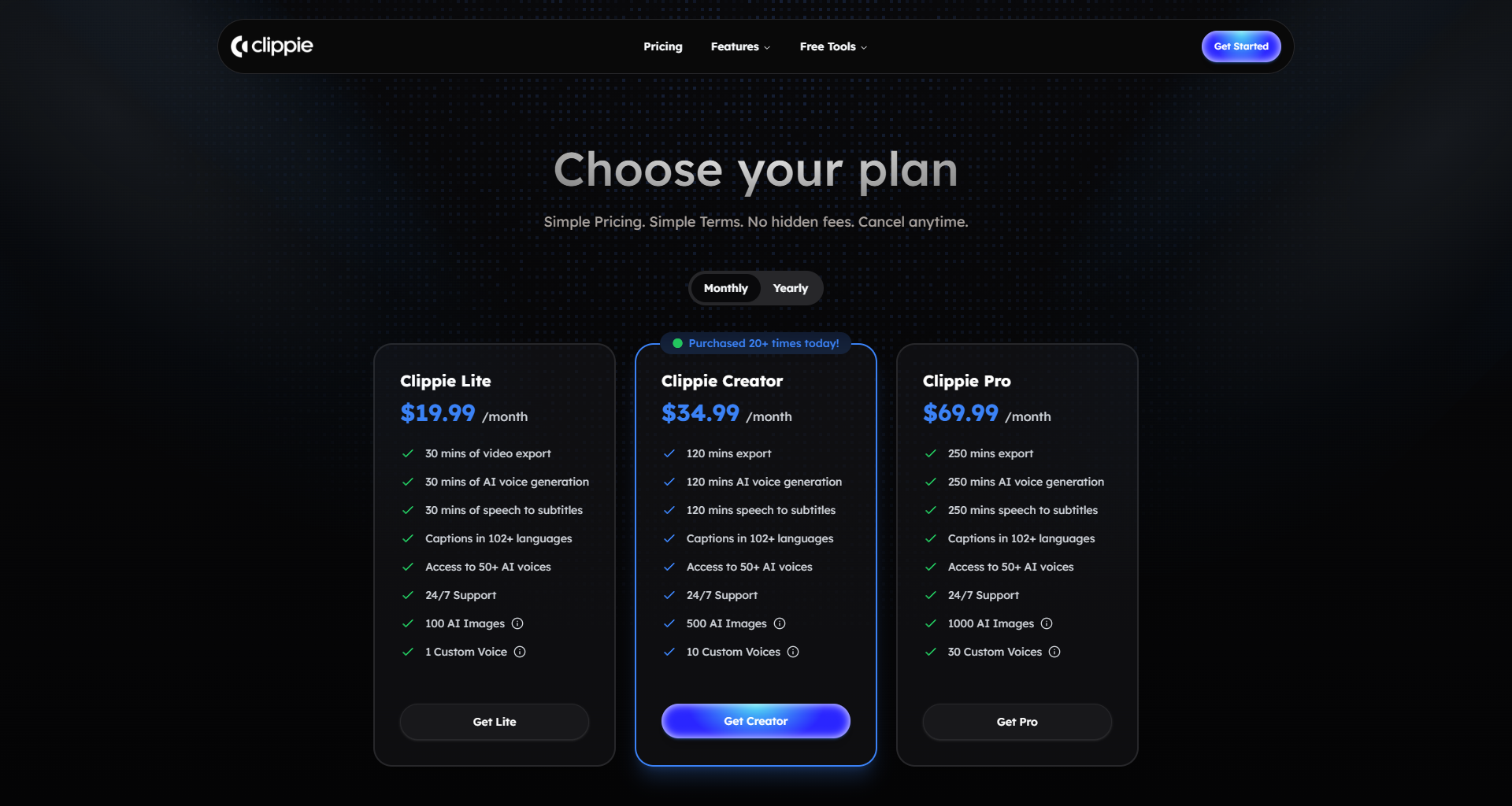
Clippie's pricing reflects its comprehensive integrated platform approach.
Free tier capabilities and limitations typically include limited video exports monthly (commonly 2-5 videos), watermarked output requiring upgrade for clean professional videos, reduced feature access with advanced capabilities restricted to paid tiers, lower priority processing with longer generation times, and limited or no access to premium stock assets. The free tier enables testing platform and evaluating fit before financial commitment but isn't viable for serious ongoing production requiring professional output. Most creators use free tier briefly for evaluation then upgrade if platform suits needs.
Paid subscription tiers typically range from starter plans ($20-50 monthly) providing unlimited or high-volume video creation without watermarks, access to all basic features including voices, captions, and templates, faster processing priority, and email support; to professional plans ($50-100 monthly) adding advanced features like custom branding, priority support, batch processing, and premium stock access; to business/enterprise plans ($100-300+ monthly) providing team collaboration, API access, white-label options, dedicated support, and custom feature development. The specific pricing and features evolve as platform develops but general structure serves different creator scales from individual to agency.
Cost per video analysis for active creators shows at $50 monthly producing 20 videos = $2.50 per video, at $100 monthly producing 40 videos = $2.50 per video, and at $100 monthly producing 10 videos = $10 per video. The cost-per-video decreases dramatically with volume making Clippie particularly economical for high-volume creators while potentially expensive for occasional users producing only 2-5 videos monthly. The value calculation should include time savings worth $25-50 per hour saved, if Clippie saves 2 hours per video versus manual production, the time value is $50-100 per video far exceeding subscription cost.
The all-in-one value proposition provides economic advantage through eliminating need for separate subscriptions to editing software ($20-50 monthly), voice generation tools ($20-50 monthly), stock footage services ($15-50 monthly), music libraries ($10-30 monthly), and specialized caption tools ($10-30 monthly) which could total $75-210 monthly. A $50-100 Clippie subscription replacing multiple specialized tools provides substantial savings beyond just subscription cost through reduced learning burden, eliminated workflow complexity, and time efficiency gains. The consolidated approach simplifies both budgeting and production.
The upgrade and downgrade flexibility allows adjusting subscription based on production volume where you can upgrade during high-production periods (launching channel, campaign push), downgrade during lower-activity periods to manage costs, typically cancel without penalty offering financial flexibility, and often grandfather legacy pricing for long-term customers. This flexibility reduces financial commitment risk making platform worth testing even if unsure about long-term needs.
VSub Pricing Structure
VSub's pricing reflects its specialized tool positioning.
Free tier capabilities if available typically provide very limited video exports (1-3 monthly), watermarked captions requiring upgrade for professional use, basic caption styles with premium templates restricted to paid users, and standard processing speed. Like Clippie, VSub's free tier serves evaluation purposes rather than sustainable production, creators commit to paid tier if tool proves valuable.
Paid subscription tiers typically range from basic plans ($10-20 monthly) providing unlimited caption generation without watermarks, access to viral templates, standard styling options, and standard support; to premium plans ($20-40 monthly) adding advanced customization, priority processing, API access, and premium support; to team/enterprise plans ($50-100+ monthly) enabling collaboration, bulk processing, and custom development. VSub's specialized focus enables lower baseline pricing than comprehensive platforms since it's solving narrower problem.
Cost per video analysis shows at $20 monthly producing 20 videos = $1 per video for captions, though total production cost includes separate editing tool ($30-50 monthly), voice tool ($20-50 monthly if using AI voices), and stock/music ($20-50 monthly if needed) for potential total of $90-170 monthly or $4.50-8.50 per video at 20 videos monthly. The caption cost alone is lower than Clippie, but total multi-tool stack often exceeds Clippie's all-in-one pricing. The economics favor VSub primarily if you already own other tools through existing workflows or free alternatives.
The specialized tool value calculation must account for full workflow cost where VSub at $20 plus CapCut free editing plus Eleven Labs at $22 totals $42 monthly, potentially cheaper than Clippie at $50 but requiring managing multiple tools, learning three separate platforms, and accepting workflow complexity. The economical choice depends heavily on what alternatives you use for non-caption functions, if using free editing tools, VSub can be cheaper. If paying for editing software, total cost often exceeds Clippie while providing less workflow integration.
The caption quality premium question is whether superior captions justify higher total cost or workflow complexity. For creators where caption quality is make-or-break factor (short-form personality content, entertainment channels), paying premium or accepting workflow complexity for best captions makes business sense. For creators where captions serve primarily functional accessibility role (educational content, tutorials), Clippie's good-enough integrated captions likely provide better overall value than optimizing caption quality at expense of workflow efficiency.
ROI Analysis for Different Creator Scenarios
Examining when each platform's investment pays for itself through time savings or improved results.
The beginner creator scenario (0-1K subscribers, early monetization stage) shows Clippie providing better ROI through dramatically lowering barrier to consistent production enabling building content library and subscriber base, requiring minimal learning investment allowing focus on content strategy and consistency, providing professional-looking output despite zero editing experience, and reasonable cost ($50 monthly) being affordable while pre-monetization. For beginners, Clippie's all-in-one simplicity often determines whether they achieve sustainable posting consistency versus giving up overwhelmed by production complexity. VSub requires too many supporting tools and skills for most beginners to adopt successfully.
The growing creator scenario (1K-50K subscribers, early monetization revenue) shows economics tilting toward Clippie for volume-focused channels producing daily or more content where time efficiency directly enables monetization-level posting frequency, workflow simplicity prevents burnout enabling sustainable growth, and growing revenue ($200-1,000 monthly) easily justifies tool cost. However, VSub becomes viable for creators with existing editing skills if superior captions provide meaningful engagement or retention improvements worth workflow complexity. The decision hinges on whether you're optimizing for volume (Clippie) or individual video quality (VSub plus supporting tools).
The established creator scenario (50K-250K subscribers, substantial revenue) shows both platforms potentially justifiable as $50-100 monthly is negligible expense relative to $2,000-10,000 monthly revenue, and decision becomes purely about workflow preference and optimization goals. Established creators might use Clippie for bulk content production plus VSub for premium flagship content, hire editors handling production while they focus on strategy, or continue with whichever workflow currently works accepting opportunity cost of not optimizing. At this scale, tool cost matters less than production efficiency and quality impact on revenue.
The agency or multi-channel scenario (serving clients or operating multiple channels) shows Clippie's scalability and workflow consistency providing major advantages through enabling systematic production across multiple clients or channels, reducing training burden for team members, simplifying project management with single platform, and providing consistent quality and branding. Agencies operating efficiently commonly produce 50-200+ videos monthly where Clippie's per-video cost is negligible and workflow efficiency is paramount. VSub's specialized approach works poorly for agencies needing comprehensive production capability rather than caption service alone.
The opportunity cost consideration often exceeds direct tool costs where 2 hours saved per video at $30 per hour value equals $60 saved, exceeding monthly tool cost after just 1 video monthly. If Clippie saves 10 hours weekly versus manual production, that's 40 hours monthly worth $1,200+ in time value for $50-100 subscription, a 12x return on investment. This opportunity cost framework suggests that efficiency tools dramatically under-priced relative to value for creators who would otherwise produce manually or not at all. The relevant question isn't whether tools cost more than free alternatives but whether time savings or quality improvements exceed subscription costs, they typically do overwhelmingly for active creators.

4. Performance on TikTok, YouTube & Instagram
Platform-specific performance analysis revealing how each tool's outputs perform algorithmically and with audiences.
TikTok Optimization and Performance
TikTok represents critical platform for faceless content with specific format requirements and algorithmic preferences.
Clippie's TikTok optimization provides platform-appropriate output through automatic 9:16 vertical formatting optimal for TikTok's full-screen mobile viewing, duration optimization ensuring videos fit platform's preferred length ranges, caption styling matching TikTok's native caption aesthetic and positioning, hook optimization front-loading engaging content in first 1-3 seconds, and trend awareness incorporating popular formats and styles. Clippie's TikTok exports work well technically and stylistically, producing videos that feel native to platform rather than obviously imported from elsewhere. The automated optimization prevents common technical mistakes like wrong aspect ratios or caption positioning that suggest creator unfamiliarity with platform.
VSub's TikTok specialization focuses specifically on short-form vertical video where platform was designed primarily for TikTok and similar platforms, caption templates explicitly modeled on viral TikTok content, styling options matching current trending caption aesthetics, and positioning awareness avoiding TikTok's UI elements. VSub's TikTok captions often look more polished and trend-aligned than Clippie's because VSub's team actively monitors and replicates trending styles while Clippie focuses on general platform appropriateness. For creators chasing TikTok trends aggressively, VSub's trend-awareness provides competitive edge.
The performance data comparison is challenging since variables beyond tools affect performance including content quality and hooks being primary performance driver (poor content performs poorly regardless of tool), creator's existing audience and algorithmic standing affecting distribution, and caption quality impact varying by content type (personality content benefits more from styled captions than educational content). Anecdotal reports suggest both tools produce TikTok content performing comparably when content quality is controlled, the tools don't create algorithmic advantages themselves but enable efficient production of technically optimized content. The performance differences come from creator execution quality rather than tool choice.
The workflow efficiency for TikTok volume favors Clippie for creators pursuing TikTok's high-volume posting strategy where posting 1-3 times daily provides algorithmic advantages, Clippie's 10-15 minute production time enables this volume sustainably, while VSub plus manual editing requires 40-60 minutes making multiple-daily posting difficult, and workflow sustainability often determines actual posting frequency regardless of intentions. For creators able to maintain consistent 2-3 daily posting through Clippie's efficiency versus inconsistent 3-5 weekly posting with more complex workflows, the volume advantage often outweighs any caption quality differences.
The trend responsiveness factor where TikTok success often requires rapid response to emerging trends (sounds, formats, topics) favors whichever workflow enables fastest production. Clippie's integrated speed often enables creating trend-response content within hours of trend emerging, while multi-tool workflows might require days to produce polished content by which time trend has moved on. The first-mover advantage on trends can outweigh production quality for time-sensitive content, acceptable quality posted quickly often outperforms excellent quality posted late.
YouTube Shorts and Traditional Video Support
YouTube represents different challenges requiring both short-form Shorts and potentially longer traditional content.
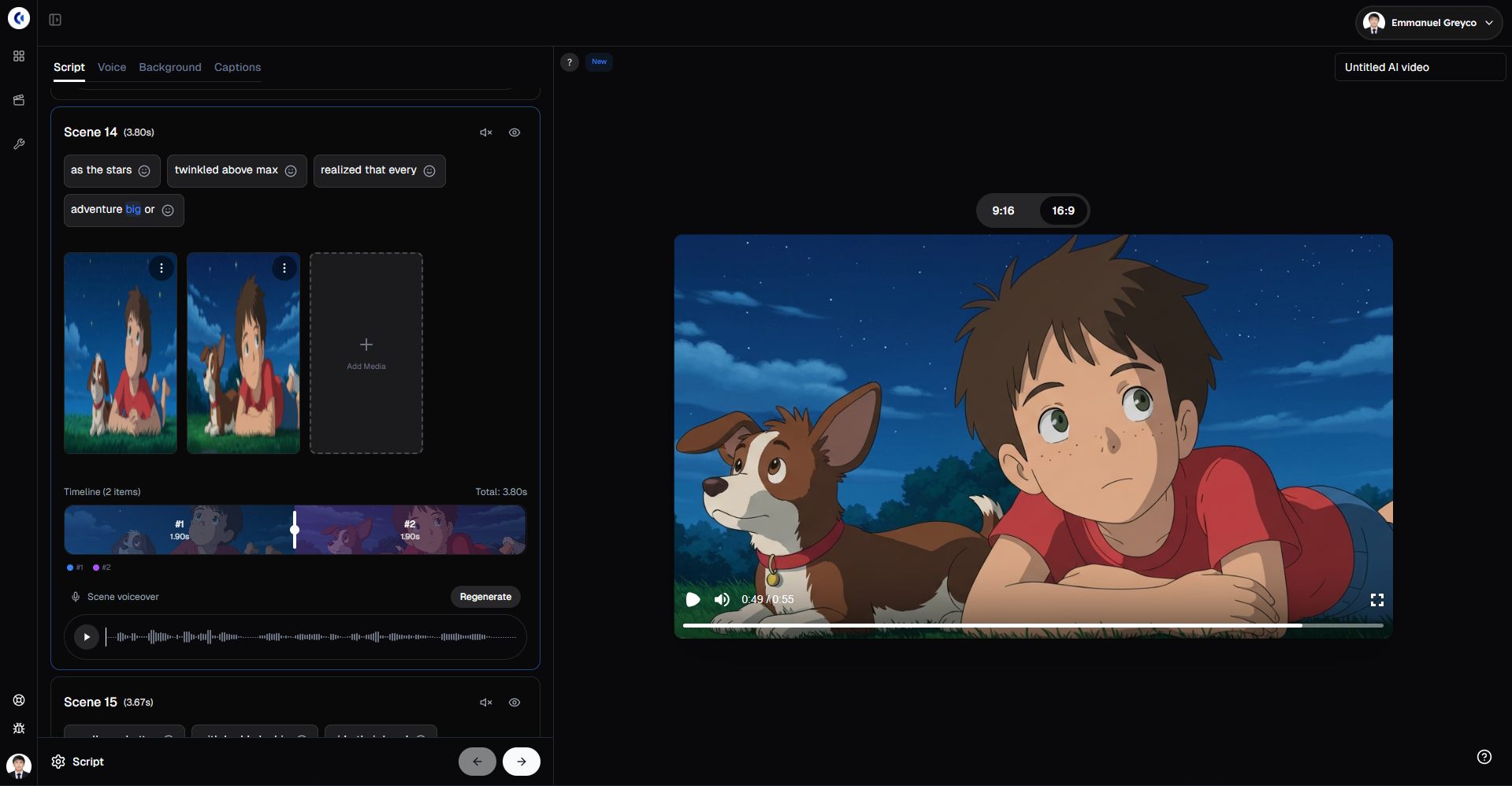
Clippie's YouTube optimization handles both formats comprehensively with Shorts (vertical 9:16) formatted identically to TikTok enabling efficient cross-posting, traditional videos (16:9 horizontal) supported for educational or long-form content, duration flexibility supporting 60-second Shorts or 5-15 minute traditional videos, and optimization including appropriate captions, pacing, and formatting for each format. Clippie enables efficient production for both YouTube content types from same script or source material, create short vertical version for Shorts and longer horizontal version for traditional channel without duplicating production effort.
VSub's YouTube applicability works for both formats but with platform assumptions favoring short-form where Shorts captioning is primary use case and focus, traditional video captioning is supported but less emphasized, and assumption of separate editing for traditional content requiring more complex production. VSub serves YouTube creators primarily focused on Shorts with occasional traditional content rather than traditional-video-primary creators venturing into Shorts.
The traditional video content consideration shows Clippie's advantages for creators producing educational or tutorial content as traditional 8-15 minute YouTube videos remain highly valuable for monetization and SEO, Clippie efficiently produces both short clips and comprehensive long-form from same material, and integrated workflow handles traditional format complexity (chapters, B-roll, pacing) better than tools optimized for short-form. VSub plus editing tools can produce excellent traditional content but workflow complexity increases substantially with longer content making Clippie's automation more valuable for comprehensive YouTube strategies.
The cross-format efficiency enables sophisticated strategy where create comprehensive traditional video on topic using Clippie (15-20 minutes), extract 8-10 short vertical clips from same content (additional 20-30 minutes), and distribute strategically across Shorts, TikTok, and Reels maximizing value from single content creation effort. This cross-format leverage is much harder with specialized tools requiring essentially separate production workflows for different formats.
Instagram Reels Compatibility and Performance
Instagram's Reels format brings unique considerations for faceless content.
Clippie's Instagram optimization provides appropriate formatting with vertical 9:16 output matching Instagram's full-screen format, aesthetic awareness producing visually polished content suiting Instagram's style-conscious culture, caption positioning avoiding Instagram's UI elements, and music integration supporting Instagram's audio-driven discovery. Clippie's Instagram Reels work well though platform is less critical for many faceless creators compared to TikTok or YouTube.
VSub's Instagram styling emphasizes visual polish where Instagram's aesthetic expectations are higher than TikTok requiring more refined caption appearance, templates include Instagram-appropriate minimal clean styles, and positioning awareness prevents covering important visual elements. VSub's captions often look more "Instagram-appropriate" than other tools' captions, more refined and less aggressively styled than TikTok trending captions.
The audience consideration on Instagram shows platform typically attracts slightly older demographic (25-40 primary versus TikTok's 16-30), visual aesthetic quality matters more than other platforms, personality and lifestyle content performs better than pure educational content, and growth often slower but audience more valuable for certain monetization (coaching, high-ticket products, brand partnerships). For creators targeting Instagram specifically, additional polish might justify VSub's specialized approach despite workflow complexity.
The multi-platform distribution efficiency remains key decision factor where most successful faceless creators distribute across all three platforms (TikTok, YouTube Shorts, Instagram Reels) to maximize reach, requiring either efficient single-tool production (Clippie) or accepting substantial workflow overhead (multi-tool approach), and 3x platform distribution potentially means 3x workflow time with specialized tools while Clippie produces optimized versions for all three from single creation. The cross-platform leverage strongly favors integrated platforms for creators pursuing multi-platform strategies.
Platform Performance Summary and Recommendations
For TikTok-focused creators: Both tools work well technically; VSub provides edge in caption trendy-ness while Clippie provides workflow efficiency enabling higher volume. Decision hinges on whether you're optimizing for individual video quality (VSub) or posting volume and consistency (Clippie).
For YouTube-focused creators: Clippie provides substantial advantages through handling both Shorts and traditional video efficiently, enabling sophisticated cross-format strategies, and supporting comprehensive video production traditional content requires. VSub works for Shorts-only strategies but less optimal for creators wanting traditional YouTube presence.
For Instagram-focused creators: VSub's aesthetic polish provides marginal advantage on style-conscious platform, but Clippie's efficiency enables consistent posting overcoming Instagram's slower growth. Neither tool provides dramatic platform-specific advantage on Instagram, both work adequately.
For multi-platform creators: Clippie's cross-platform efficiency provides overwhelming advantages through producing optimized versions for all platforms from single workflow, enabling sustainable multi-platform posting consistency, and preventing burnout from managing multiple specialized tools. Multi-platform strategies heavily favor integrated comprehensive platforms over specialized tools.

5. Final Verdict: Who Is Each Tool Best For?
Synthesizing analysis into actionable recommendations for different creator scenarios.
When Clippie AI Is the Better Choice
Specific situations where Clippie's integrated approach provides optimal value.
Beginners and new creators starting faceless content journeys benefit enormously from Clippie's accessibility where zero editing experience required to produce professional results, single platform learning curve versus multiple tools, affordable entry point ($50 monthly) for comprehensive capability, and fast time-to-first-video (hours not weeks) enabling immediate content production. For aspiring creators overwhelmed by production complexity, Clippie often determines whether they launch successfully or abandon before creating first videos.
High-volume content creators producing daily or multiple-daily content find Clippie essential for sustainability through 10-15 minute production time per video enabling consistent high-frequency posting, workflow efficiency preventing burnout maintaining production over months and years, systematic repeatable process enabling batching and scheduling, and scalability supporting growth from 3 weekly videos to 15+ without proportional time increases. Volume-focused strategies are nearly impossible to sustain without efficient integrated tools.
Solo creators managing complete production independently without team support benefit from Clippie's comprehensive coverage through handling all production aspects in single platform, eliminating need for specialized expertise in editing, voice, design, and minimizing decision fatigue and context switching overhead. Solo creators have finite attention and energy, spending it on content strategy and audience building rather than tool management provides better business returns.
Multi-platform content strategies distributing across TikTok, YouTube, and Instagram require Clippie's cross-platform efficiency creating platform-optimized versions from single content creation, enabling sustainable multi-platform presence despite solo operation, and preventing workflow complexity from limiting distribution strategy. Multi-platform presence is increasingly important for creator business resilience, Clippie enables this without requiring team.
Agencies and multi-channel operators serving clients or managing multiple content properties find Clippie's systematic approach invaluable through consistent workflow across all clients and properties, simplified training for team members joining production, efficient project management with single tool stack, and predictable cost and time budgets enabling accurate client quotes. Agencies need systematic scalable workflows more than customization for each client.
Educational and tutorial content creators explaining concepts or processes benefit from Clippie's features through screen recording integration capturing demonstrations, automated B-roll placement illustrating concepts, natural voice narration maintaining engagement, and efficient production enabling comprehensive content libraries. Educational content often benefits more from comprehensive coverage and posting consistency than individual video optimization, Clippie's efficiency enables building substantial educational resources.
Creators prioritizing efficiency over perfection who view content as business requiring systematic production find Clippie's philosophy aligned with their approach valuing good-enough quality at high volume over perfect quality at low volume, accepting reasonable automated results over time-intensive custom work, and focusing creative energy on content strategy not production perfectionism. For creators building businesses around content, efficient production often delivers better ROI than optimizing individual videos.
When VSub Is the Better Choice
Specific situations where VSub's specialized excellence justifies workflow complexity.
Experienced editors with existing production workflows only needing caption improvement benefit from VSub's specialization where you already edit competently in Adobe, Final Cut, or other professional tools, only need best-in-class captions added to otherwise-completed videos, and appreciate deep customization control over caption appearance. For editors who already have production infrastructure, adding specialized caption tool makes more sense than replacing entire workflow.
Personality-driven short-form creators where captions carry entertainment value beyond accessibility find VSub essential through caption styling being critical brand element not just functional text, viral template library enabling trend replication, extensive customization creating distinctive memorable captions, and caption quality directly impacting engagement and entertainment value. For creators where captions are the creative element rather than supporting feature, VSub's specialization justifies workflow investment.
Quality-over-quantity content strategies producing fewer higher-polish videos find VSub's approach aligned with their priorities valuing individual video optimization over efficient volume, accepting workflow complexity for superior results in each element, and focusing on making each video exceptional rather than maintaining posting frequency. For creators with established audiences where quality matters more than consistency, specialist tools often provide better outcomes.
Creators with existing tool stacks already paying for editing software, voice tools, and asset libraries find VSub's specialization economically sensible through adding caption excellence without duplicating capabilities you already own, lower VSub cost versus comprehensive platforms when you already have other pieces, and fitting naturally into established workflow rather than requiring complete overhaul. For creators with sunk costs in other tools, VSub slots in efficiently.
Brand-focused content requiring distinctive styling benefits from VSub's customization where captions must match specific brand guidelines and aesthetics, consistency across hundreds of videos requires precise control, and differentiation through unique caption style creates brand recognition. For established brands with strict guidelines, VSub's customization enables brand compliance that template-based tools struggle with.
Short-form content specialists focusing exclusively on TikTok and Reels without traditional content find VSub's optimization appropriate where you're not producing longer content requiring comprehensive platform, your entire focus is 15-60 second vertical videos, and caption quality is disproportionately important for short-form success. For pure short-form specialists, VSub's focus aligns perfectly with needs.
Hybrid Approaches and Tool Combinations
Strategic ways to use both platforms or integrate with other tools.
The strategic tier approach uses Clippie for bulk content production creating daily consistent posting maintaining algorithmic favor and audience engagement, while using VSub plus custom editing for flagship premium content where highest production value justifies additional effort and investment. This tiered approach balances efficiency and quality optimizing ROI across content portfolio.
The content type segregation assigns different tools based on content characteristics using Clippie for educational tutorials and informational content where workflow efficiency matters most, VSub plus manual editing for personality content and entertainment where caption styling carries substantial value, and potentially different workflows for different platforms (Clippie for YouTube, VSub for TikTok). This segregation requires managing multiple workflows but optimizes each content type appropriately.
The team division approach for growing operations assigns different team roles to different tools where content strategist uses Clippie producing drafts and high-volume content, while dedicated video editor uses VSub polishing key content and creating premium flagship pieces, and potentially junior producers using Clippie while senior producers work in professional tools. This division leverages each tool's strengths while building toward sustainable team-based production.
The experimental testing approach for creators unsure which workflow suits them involves using Clippie free tier testing integrated workflow producing 5-10 videos evaluating efficiency and quality, simultaneously testing VSub with existing editing evaluating caption improvement value, comparing results objectively measuring production time, engagement metrics, and personal satisfaction, and committing to whichever approach proves more sustainable and effective for your specific situation. This empirical approach bases decision on personal experience rather than generic advice.
The Decision Framework
Systematic questions helping determine your optimal choice.
Question 1: Do you currently edit videos competently? If no → Clippie (integrated solution accessible to non-editors). If yes → VSub may fit into existing workflow or Clippie might still provide efficiency improvements.
Question 2: What's your target content volume? If daily or multiple-daily posting → Clippie (efficiency enables sustainability). If 2-5 weekly posts → Either approach viable, depends on other factors.
Question 3: Is your content personality-driven with caption styling mattering substantially? If yes → VSub's specialized excellence likely worth workflow complexity. If no → Clippie's functional captions probably sufficient.
Question 4: Do you distribute across multiple platforms? If yes → Clippie's cross-platform efficiency provides major advantages. If single platform focused → Specialized tools more viable.
Question 5: What's your budget? If under $50 monthly → Clippie provides most comprehensive capability at that budget. If $100+ monthly budget → Can afford multi-tool approach including VSub if workflow complexity acceptable.
Question 6: How much do you value workflow simplicity versus element-level optimization? If prioritize simplicity → Clippie's integration is core value. If willing to accept complexity for quality → VSub plus supporting tools viable.
The decision matrix suggests Clippie for most faceless creators particularly beginners, high-volume creators, solo operators, and multi-platform strategists. VSub serves niche of experienced editors, personality creators where captions are entertainment, and quality-over-quantity strategists. The majority of faceless creators benefit more from Clippie's integrated efficiency, while specific scenarios justify VSub's specialized excellence.
FAQs
1. Can I realistically use both tools together, or would that be too complex?
Using both tools simultaneously is definitely possible and some creators successfully implement hybrid approaches, but the complexity and economics require careful consideration. The hybrid workflow typically involves using Clippie for bulk content production creating 80% of your content efficiently through integrated workflow while using VSub plus custom editing for 20% flagship content where maximum quality justifies additional investment. This tiered approach balances efficiency and quality though requires managing two different production workflows, potentially duplicate subscription costs ($50 Clippie + $20 VSub + potential editing tools = $70-150 monthly), and decision overhead determining which workflow for which content. The practical implementation challenges include maintaining proficiency in two different workflows requiring mental model switching, preventing workflow confusion where you accidentally mix approaches mid-production, and justifying economics where you're paying for Clippie's comprehensive capability while using VSub for part that Clippie already handles. The scenarios where hybrid approaches make sense include established creators with revenue justifying premium tools ($100-200 monthly tool budget from $2,000+ monthly revenue), content strategies with genuinely distinct tiers (daily bulk content plus weekly premium content), and teams where different people use different tools based on roles and skills. The scenarios where hybrid approaches don't make sense include beginners still learning production where managing one workflow is already challenging, limited budgets under $100 monthly where duplicating capabilities wastes resources, solo creators with limited time better invested in consistent single-workflow production, and content strategies without meaningful quality tiers justifying different workflows. The honest assessment for most creators is that hybrid approaches sound good in theory but practical complexity often exceeds benefits, pick one primary workflow that matches your priority (efficiency or quality) rather than attempting to optimize everything simultaneously. The exception is creators explicitly segmenting content types (education on YouTube using Clippie, personality content on TikTok using VSub) where workflows naturally separate by content category rather than arbitrary quality tiers. If considering hybrid approach, test it explicitly for 2-3 weeks tracking actual production time, mental overhead, and whether you actually maintain both workflows before committing to permanent hybrid strategy. Many creators who attempt hybrid approaches eventually simplify to single workflow once novelty wears off and efficiency considerations dominate.
2. How do these platforms handle content in languages other than English?
Both platforms support multiple languages but with varying capabilities and limitations requiring consideration for international creators or content targeting non-English audiences. Clippie's language support typically includes major European languages (Spanish, French, German, Italian, Portuguese), Asian languages (Japanese, Korean, Mandarin Chinese), and potentially 20-50 languages total depending on feature, with voice synthesis quality varying by language (English, Spanish, French typically best; less common languages may have more robotic voices), caption accuracy ranging from 90-95% on major languages to 75-85% on less-supported languages requiring more correction, and interface localization available for some languages though English interface is standard. Clippie generally handles major languages adequately for international content though creators should test specific language before committing as quality varies. VSub's language approach similarly supports major international languages with caption generation working on 40-60 languages with varying accuracy, styling and templates being somewhat language-agnostic (visual styling works regardless of language), but caption animation and effects designed primarily for Latin alphabet may work less elegantly with character-based languages (Chinese, Japanese, Arabic), and interface typically English-language requiring comfort navigating English menus. The practical considerations for non-English creators include testing caption accuracy on your specific language during free trials as accuracy varies dramatically, considering whether voice quality meets your standards for target language, evaluating whether you need localized interface or can work with English menus, and understanding that less-common languages typically have lower accuracy and fewer voice options requiring potentially more manual correction. The workaround strategies for limited language support include using better voice services (Eleven Labs, Murf) for languages where built-in platform voices are inadequate, preparing for more manual caption correction with less-supported languages, potentially creating content in multiple languages where English versions use full platform capabilities and other languages accept more manual workflow, and actively requesting language support from platform developers as user demand often drives language expansion. The broader trend shows language support continuously expanding as AI models improve and platforms recognize international markets, tools that have limited support for your language today may expand within 6-12 months making them worth revisiting. The practical advice for international creators: test thoroughly during free trials, have realistic expectations about AI accuracy in your language, build extra correction time into production workflow for less-supported languages, and consider whether English-language content is viable for accessing largest platform audiences while potentially maintaining separate local-language content using different approaches.
3. What happens to my videos if I cancel my subscription? Can I still download or access them?
The content ownership and access policies differ between platforms and have important implications for long-term content strategy and business continuity. Clippie's typical approach follows standard SaaS patterns where you retain access to export files you've downloaded locally during active subscription, platform may retain your projects and render outputs for 30-90 days after cancellation allowing re-export if needed, after grace period projects and renders may be deleted from platform servers, and source content you uploaded should be downloadable before final deletion. The critical practice is downloading all exports and source files before canceling subscription ensuring you maintain permanent access to your content. The video ownership itself is unambiguous, you own videos you create using the platform regardless of subscription status since you provided source material and creative direction. The business continuity consideration means maintaining local backups of all exports rather than depending on platform cloud storage and potentially maintaining minimal subscription during breaks rather than full cancellation if you might return. VSub's approach is similar where you own caption files and can export them in standard formats (SRT, VTT), your edited videos exist separately from VSub since it's post-production tool rather than renderer, and canceling loses access to VSub's caption generation and styling but doesn't affect videos you've already completed and exported. The platform independence advantage of VSub is that your source videos exist separately unlike Clippie where platform renders videos, VSub is just adding caption layer to content that exists regardless. The practical recommendations for business continuity include downloading all content regularly (weekly or monthly) rather than depending on platform long-term storage, maintaining organized local archive with source files, renders, and project files, considering lower-tier subscriptions during production breaks rather than full cancellation if you might return, documenting your content including metadata, publish dates, and performance metrics, and having disaster recovery plan if platform unexpectedly shuts down or has technical failures. The broader consideration is not being entirely dependent on any single platform's continued operation, maintain your own archives and be prepared to migrate to alternative tools if necessary. The reassuring reality is that video files you've exported are standard formats (MP4, MOV) that remain accessible forever regardless of what happens to creation platform, you're not locked into proprietary formats requiring specific software to access your content. The risk mitigation hierarchy: download immediately after creating (critical), maintain organized backups (important), document content systematically (helpful), and maintain production-level subscription continuously unless taking extended hiatus (optional but reduces risk). Never assume platform cloud storage is permanent backup, always maintain local copies of content you value.
4. How do these tools handle copyrighted content, stock footage, and music licensing?
Content licensing represents critical consideration for creators needing to ensure commercial usage rights and avoid copyright issues damaging channels or creating legal liability. Clippie's licensing approach typically includes built-in stock footage and music library with content properly licensed for platform use and commercial YouTube/TikTok/Instagram content, clear licensing terms specifying permitted uses and any restrictions, regular updates as platform negotiates additional content libraries, and responsibility on creator to verify licensing if using content from platform libraries. The platform essentially handles licensing complexity for included assets, you use them with confidence they're properly licensed for intended use. However, any content you upload to Clippie yourself (your own footage, music, or third-party content) remains your responsibility to license properly, the platform doesn't indemnify you against copyright violations in content you provide. VSub's licensing position is simpler as it's primarily caption tool not providing media assets, making stock footage and music sourcing entirely your responsibility through separate services. If you use copyrighted content without proper licensing in videos you caption with VSub, that's fully your legal risk, VSub isn't providing the content so doesn't address licensing. The platform assumes you're working with properly licensed content whether self-created or properly licensed from stock services. The practical licensing best practices regardless of platform include using platform-provided stock assets when available since licensing is handled, properly licensing any third-party music through AudioJungle, Epidemic Sound, Artlist, or YouTube Audio Library, understanding that "royalty-free" doesn't mean no license, just that you don't pay per-use royalties after initial license, avoiding copyrighted music even briefly as Content ID detects and claims it, and being especially careful with ambient audio, brand logos, or recognizable property in footage. The YouTube Content ID system complicates music licensing where even properly licensed music may trigger Content ID claims if other creators also licensed same track, requiring disputing claims and providing proof of licensing, sometimes requiring exclusive or YouTube-cleared licenses to avoid claims entirely, and recognizing that claims don't necessarily mean you violated copyright, just that system detected copyrighted content. The fair use considerations don't provide blank check for using copyrighted content where commentary and criticism may qualify for fair use but isn't guaranteed legal protection, transformative use requires substantial transformation not just adding captions or minor edits, and safe approach is avoiding reliance on fair use by using properly licensed or original content. The AI-generated content copyright issues remain legally unsettled where most platforms claim users own AI-generated outputs, but underlying training data copyright questions remain unresolved creating uncertain legal landscape, and conservative approach treats AI-generated content as licensed for commercial use but not making copyright claims on it. The peace of mind approach for risk-averse creators: use only platform-provided licensed assets, create your own original footage and music, license everything properly from legitimate services with clear commercial rights, maintain documentation of all licenses, and consult intellectual property attorney if planning substantial business around content wanting to ensure full legal compliance. The vast majority of creators never face copyright issues if they follow basic practices of not using obviously copyrighted content without license and using platform-provided or properly-licensed assets.
5. Which platform provides better customer support and learning resources?
Support quality and educational resources significantly impact user experience particularly for creators learning platforms and troubleshooting production issues. Clippie's support infrastructure typically includes comprehensive knowledge base with written tutorials and FAQs, video tutorials demonstrating features and workflows, email support responding within 24-48 hours for paid subscribers, potentially live chat support for higher subscription tiers, active user community on Discord or similar platforms, and regular platform updates and changelog keeping users informed. The support quality reports vary with users generally reporting responsive helpful support for technical issues but varying quality on creative strategy guidance which isn't Clippie's core expertise. The learning curve accommodation includes onboarding flows guiding new users through first video creation, template library providing starting points reducing blank-slate overwhelm, and gradual feature revelation introducing advanced capabilities as users gain proficiency. VSub's support approach reflects smaller more specialized tool with focused documentation on caption features and best practices, responsive email support given smaller user base enabling more personal attention, potentially limited video tutorials since feature set is more focused, active presence in creator communities like YouTube and TikTok where users share tips, and regular updates though less frequent than comprehensive platforms. The support experience reports suggest personal responsive support from small team but fewer comprehensive resources than larger platforms. The learning resources trade-off shows comprehensive platforms providing more extensive documentation and tutorials but potentially overwhelming new users, while specialized tools offering simpler focused learning but requiring separate learning for supporting tools in complete workflow. The community knowledge consideration increasingly matters where larger user bases generate extensive community-created tutorials, tips, and troubleshooting, creating unofficial support network through YouTube videos, blog posts, and forum discussions, and enabling peer learning where other creators share their workflows and solutions. The platform maturity factor affects documentation quality where established platforms typically have comprehensive refined documentation from years of user feedback, while newer features may have minimal documentation until more users adopt them, and rapidly evolving platforms may have documentation lagging current feature state. The practical recommendations for evaluating support include searching platform name plus "tutorial" on YouTube evaluating community content quality and recency, joining platform's community channels observing how active and helpful they are, reviewing documentation during free trial ensuring it meets your learning style, testing support responsiveness by asking simple question before subscribing, and considering your support needs realistically (do you typically need hand-holding or prefer self-service learning?). The often-overlooked reality is that best support is not needing support, intuitive platforms requiring minimal assistance provide better user experience than those requiring frequent support contact regardless of support quality. The decision factor hierarchy suggests evaluating core features and workflow first, then considering support quality as secondary factor distinguishing between otherwise comparable options rather than primary decision criteria. The support quality typically correlates with platform maturity and pricing, more expensive established platforms generally provide better support than cheaper newer alternatives, though exceptions exist.
6. Are there good free alternatives to either platform that I should consider first?
Free alternatives exist but come with significant limitations and trade-offs that creators should understand before assuming they can avoid paid tools entirely. The free video editing alternatives include CapCut providing surprisingly capable free editing with AI features including captions, effects, and templates, but requiring manual editing skills, consuming significant time per video, and lacking batch processing or automation, DaVinci Resolve offering professional-grade editing completely free but with steep learning curve requiring weeks to months for proficiency, and iMovie (Mac only) providing basic editing free for Apple users but limited capabilities and platform lock-in. These free editors can produce excellent results but require substantially more time and skill than automated platforms, acceptable trade-off for creators with more time than money. The free caption tools include YouTube's automatic captions providing acceptable 85-90% accuracy for free but requiring manual timing adjustments and limited styling, Kapwing's free tier offering basic captioning with watermarks and export limits, and various online caption generators providing limited free usage. Free caption tools typically produce functional but not exceptional results, adequate for starting out but limiting quality and branding as channel grows. The free voice synthesis options include Eleven Labs' free tier providing limited character generation but excellent quality, Natural Reader and similar TTS tools offering basic robot-like free voices, and potentially Google Cloud or Azure APIs' free tiers for technical users comfortable with coding. Free voices work for testing but quickly hit limitations requiring paid upgrades for serious production. The realistic free workflow combining tools might use CapCut for editing (free but time-intensive), YouTube's automatic captions (free but limited styling), free voice tools for narration (limited quality or volume), and free stock from Pexels/Pixabay (limited selection). This completely free approach enables content creation without financial investment but requires substantial time investment learning multiple tools, managing workflow complexity, and accepting quality limitations that may hurt algorithmic performance and audience retention. The free-to-paid transition pattern most successful creators follow involves starting completely free validating that you can maintain consistent content creation, upgrading caption tool first as this provides biggest quality improvement for money, adding voice synthesis next improving narration quality substantially, and finally upgrading editing workflow once monetization justifies investment. The critical mistake to avoid is assuming you can compete long-term with completely free tools against creators using paid professional tools, the quality and efficiency gaps compound into insurmountable competitive disadvantages. The honest assessment: free tools enable learning and validation phases but serious sustainable content businesses eventually require some paid tools providing efficiency and quality justifying subscription costs through time savings or improved results. The budget allocation framework suggests investing first in tools providing biggest bottleneck relief, if editing is hardest part, invest there. If captions are limiting quality, invest there. The smart spending progression starts with $0 monthly validating consistent production capability, moves to $20-40 monthly adding one critical paid tool, grows to $50-100 monthly using comprehensive platform or multiple specialized tools, and potentially reaches $150-300 monthly for established creators where tools are small expense relative to revenue and efficiency enables growth. The key principle: paid tools should improve efficiency or quality enough to justify cost through time savings or improved performance. If tool doesn't clearly deliver more value than subscription cost, don't pay for it.
7. How frequently do these platforms update their features, and can I influence their development?
Platform development velocity and user influence on roadmap affect long-term value and risk of choosing platform that stagnates while competitors innovate. Clippie's development approach shows active regular updates throughout 2024-2025 with major features added every 2-3 months, minor improvements and bug fixes more frequently (weekly or bi-weekly), responsive development team addressing user feedback, and clear product roadmap visible to users. The platform exhibits healthy development velocity suggesting continued investment and improvement rather than maintenance-only mode. The user influence on development happens through feature request channels where users vote on desired capabilities, public roadmap showing planned features and timelines, beta testing programs for major new capabilities, and active community interaction where developers participate in discussions. Clippie appears reasonably responsive to user needs while maintaining clear product vision rather than just implementing every request indiscriminately. VSub's development cadence is harder to assess given smaller scale but generally shows steady updates improving core caption capabilities, responsive to user feedback given smaller user base enabling more direct communication, focused development on caption excellence rather than expansion into unrelated features, and sustainable pace for smaller team suggesting platform stability. The platform development philosophy differs from comprehensive platforms, VSub improves what it does rather than expanding scope dramatically. The risk assessment for platform longevity includes considering whether platform has sustainable business model supporting ongoing development, observing whether development velocity is accelerating, stable, or declining over time, evaluating whether platform is part of larger stable company or independent vulnerable startup, and monitoring whether user base is growing suggesting healthy business or shrinking suggesting decline. The hedge strategies against platform risk include not depending entirely on single platform having workflow alternatives identified, maintaining local copies of all content and assets, developing transferable skills rather than platform-specific knowledge where possible, and staying informed about platform health watching for warning signs of decline. The warning signs suggesting platform problems include development slowing dramatically or stopping entirely, support quality declining with delayed responses, user community becoming inactive or negative, pricing changes suggesting financial stress, and security or reliability issues increasing. The positive indicators suggesting healthy platform include regular feature updates maintaining competitive position, growing active user base with engaged community, responsive support and development team, transparent communication about roadmap and plans, and continuous investment in infrastructure and capabilities. The practical impact on platform choice slightly favors established platforms with proven development track records over newer platforms with uncertain futures, though innovation often comes from newer players willing to challenge established approaches. The balanced approach recognizes that all platforms carry some risk, even established platforms can stagnate or pivot away from your needs, requiring flexibility and preparedness to adapt if necessary. The user influence potential rarely justifies platform choice alone, pick platform primarily based on current capabilities and fit for your needs rather than hoping future development will address current limitations. The realistic expectation is that platforms will iteratively improve but fundamental approach and philosophy typically remain consistent, comprehensive platforms stay comprehensive, specialized platforms stay specialized. Don't expect VSub to suddenly become end-to-end platform or Clippie to match VSub's caption specialization, choose based on what platforms currently are rather than hoping they become something different.
Conclusion
The faceless content creation tool landscape in 2026 presents creators with sophisticated options reflecting genuinely different approaches to production workflow optimization. Clippie AI and VSub represent the philosophical spectrum of comprehensive integration versus specialized excellence, each serving distinct creator needs and preferences rather than one being universally superior to the other across all scenarios and use cases. Understanding which philosophy aligns with your specific situation, content strategy, skill level, and business goals determines whether you'll thrive with integrated efficiency or specialized quality optimization.
Clippie AI's comprehensive end-to-end approach serves the majority of faceless content creators particularly those prioritizing production efficiency enabling consistent high-volume posting, workflow simplicity accessible to non-technical creators, solo operation without team support required, multi-platform distribution strategy, and business-oriented content production over artistic craft focus. The platform's 10-15 minute production times from script to final video, integrated handling of editing, voice, captions, and assets, and platform-specific optimization enable sustainable content businesses that would collapse under workflow complexity of multi-tool approaches. For creators building channels around systematic efficient production, educational content, story videos, tutorial libraries, or high-frequency social media presence, Clippie's integration provides overwhelming advantages through time efficiency, reduced learning burden, workflow simplicity, and cost consolidation replacing multiple specialized tools.
VSub's specialized caption excellence serves specific creator categories where caption quality disproportionately impacts content success including experienced editors with established production workflows only needing caption improvement, personality-driven short-form creators where styled captions carry entertainment value, quality-over-quantity strategies accepting workflow complexity for superior element-level results, and creators with existing tool investments making comprehensive platform adoption economically wasteful. For creators where captions are the differentiating element rather than supporting feature, entertainment content, trendy TikTok material, brand-focused content requiring distinctive styling, VSub's specialized focus justifies workflow overhead through measurably superior caption quality, viral template access, and extensive customization enabling brand expression that template-based integrated platforms cannot match.
The feature comparison reveals meaningful capability differences beyond marketing positioning where Clippie excels at workflow integration, production automation, time efficiency, accessibility for beginners, and cross-platform optimization, while VSub excels at caption accuracy, styling customization, viral trend replication, and integrating into existing professional workflows. Neither platform is comprehensively superior, each optimizes different variables producing different optimal outcomes for different creator types. The economic analysis similarly shows context-dependent value where Clippie provides better overall value for high-volume creators, beginners building foundations, and multi-platform strategists, while VSub provides better value for editors with existing tools, specialized short-form creators, and quality-focused strategists. The platform performance analysis confirms both tools produce technically sound outputs performing well algorithmically, success differences come from content quality and creator execution rather than tool selection between these two quality options.
The Strategic Decision Framework
Making optimal platform choice requires honest assessment of your specific situation rather than assuming generic "best" tool exists universally.
Assess your current state identifying whether you're complete beginner, experienced editor, or somewhere between, your comfortable production time investment (10 minutes versus 60 minutes per video), your target content volume and platform strategy, and your budget for tools and learning investment. This honest self-assessment reveals whether you're Clippie's target user (efficiency and simplicity priorities) or VSub's target user (quality optimization and existing skills).
Define your content strategy clarifying whether you're building volume-based content business requiring consistent high-frequency posting or quality-focused brand producing fewer premium pieces, whether you're operating across multiple platforms requiring cross-platform efficiency or specializing deeply on single platform, whether you're creating educational/tutorial content or personality/entertainment content, and whether you're optimizing for growth metrics (subscribers, views) or engagement metrics (retention, comments). Strategy clarity reveals which tool philosophy aligns with your goals.
Evaluate economic reality calculating what monthly tool budget your current revenue justifies (or you're willing to invest pre-monetization), comparing total cost of multi-tool stacks versus integrated platforms, considering opportunity cost of time spent on production versus other business activities, and projecting ROI through time savings or quality improvements expected from paid tools. Economic analysis often reveals that efficiency tools are dramatically underpriced relative to value for active creators.
Test before committing by using free trials or limited versions of both platforms producing 5-10 videos in each workflow, tracking actual time invested and mental overhead experienced, evaluating output quality objectively comparing engagement metrics if possible, and soliciting feedback from audience or fellow creators. Empirical testing beats theoretical analysis, what works for you matters more than what works generically.
Choose decisively and commit selecting platform that best fits your honest assessment, committing to chosen workflow for at least 30-50 videos before reconsidering (premature switching prevents developing proficiency), systematically improving within chosen system rather than constantly platform-hopping, and accepting that no tool is perfect in all dimensions. The committed execution within chosen system typically delivers better results than perpetually seeking marginally better alternatives without mastering current tools.
Clippie AI represents the optimal choice for most faceless content creators in 2026 particularly those building sustainable content businesses around efficient systematic production, enabling consistent high-volume posting across multiple platforms while maintaining professional quality standards that algorithms reward and audiences appreciate. The platform's comprehensive integration, accessible learning curve, and dramatic time efficiency democratize professional content creation enabling talented storytellers, educators, and communicators to build successful channels without requiring technical production expertise or unsustainable time commitments that lead to burnout and channel abandonment.
Start Your Free Clippie Trial Now and experience the integrated efficient workflow that's enabling thousands of faceless content creators to build sustainable successful channels through systematic professional production in 2026. Your optimized efficient content creation strategy starts with the workflow transformation you implement today.
Related Blog Posts
1. The Complete Guide to Building a Profitable Faceless YouTube Channel in 2026: Comprehensive strategy guide for faceless content success including niche selection and validation for faceless formats, content strategy and posting frequency optimization, monetization approaches from ads through products, and systematic scaling from solo creator to sustainable business operation.
2. Story Videos That Go Viral: Complete Format Analysis and Production Guide: Deep dive into the explosive story video format including psychological principles driving story content engagement, narrative structures and formats that consistently perform, production workflows from script through final video, and platform-specific optimization for TikTok, YouTube, and Instagram story content.
3. The AI Content Creator's Tech Stack: Essential Tools for 2026: Strategic guide to assembling optimal tool combinations including comprehensive platform versus specialized tool decision framework, budget-appropriate recommendations for different revenue levels, workflow integration strategies minimizing tool-switching overhead, and future-proofing tool selections against rapid AI advancement.
Make an AI story video
Write a script or let AI write one. Clippie turns it into a narrated video with AI scenes, voiceover and captions.
Read more

How to Make Top 5 Ranking Videos in 2026 (Step-by-Step)
Build ranking Shorts that can still earn: pick a debatable topic, set clear criteria, source clips you may use, script the countdown, add your commentary.

How to Create Short-Form Videos Using AI: 8 Steps (2026)
A beginner workflow for AI videos on TikTok, Reels and Shorts: pick a format, script a hook, add visuals, voice and captions, export at 9:16, label AI.

7 Free CapCut Alternatives for Short-Form Video (2026)
Compare Edits, YouTube Create, VN, Clipchamp, Canva, DaVinci Resolve and Shotcut: what each gives free users, what it caps first and where it falls short.