
AI Video Creation Trends 2026: Don't Get Left Behind
What changed in AI video in 2025, the 8 trends shaping 2026, and the tools and workflow faceless Shorts, TikTok and Reels creators should use now.

If you searched for AI video creation trends for 2026, you want to know which changes actually affect what you post and which are noise. This guide answers that from a faceless short-form creator's point of view. It covers what shifted in 2025, what is shaping the rest of 2026, and which tools and workflows are worth adopting now.
It matters right now because the ground moved twice in twelve months. Models got dramatically better, one of the most hyped AI video apps shut down, and platforms tightened their rules on labelling and originality.
The #1 defining trend of AI video in 2026: generating a good-looking clip is no longer the hard part, so originality, not production quality, now decides who gets reach and who gets paid.
Executive Summary
This guide covers the five AI video shifts that defined 2025, the eight trends shaping 2026, the generation tools creators actually use, and a step-by-step workflow that holds up when models and platform rules change. It's written for faceless creators, Shorts, TikTok and Reels editors, and marketers choosing an AI video stack. You'll finish knowing which text-to-video tools fit which job, what you need to disclose, and how to keep AI-assisted videos monetizable.
Table of Contents
Part 1: What Changed in AI Video Creation in 2025
Part 2: 8 AI Video Trends Defining 2026
Top AI Video Tools Creators Are Using in 2026
AI Video Generator Comparison Summary (2026)
Pro Tip: How to Avoid the Uncanny Valley in AI Video
Step-by-Step: How to Build a Future-Proof AI Video Workflow in 2026
FAQs About AI Video Creation Trends
Conclusion: Where AI Video Goes Next in 2026

Part 1: What Changed in AI Video Creation in 2025
2025 was the year AI video went from impressive demos to usable production tools. These five shifts set up everything happening in 2026.
Trend #1: Native Audio Arrived in Text-to-Video
What it is: In May 2025, Google released Veo 3, which generated synchronized audio alongside the video, including dialogue, sound effects and ambient noise. Before that, AI clips were silent and sound was always a separate job.
Why it mattered: A generated clip could suddenly carry a scene on its own. That raised the bar for what "finished" looked like across every competing model.
What it meant for faceless creators: Native audio is useful for B-roll with atmosphere, but it doesn't replace narration. Faceless formats still depend on a consistent voiceover and captions that work with the sound off.
Trend #2: Sora 2 Turned AI Video Into a Social Feed
What it is: OpenAI announced Sora 2 on September 30, 2025, and launched Sora as a TikTok-style app built around a vertical feed of AI-generated clips.
Why it mattered: It pushed AI video into mainstream consumer attention. "Fully AI-generated feed content" became a visible category almost overnight.
What it meant for faceless creators: It sparked a wave of experimentation, and plenty of workflows got built around a single app. As Part 2 explains, that bet didn't age well.
Trend #3: YouTube Renamed "Repetitious" Content to "Inauthentic" Content
What it is: On July 15, 2025, YouTube renamed its "repetitious content" monetization policy to "inauthentic content." The update clarified that mass-produced and repetitive videos aren't eligible to earn.
Why it mattered: YouTube said this wasn't a new ban. But the new wording described exactly what low-effort AI channels were producing.
What it meant for faceless creators: AI tools stayed allowed, and template-cloned uploads became the obvious risk. We cover the eligibility changes that followed in our guide to YouTube monetisation changes in 2026.
Trend #4: Portrait Output and Reference Control Went Mainstream
What it is: Google's Veo 3.1 arrived in October 2025 with native 9:16 portrait output and support for up to three reference images. Luma released Ray3 in September 2025 with 16-bit HDR, and Runway shipped Gen-4.5 in December 2025.
Why it mattered: Vertical-native generation removed the crop-from-landscape step. Reference images made characters and products more consistent from shot to shot.
What it meant for faceless creators: Generated inserts started fitting Shorts, TikTok and Reels frames without awkward reframing.
Trend #5: AI Labels Moved From Honor System to Infrastructure
What it is: TikTok already required labels on realistic AI content and read C2PA Content Credentials embedded in uploads. In November 2025, it added an AI-generated content slider to Manage Topics and began adding invisible watermarks to AI content.
Why it mattered: Detection no longer relied only on creators ticking a box. Metadata and watermarks now travel with the file.
What it meant for faceless creators: Assume platforms can tell when footage is AI-generated. Build disclosure into your workflow instead of hoping nobody notices.

Part 2: 8 AI Video Trends Defining 2026
Each trend below follows the same format: what it is, why it matters, what it means for faceless creators, and how to apply it this week.
Trend #1: Text-to-Video Quality Jumps While the Field Consolidates
What it is: The current flagships are Runway Gen-4.5, Google Veo 3.1 (up to 4K) and Luma Ray3.2, released June 2026 with up to 16 keyframes per clip. Meanwhile, OpenAI discontinued the Sora app on April 26, 2026, and Sora's developer access ends on September 24, 2026.
Why it matters: Top models now compete on control (keyframes, references, camera direction) more than raw image quality. The Sora exit also proved a model can vanish from your pipeline within months.
What it means for faceless creators: Visual quality is no longer your moat, because everyone can access it.
How to apply it:
Pick models by job, such as camera movement, native sound or HDR, not by hype.
Keep prompts and style references in one document so you can move them to another model in a day.
Migrate anything still built on Sora before September 24, 2026.
Trend #2: Native Audio and Voice Generation Split the Market
What it is: Veo 3.1 generates audio with every clip. Runway's Gen-4.5 spec lists no native audio, and Luma confirms Ray3.2 text-to-video and image-to-video clips have no natively generated sound.
Why it matters: Native audio isn't universal. Your tool choice decides whether sound comes built in or gets added afterward.
What it means for faceless creators: In narrated formats, generated ambient sound can clash with your voiceover.
How to apply it:
Use native audio for standalone cinematic inserts where atmosphere sells the scene.
Generate narration separately and keep it as the primary audio track.
Lock one voice per channel so viewers recognise you without ever seeing you.
Trend #3: Realistic AI Video Avatars vs Faceless Formats
What it is: Realistic AI video avatars and dialogue scenes keep improving. Veo 3.1 handles spoken dialogue, and Luma's Ray3.2 can transfer expressive facial performance across up to eight faces.
Why it matters: Realistic synthetic people carry the strictest disclosure expectations. YouTube requires disclosure when content makes a real person appear to say or do something they didn't, or shows a realistic scene that never happened.
What it means for faceless creators: Faces and hands are where viewers spot AI artifacts first. Faceless formats such as text stories, rankings and narrated explainers avoid that problem entirely.
How to apply it:
Use avatars only where a presenter adds trust, such as product explainers or training content.
Never make an avatar resemble a real person without consent, and disclose realistic synthetic people.
Default to faceless formats for growth channels, and spend the saved effort on hooks.
Trend #4: Automated Video Editing and Captioning Become the Default
What it is: Editing is increasingly model-driven. Runway's Aleph 2.0 edits existing footage, while Luma's Ray3.2 Modify Video restyles clips and Reframe expands them to new aspect ratios while keeping the original audio.
Why it matters: The time sink has moved from cutting to deciding. When captions and resizing take minutes, the bottleneck becomes scripting and hook-testing.
What it means for faceless creators: In faceless video, captions do the job a face normally does. They hold the viewer's eye.
How to apply it:
Automate captions, subtitles and aspect-ratio exports, then review timing and spelling.
Use one caption style per channel as part of your brand.
Reinvest the saved time into writing three hook variations per video.
Trend #5: Cinematic AI Video Moves Into Short-Form
What it is: Features built for film pipelines are now in creator tools. Luma Ray3.2 outputs native 16-bit HDR with EXR export, and Runway Gen-4.5 follows detailed camera choreography from a single prompt.
Why it matters: Short-form viewers decide in seconds. One striking establishing shot can carry a viewer through the hook.
What it means for faceless creators: Treat cinematic AI video as seasoning, not the meal. Most generated clips cap at 8–10 seconds, so a full Short is still assembled from inserts.
How to apply it:
Generate two or three cinematic inserts for hook and payoff moments, not a whole video.
Match lighting and colour language across every insert prompt.
Generate in 9:16 natively where the model supports it, instead of cropping landscape clips.
Trend #6: Platform AI-Disclosure Labels Get Enforced and Legislated
What it is: YouTube requires creators to disclose realistic altered or synthetic content in YouTube Studio, and TikTok requires labels on realistic AI-generated content. Veo outputs also carry Google's SynthID watermark, and the EU AI Act's Article 50 transparency duties, including deepfake disclosure, have applied since August 2, 2026.
Why it matters: Labelling is becoming automatic, and in some markets it's a legal duty. Getting caught unlabelled is worse than labelling.
What it means for faceless creators: YouTube states that disclosure alone doesn't limit a video's audience or its eligibility to earn. Clearly unrealistic content and production help such as scripts and captions don't need YouTube disclosure.
How to apply it:
Tick YouTube's altered-content setting whenever a realistic person, place or event is synthetic.
Apply TikTok's AI-generated label to realistic AI footage.
Keep a simple log of which uploads contain generated footage, and get qualified advice if you publish realistic synthetic content to EU audiences.
Trend #7: Originality and Reused-Content Risk Decide Monetization
What it is: YouTube's inauthentic content policy targets mass-produced, repetitive or templated videos. That includes AI content built from generic templates that reads as mass production.
Why it matters: AI makes it trivially easy to publish 50 near-identical videos, which is exactly the pattern the policy describes. Enforcement typically hits a channel's monetization as a whole, not one upload.
What it means for faceless creators: Rankings, Reddit stories and text stories are still monetizable when each video has a real angle and narrative. You can watch how to keep ranking Shorts monetizable under the 2026 rules on YouTube.
How to apply it:
Vary structure, not just topic. Change the hook type, list length and payoff between uploads.
Add something a template can't, such as your own ranking logic, commentary or research.
Don't withhold payoffs or skip numbers to force watch time.
Trend #8: Multi-Model Platforms Replace Single-Model Loyalty
What it is: Creator platforms increasingly bundle several models. Runway's plans include Kling 3.0 and Seedance 2.0 alongside Gen-4.5, and Google's AI plans now list Gemini Omni Flash as the video model in Gemini and Flow.
Why it matters: Sora showed the risk of building on one model. Multi-model hubs let you switch models without rebuilding your workflow.
What it means for faceless creators: Your script, voice, captions and format should outlast any single AI video generator.
How to apply it:
Choose tools where you can swap the generation model without changing your editing and export steps.
Test a new model on your three best-performing scripts before switching.
Budget in credits per finished video, not per clip.

Top AI Video Tools Creators Are Using in 2026
No single AI video generator wins every job. Here's what each leading tool is actually best at, where it falls short, and who should use it.
Google Veo 3.1
Best at: Short cinematic clips with synchronized dialogue, sound effects and ambience, in 16:9 or 9:16, at up to 4K.
Realistic limitations: Each generation is 4, 6 or 8 seconds, and 1080p or 4K requires the full 8 seconds. Google's AI plan pages now list Gemini Omni Flash as the video model in Gemini and Flow, so check which model your subscription actually runs.
Who should use it: Creators who want sound-on cinematic inserts or dialogue scenes without a separate audio pass. To see it inside a faceless story workflow, watch the full Veo 3.1 video tutorial with Clippie on YouTube.
Runway Gen-4.5
Best at: Controllable cinematic shots, including detailed camera choreography, sequenced actions and complex scene composition from one prompt.
Realistic limitations: Output is 720p at 2–10 seconds, text-to-video is 16:9 only, and the Gen-4.5 spec has no native audio. At 12 credits per second, the Standard plan's 625 monthly credits cover about 52 seconds of Gen-4.5.
Who should use it: Editors who care most about camera movement and want other models, such as Kling 3.0 and Seedance 2.0, in the same workspace.
Luma Ray3.2
Best at: Director-level control with up to 16 keyframes per clip, plus native 16-bit HDR, EXR export, Modify Video for restyling footage, and Reframe for new aspect ratios.
Realistic limitations: Text-to-video and image-to-video clips are 5 or 10 seconds with no native audio. 1080p costs four times the credits of 720p, at 400 versus 100 credits for a 5-second clip.
Who should use it: Creators working from a storyboard, and anyone restyling existing footage rather than generating from scratch.
Kling 3.0 and Seedance 2.0
Best at: Giving you alternative looks and motion styles to test. Both are available inside multi-model platforms such as Runway.
Realistic limitations: Specs and costs depend on the platform you access them through. Check the host's model page before building a workflow around either.
Who should use it: Creators who want to A/B test models on the same prompt without adding subscriptions.
OpenAI Sora (Discontinued)
Status: The Sora web and app experiences closed on April 26, 2026, and developer access is scheduled to end on September 24, 2026.
Who should use it: Nobody starting a new workflow. Export anything you still need before the final deadline.
Clippie AI
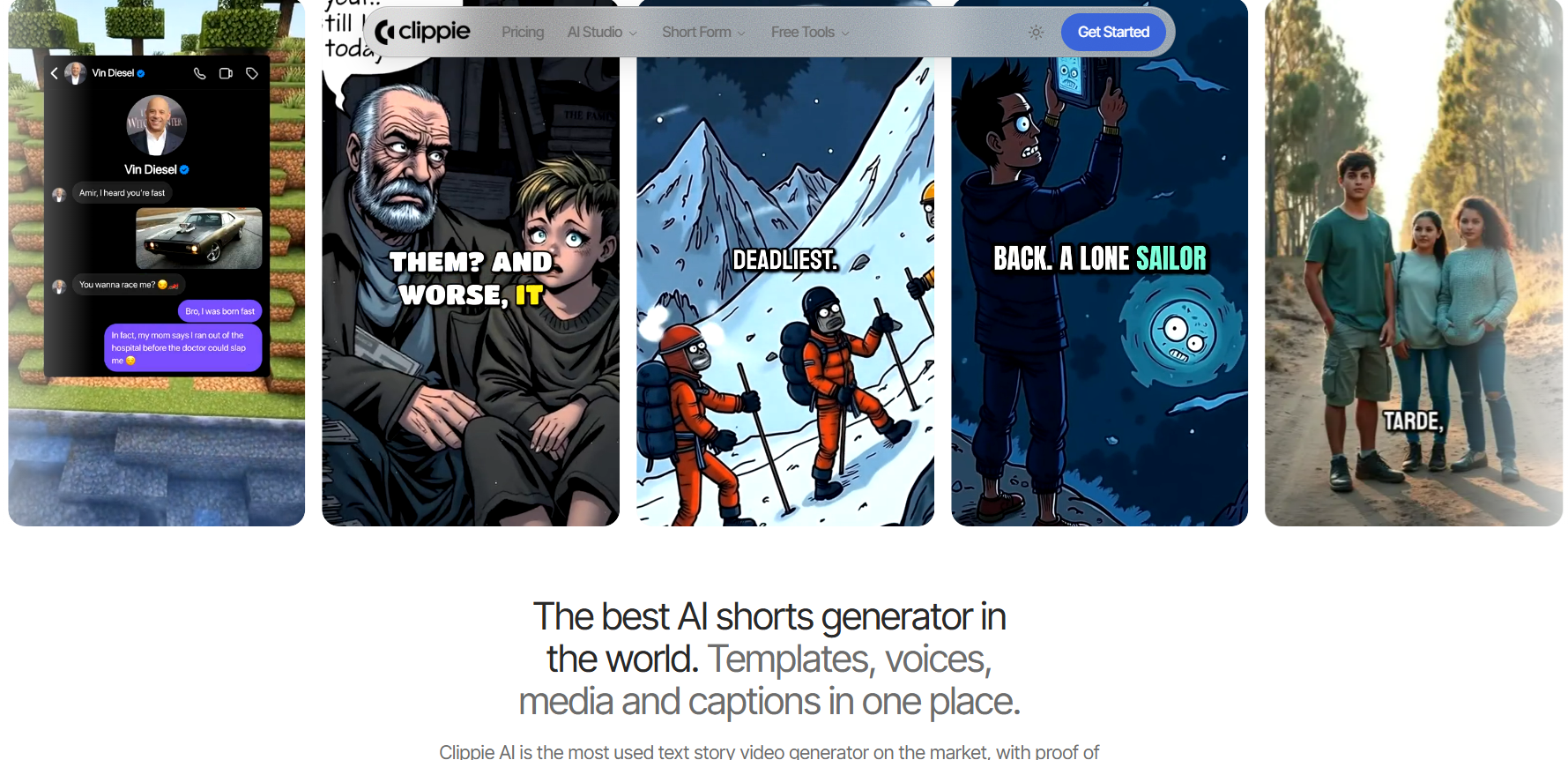
Best at: Turning scripts, Reddit posts, text stories and ranking ideas into finished, captioned vertical videos with ready-made faceless templates. Its AI Studio adds image, video and voice generation you can drop into those templates.
Realistic limitations: Clippie isn't trying to be a better generation model than Veo, Runway or Luma. Export, AI voice and subtitle minutes are capped by plan, and originality still comes from your script and angle.
Who should use it: Faceless creators and editors publishing Shorts, TikTok and Reels on a schedule who want the assembly steps handled in one place.

AI Video Generator Comparison Summary (2026)
Values below come from each tool's official pages, checked in September 2026. For picks by format rather than by generation model, see our ranking of the best faceless video creation tools in 2026.
Google Veo 3.1
Best For: Short cinematic clips that need synchronized dialogue, sound effects or ambience
Output Type: Text-to-video and image-to-video; 16:9 or 9:16; 24fps
Max Clip Length: 8 seconds per generation (4, 6 or 8 seconds); Veo-generated clips can be extended to 148 seconds total at 720p on Google's developer platform
Max Resolution: 4K on Veo 3.1 and Veo 3.1 Fast (Veo 3.1 Lite tops out at 1080p)
Native Audio: Yes, always on
Strengths: Native dialogue and sound effects; up to three reference images; first-and-last-frame control
Limitations: 1080p and 4K require 8-second clips; every output carries a SynthID watermark; consumer Google AI plans now list Gemini Omni Flash for video
Pricing: Pay-per-second developer pricing from roughly $0.05 to $0.60 per second of video, depending on tier and resolution; also bundled into Google AI plans, with prices that vary by region
Runway Gen-4.5
Best For: Cinematic shots with precise camera movement
Output Type: Text-to-video (16:9) and image-to-video (16:9, 9:16, 1:1, 4:3, 3:4, 21:9); 24 or 25fps
Max Clip Length: 10 seconds (2–10 seconds)
Max Resolution: 720p, with 4K upscaling on paid plans
Native Audio: No; music, voice and sound effects are separate Runway tools
Strengths: Camera choreography and sequenced prompts; multi-model workspace that includes Kling 3.0 and Seedance 2.0
Limitations: 720p native output; 12 credits per second limits volume on lower tiers
Pricing: Paid plans from roughly $12 to $95 per month, from Standard to Max, depending on annual or monthly billing
Luma Ray3.2
Best For: Keyframe-directed shots and HDR finishing
Output Type: Text-to-video, image-to-video, Modify Video and Reframe; 9:16, 3:4, 1:1, 4:3, 16:9 and 21:9
Max Clip Length: 10 seconds for text-to-video and image-to-video; up to 20 seconds with Modify Video from 24fps source footage
Max Resolution: 1080p, with native 16-bit HDR and EXR export
Native Audio: No for text-to-video and image-to-video; Modify Video and Reframe keep the source audio
Strengths: Up to 16 keyframes per clip; performance and facial tracking; Reframe to new aspect ratios
Limitations: 1080p costs four times the credits of 720p; Modify Video struggles with shaky or fast-moving footage
Pricing: Paid plans from roughly $30 to $300 per month
Clippie AI: Editor's Choice for Faceless Short-Form Workflows
Best For: The fastest way to turn scripts, stories and ranking ideas into finished, captioned vertical videos
Output Type: Finished short-form videos from faceless templates (AI story, Reddit, text story, Top 5, captions and voiceover), plus AI Studio generations
Max Clip Length: Not publicly disclosed
Max Resolution: Not publicly disclosed
Native Audio: Not a native-audio generation model; AI voiceover is built in, with 50+ AI voices and custom voices on every plan
Strengths: Captions in 102+ languages; speech-to-subtitles; templates built for Shorts, TikTok and Reels; 24/7 support
Limitations: Monthly caps on export, AI voice and subtitle minutes; not a replacement for a frontier generation model when you need bespoke cinematic shots
Pricing:
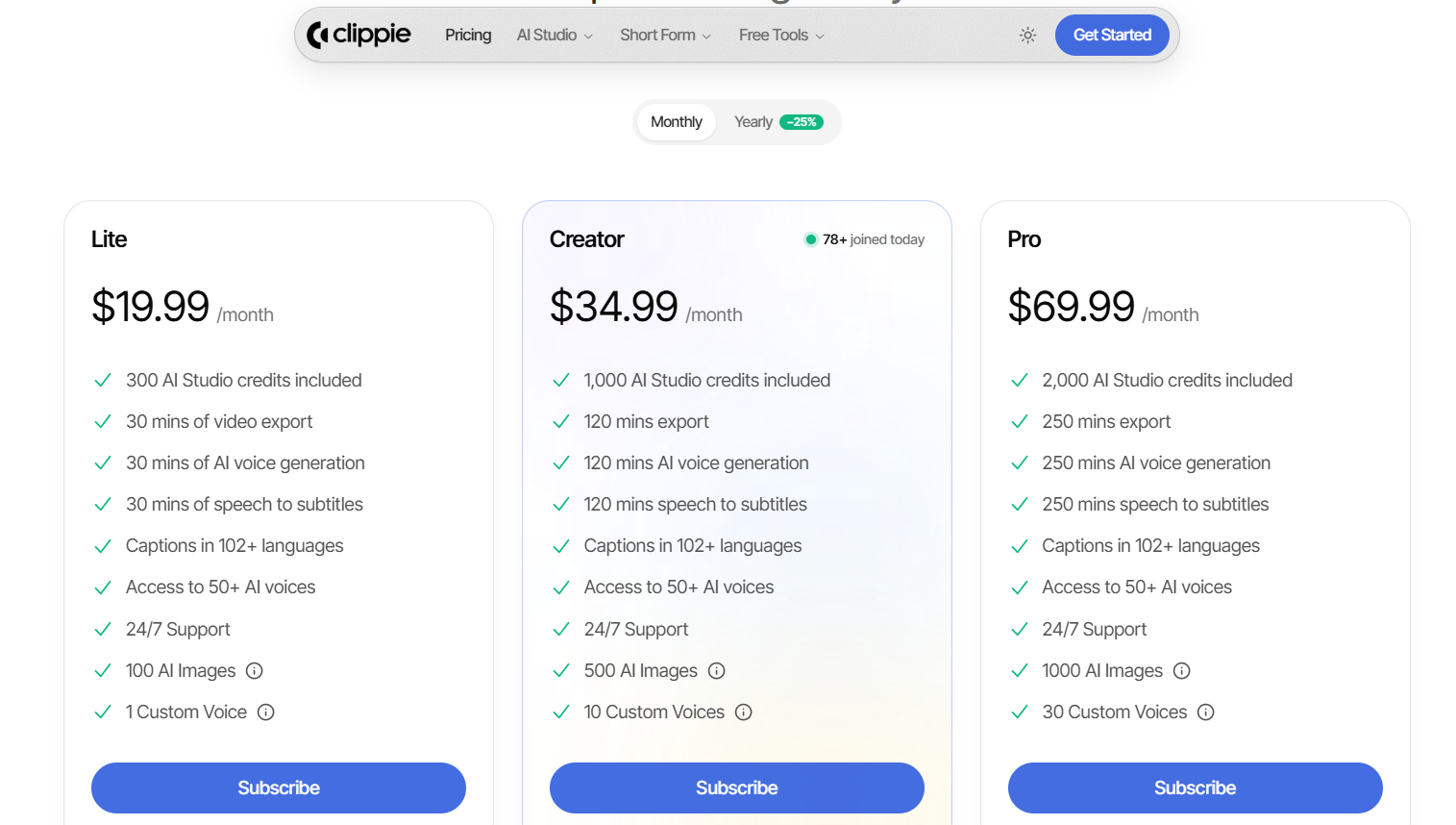
Lite, $19.99/month: 30 mins video export, 30 mins AI voice generation, 30 mins speech-to-subtitles, 100 AI images, 1 custom voice, 300 AI Studio credits
Creator, $34.99/month: 120 mins export, 120 mins AI voice generation, 120 mins speech-to-subtitles, 500 AI images, 10 custom voices, 1,000 AI Studio credits
Pro, $69.99/month: 250 mins export, 250 mins AI voice generation, 250 mins speech-to-subtitles, 1,000 AI images, 30 custom voices, 2,000 AI Studio credits
Pro Tip: How to Avoid the Uncanny Valley in AI Video
The uncanny valley is the uneasy feeling you get when something looks almost human but not quite. In short-form, it costs you viewers within seconds, so design around it from the start.
Keep shots short and cut often. Drift and artifacts are easier to notice in long generated shots. Cut every 2–4 seconds and let the edit create the energy.
Avoid close-up faces and hands. These are where viewers spot errors first. Frame wide, use silhouettes, or cut away before a hand interacts with an object.
Lock lighting and style in every prompt. Reuse the same lighting, lens, colour and style phrases for every insert, such as "overcast soft light, 35mm, muted teal palette," so all clips feel like one video.
Pace the voice like a person. Add pauses before reveals and vary sentence length. Flat, evenly spaced delivery gives away a synthetic voice faster than any visual.
Blend generated shots with stock or B-roll. Real footage between AI inserts anchors the viewer and hides small inconsistencies.
Let captions carry attention. Bold, well-timed captions give the eye a stable anchor while backgrounds change.
Faceless formats sidestep the avatar uncanny valley entirely. With no synthetic presenter on screen, there's no face for viewers to scrutinise.

Step-by-Step: How to Build a Future-Proof AI Video Workflow in 2026
This AI video workflow is built to survive model shutdowns and policy updates. Your originality stays in your hands, and the repetitive work gets automated.
Step 1: Pick a Format With Built-In Originality
Choose formats where your judgment is visible, such as rankings with your own criteria, narrated explainers, or story videos with a clear arc. Avoid formats that only work as copies of someone else's template.
Step 2: Write the Script and Three Hooks
Draft with AI if it helps, then rewrite for your angle and check the facts. Write three opening lines and pick the strongest before you produce anything.
Step 3: Lock Your Voice and Visual Style
Pick one AI voice, one caption style and one set of lighting and style prompts per channel. Consistency is what makes a faceless channel recognisable.
Step 4: Generate Only the Shots You Need
Use Veo 3.1, Runway Gen-4.5 or Luma Ray3.2 for two or three hook or payoff inserts, and use stock footage, gameplay or AI images for the rest. Save every prompt so you can rerun it on a different model.
Step 5: Assemble, Caption and Export Vertical
This is where hours disappear if you work by hand. Clippie's AI story video generator handles the voiceover, scene visuals and captions in one editor, so your time goes into the script rather than the timeline.
Step 6: Disclose and Run an Originality Check
Use YouTube's altered-content setting and TikTok's AI label whenever footage is both realistic and synthetic. Then ask whether this video would still stand out if a viewer saw it next to your last five uploads.
Step 7: Publish, Measure and Iterate
Track retention at the hook and at the main drop-off point, not just views. Double down on the angles that hold attention, and test new models only on proven scripts.

FAQs About AI Video Creation Trends
What are the biggest AI video creation trends in 2026?
The biggest shifts are better text-to-video control, native audio in some models but not all, automated editing and captioning, stricter AI labelling, and tighter originality rules for monetization. OpenAI's Sora shutdown also pushed creators toward multi-model workflows.
Is AI-generated video still monetizable on YouTube in 2026?
Yes. YouTube's inauthentic content policy targets mass-produced, repetitive and templated videos, not the use of AI tools. Videos that add a real angle, narrative or commentary can still earn.
What happened to OpenAI Sora?
OpenAI discontinued the Sora web and app experiences on April 26, 2026. Developer access is scheduled to end on September 24, 2026, so creators should export their content and move workflows to other tools.
Which AI video generators create native audio?
Google Veo 3.1 generates synchronized audio with every clip. Runway Gen-4.5 and Luma Ray3.2's text-to-video and image-to-video modes don't, so sound and voiceover are added separately.
Do I have to label AI-generated videos on YouTube and TikTok?
Yes, if the content is realistic and synthetic or meaningfully altered. YouTube asks you to use the altered-content setting in YouTube Studio, and TikTok requires labels on realistic AI-generated content, while clearly unrealistic content and production help like scripts or captions don't need YouTube disclosure.
Are faceless AI videos better than AI avatar videos?
For most short-form growth channels, faceless formats are the lower-risk choice because there's no synthetic face to trigger the uncanny valley. Avatars make sense when a presenter genuinely adds trust, such as in product explainers or training content.

Conclusion: Where AI Video Goes Next in 2026
AI video in 2026 rewards creators who treat models as interchangeable tools and originality as the product. Through the rest of the year, expect more control features, more automatic labelling, and more consolidation into multi-model platforms.
Which AI video tool are you using right now, and why? Tell us in the comments, especially if you've switched models this year.
If faceless Shorts are your focus, Clippie is built to turn your scripts into finished videos fast.
Read more
How to Create AI Story Videos Step by Step (2026 Guide)
AI story videos follow one pipeline: script, scenes, characters, voice, captions, export. Each stage explained, plus where YouTube draws the template line.

How to Make Reddit Story Videos in 2026 (Step-by-Step)
Reddit story videos take six steps: pick a post, rewrite it in your words, add an AI voice and background, caption, export. Plus what stays monetizable.

Viral Storytelling Formats: 8 Story Structures for Shorts
Story structures that keep viewers past the opening seconds, from POV confessions to open loops and twist endings, each with a script outline to reuse.