
CapCut vs Clippie AI: Video Editor or Faceless Video Maker?
Choosing between CapCut and Clippie AI comes down to workflow: one is a hands-on editor, the other builds a finished short from a script. Pricing and fit.

If you searched for CapCut vs Clippie AI, you want to know which tool to use for short-form video, and whether you need both. This comparison answers that directly. CapCut is a hands-on video editor, and Clippie AI is a faceless video generator that builds a finished short from a script. They solve different problems. That matters in 2026 because CapCut has moved more features behind its paid plan and changed US operators, while faceless creators are posting at volumes where editing every video by hand is the bottleneck.
Executive summary: This post is for short-form and faceless creators choosing between CapCut and Clippie AI for YouTube Shorts, TikTok and Reels. It compares what each tool does best, how the workflows differ, 2026 pricing, voices, captions and templates, and CapCut's current US availability. It ends with a clear recommendation by creator type. You will leave knowing which tool fits your videos, and when using both makes sense.
Table of Contents
CapCut vs Clippie AI: The Short Answer
What CapCut Does Best
What Clippie AI Does Best
Workflow Compared: Editing vs Generating
Pricing Compared in 2026
Voices, Captions and Templates
Is CapCut Still Available in 2026?
Who Should Use CapCut and Who Should Use Clippie AI
FAQs
What to Do Next

CapCut vs Clippie AI: The Short Answer
Use CapCut if you edit your own footage and want full control over every cut, effect and transition. Use Clippie AI if you run a faceless channel and want a finished short from a script, a Reddit post or a template, without building each video on a timeline. Many creators use both.
Why the distinction matters: comparing them as rival editors misses the point. CapCut is where you shape footage you already have. Clippie AI is where you generate the video in the first place.
The quick rule:
You film or collect clips yourself: CapCut.
You publish faceless story, text or ranking videos at volume: Clippie AI.
You do both: generate in Clippie AI, then fine-tune in CapCut when a video needs it.

What CapCut Does Best
CapCut does hands-on editing best. It is a full video editor on mobile, desktop and web, with templates, effects, auto captions, text to speech, noise reduction and background removal. It is strongest when you have your own footage and want precise control over the timing and look of every clip.
What it is: CapCut is a video editor available as a phone app, a desktop app and a browser version called CapCut Online.
Why it matters: trend-driven formats live or die on timing. A timeline editor lets you cut to the beat, layer effects and adjust every caption by hand.
Where it is strongest:
Templates: large libraries, including Reels and TikTok templates.
Editing depth: a full timeline editor with effects, transitions and caption templates.
Audio tools: text to speech, custom voices, voice enhancement and noise reduction.
Visual tools: video and image background removal, plus image upscaling.
Where it falls short: every video is still built by hand. For a faceless channel posting daily, assembling the voice, background and captions for each video becomes the slow step.

What Clippie AI Does Best
Clippie AI does template-based faceless video generation best. You start from a script, a Reddit post or a template, and it produces a finished vertical short with AI visuals, an AI voiceover and synced captions. It is built for creators who publish faceless content at volume, not for editing raw footage.
What it is: a faceless short-form video generator. Its templates cover Reddit stories, fake text stories, Twitter videos, AI story videos, split-screen, Top 5 rankings, Would You Rather videos, captions and voiceovers.
How the AI story workflow works:
Write a script, or start one with the AI Script Writer.
Pick an AI image model or a preset art style for the scenes.
Choose an AI voice, or upload your own voiceover.
Style the captions, preview, then export in 9:16 or 16:9.
You can try this in the AI story video generator, or watch the full AI story video tutorial first.
Where it falls short: it is not a timeline editor for your own footage, and every plan caps export minutes each month.

Workflow Compared: Editing vs Generating
The core difference is where the work happens. In CapCut, you assemble the video yourself from footage, audio and captions on a timeline. In Clippie AI, you supply the script or source and the tool assembles the video. Editing gives more control; generating gives more output for the same time.
CapCut workflow (editing):
Step 1: gather or film your clips.
Step 2: arrange them on the timeline and trim.
Step 3: add voice, music and auto captions, then adjust them.
Step 4: add effects and transitions, then export.
Clippie AI workflow (generating):
Step 1: paste a script or source, or pick a template.
Step 2: choose visuals, voice and caption style.
Step 3: preview, adjust and export.
Example: a channel posting one Reddit story a day spends most of its editing time on the same repeated steps: voice, background and captions. A generator removes those steps. A creator cutting vlog footage still needs a real editor.
For a fuller walkthrough of the generate-first approach, see how to create YouTube Shorts faster with AI.

Pricing Compared in 2026
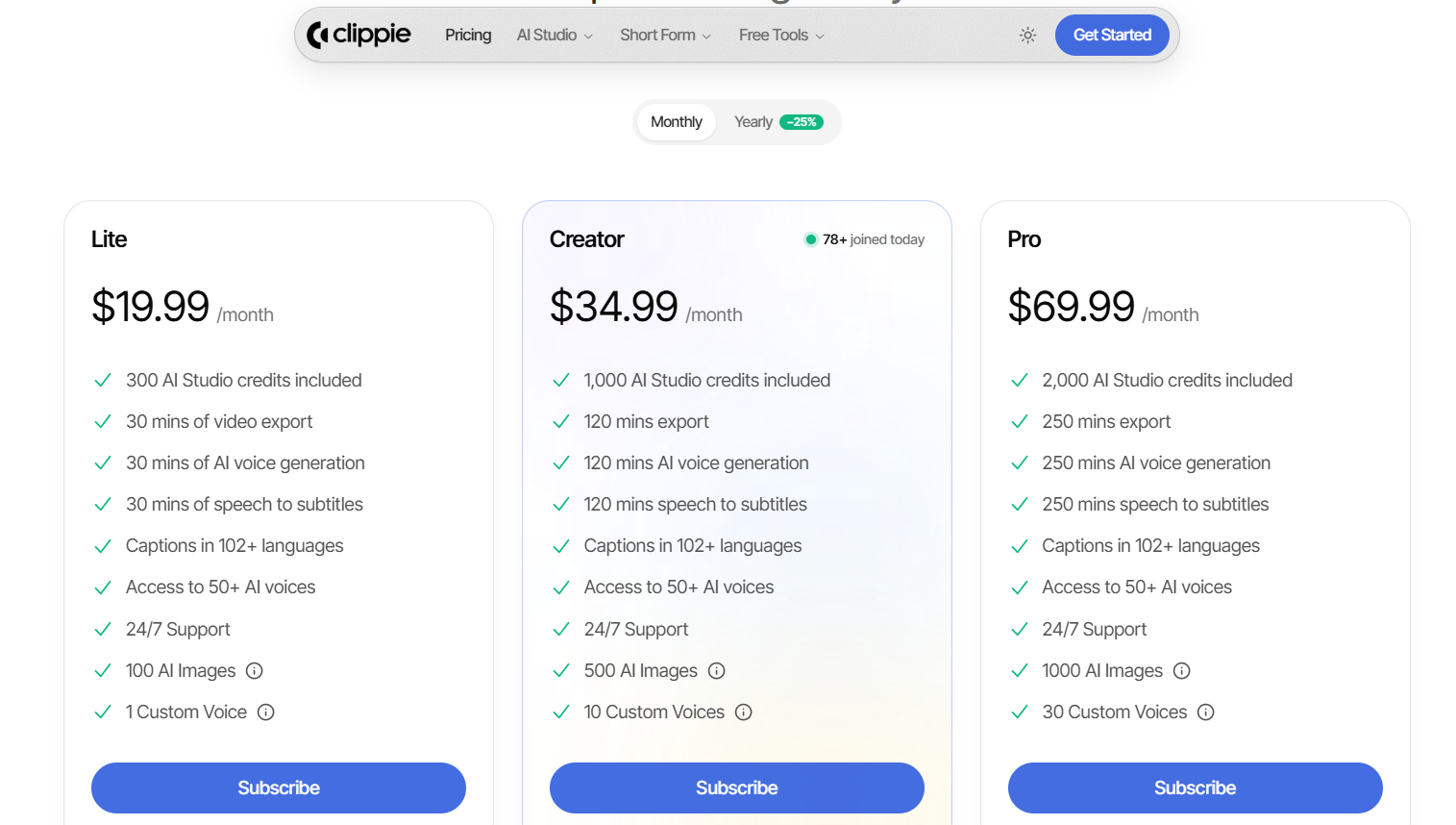
CapCut has a free plan with limits. Its Pro plan is about $19.99 a month or $179.99 a year in the US, with regional variation. Clippie AI has three paid plans: Lite at $19.99, Creator at $34.99 and Pro at $69.99 a month, each with a monthly cap on export minutes.
CapCut:
Free: basic editing. Some templates and exports carry a watermark or end-card, and several AI tools are limited.
Standard: about $9.99 a month, offered only in some regions and mainly on mobile.
Pro: about $19.99 a month or $179.99 a year, with 4K exports and full AI tools. Prices vary by region and by app store versus website, so confirm at checkout.
Clippie AI:
Lite: $19.99 a month for 30 minutes of video export, AI voice and speech-to-subtitles, plus 100 AI images.
Creator: $34.99 a month for 120 minutes of each, plus 500 AI images.
Pro: $69.99 a month for 250 minutes of each, plus 1,000 AI images.
Yearly billing: listed at 25% off.
How to compare them: CapCut Pro pays for editing power. Clippie AI pays for finished output. Estimate how many minutes of faceless video you publish each month, then check which Clippie plan covers it.

Voices, Captions and Templates
Both tools offer AI voices, auto captions and templates, but they use them differently. CapCut gives you editing templates and voice tools to apply to your own video. Clippie AI builds the voice, captions and visuals into each faceless template, with captions in 102+ languages and 50+ AI voices on every plan.
Voices:
CapCut: text to speech, custom voices, voice enhancement and noise reduction.
Clippie AI: 50+ AI voices on every plan, plus 1, 10 or 30 custom voices depending on the plan.
Captions:
CapCut: auto captions and caption templates. Recent reports say full auto captions sit behind Pro, so check what your free version includes.
Clippie AI: speech-to-subtitles minutes on every plan, with captions in 102+ languages.
Templates:
CapCut: editing templates for trends, effects and occasions, applied to your own media.
Clippie AI: format templates that generate a whole video, such as Reddit stories, fake texts and Top 5 rankings. See a Top 5 ranking video built from a template.

Is CapCut Still Available in 2026?
Yes. CapCut is available in the US App Store and on Google Play as of September 2026. It was removed from US stores in January 2025 and restored on February 13, 2025. Since January 22, 2026, the US version has been operated by TikTok USDS Joint Venture LLC.
Why it matters: creators who rely on one app for every video were cut off for several weeks in 2025. Keeping project files and source media outside a single app reduces that risk.
One exception: CapCut's dedicated iPad app is still in beta and is not in the US App Store. CapCut recommends iPad users in the US use CapCut Online in the browser instead.

Who Should Use CapCut and Who Should Use Clippie AI
Choose CapCut if you edit your own footage, follow trend templates or need precise control over every cut. Choose Clippie AI if you run a faceless channel built on repeatable formats like stories, texts or rankings. Choose both if you generate videos at volume but still polish your best ones by hand.
Use CapCut if you:
Film vlogs, talking clips or product footage.
Edit to music and trends on your phone.
Want the free plan and can work within its limits.
Use Clippie AI if you:
Run a faceless channel and never appear on camera.
Publish daily story, text or ranking videos.
Want voice, visuals and captions handled in one step.
Use both if you: generate a batch in Clippie AI, then open your best-performing format in CapCut to test new hooks or effects.
To compare more tools for each stage of faceless production, see our guide to the best AI video tools for faceless content.
FAQs
Is CapCut free in 2026?
CapCut has a free plan, but it is limited. You get basic editing, while some templates and exports add a watermark or end-card, and several AI tools are restricted. CapCut Pro costs about $19.99 a month or $179.99 a year in the US. Prices vary by region, platform and app store, so check at checkout.
Is CapCut banned in the US?
No. CapCut is available in the US App Store and on Google Play as of September 2026. It was briefly removed in January 2025 and restored on February 13, 2025. Since January 22, 2026, the US version has been run by TikTok USDS Joint Venture LLC. The dedicated iPad app is still in beta and not in the US App Store.
Can you make faceless videos with CapCut?
Yes. CapCut has text to speech, auto captions and templates, so you can build faceless videos without filming yourself. The difference is effort: you assemble the voice, visuals and captions for each video on a timeline. For daily faceless posting, a generator such as Clippie AI does those steps for you from a script.
Does Clippie AI replace CapCut?
Not entirely. Clippie AI replaces the repeated assembly work in faceless videos: script to voice, visuals and captions. It does not replace a timeline editor for your own footage, effects or detailed cuts. Creators who film their own content still need an editor like CapCut. Faceless creators often need only Clippie AI.
Which is cheaper, CapCut or Clippie AI?
CapCut is cheaper to start, because it has a free plan and Pro is about $19.99 a month. Clippie AI starts at $19.99 a month for 30 export minutes. The fairer comparison is cost per finished video: if you publish faceless videos daily, compare the time you save against the plan that covers your monthly minutes.
Does CapCut have text to speech?
Yes. CapCut lists text to speech, custom voices, voice enhancement and noise reduction among its tools. Some voices and AI features may require Pro, depending on your region and platform. Clippie AI includes 50+ AI voices on every plan, with 1 to 30 custom voices depending on the plan.
What to Do Next
List your last ten videos: count how many used your own footage and how many were faceless formats.
Match the tool to the majority: mostly footage means CapCut; mostly faceless formats means Clippie AI.
Estimate monthly minutes: multiply your average video length by your posting frequency to choose a Clippie plan.
Check CapCut pricing in your region: compare the website price with the app store price before subscribing.
Test one format end to end: build the same video in both tools and time each workflow.
Read more

Viral Storytelling Formats: 8 Story Structures for Shorts
Story structures that keep viewers past the opening seconds, from POV confessions to open loops and twist endings, each with a script outline to reuse.

Faceless YouTube Automation Ideas That Stay Monetizable
Channel concepts built for a repeatable script, voice and visuals pipeline, each checked against YouTube's July 2026 rules and where human input matters.

Anonymous Content Ideas: 30 Faceless Videos to Post in 2026
Video ideas that never need your face or your own voice, grouped by format: stories, rankings, quizzes, explainers and commentary, with the policy line.