
How to Build a Fully Automated AI Video Business in 2026 (Step-by-Step Guide)
Learn how to build a fully automated AI video business in 2026, from daily content systems and monetisation models to operations management and production automation with Clippie AI.

Searching for how to build an automated video business with AI in 2026?
The opportunity is real, and the infrastructure to make it work is more accessible than it has ever been. Creators are running profitable video businesses across multiple channels, producing dozens of videos per month, with workflows that require only a few hours of human input per week.
This is not a passive income fantasy. It is a systems problem. And this guide gives you the complete blueprint, from what an automated video business actually looks like, to the monetisation models that scale, to the production systems that make it operationally sustainable.
Executive Summary
This guide is for content creators, digital entrepreneurs, and agency operators who want to build a scalable, AI-powered video business in 2026. It covers the structure of a genuinely automated video operation, the daily content systems that keep it running, the monetisation models with the highest long-term leverage, the operational frameworks that prevent bottlenecks, and how Clippie AI serves as the production core of the entire system. By the end, you will have a clear, executable blueprint, not a motivation post.
Table of Contents
What a Fully Automated AI Video Business Actually Looks Like in 2026
How to Build Daily Content Systems That Run Without You
The Monetisation Models That Scale With an Automated Video Business
How to Manage Operations Efficiently at Volume
How to Automate Your Video Production With Clippie AI
Frequently Asked Questions

1. What a Fully Automated AI Video Business Actually Looks Like in 2026
Most people picture automation as a binary, either you do everything manually or a robot does it all while you sleep. The reality is more nuanced and more useful.
A fully automated video business in 2026 is one where AI handles every production task and the human makes only strategic decisions.
The Difference Between a Busy Creator and an Automated Business
A busy creator:
Generates ideas reactively, when inspiration strikes
Writes scripts manually for every video
Records or produces each video individually
Edits frame by frame
Uploads and captions manually
Monitors performance sporadically
Income is directly tied to hours worked
An automated video business:
Has a defined content pipeline that generates ideas on a schedule
Uses AI to produce scripts from structured briefs
Runs all production through an AI platform, voiceover, visuals, captions, export
Publishes on a scheduled cadence, often batched days in advance
Reviews analytics on a fixed weekly or monthly schedule
Income compounds as the content library grows, older videos continue generating revenue
The distinction is not the tools. It is the system architecture around the tools.
What "Automated" Actually Means at Each Stage
Idea generation: Semi-automated: Trend monitoring tools, platform search, and community listening are used on a fixed schedule. Ideas are captured into a structured pipeline without daily manual effort.
Scripting: Semi-automated: AI generates first-draft scripts from structured topic briefs. Human review takes 5–10 minutes per script, not 60.
Production: Fully automated: Voiceover, image generation, captioning, and export handled entirely by AI tools. Zero manual recording. Zero manual subtitle creation.
Publishing: Scheduled: Videos are scheduled in batches, typically 3–7 days in advance. No daily publishing decisions required.
Monetisation: Passive once established: AdSense, affiliate links, and digital products generate revenue from existing content without active promotion.
Analytics: Periodic review: Weekly 30-minute review replaces daily metric-checking. Data feeds back into content decisions on a structured cycle.

The 3 Business Models That Suit Automation
Not every video business model is equally compatible with automation. The three that work best:
Model 1: Single Niche Channel (Solopreneur): One channel, one niche, high posting frequency. Monetised through AdSense, affiliate marketing, and digital products. The lowest operational complexity. Best starting point.
Model 2: Multi-Channel Portfolio (Niche Network): Multiple channels across different niches, each operating as a separate content asset. Higher upfront build cost, but significant revenue diversification. Clippie AI's Pro plan with 30 custom voices supports this model, one voice identity per channel.
Model 3: Content Agency (Client-Facing): Building and operating faceless video channels on behalf of clients. The highest revenue ceiling and the most complex operations. Requires clear SOPs, client communication systems, and production capacity planning.

2. How to Build Daily Content Systems That Run Without You
An automated video business runs on systems, not motivation. Every stage of the content operation needs a defined process that can be executed without creative improvisation.
System 1: The Idea Pipeline
The idea pipeline is the fuel supply for the entire business. It needs to run on a fixed schedule, not when you feel inspired.
The weekly idea pipeline process:
Monday morning (15 minutes): Check TikTok trending, YouTube autocomplete, Google Trends rising queries, and the top 3 Reddit threads in your niche. Capture every idea, no filtering yet.
Monday afternoon (10 minutes): Filter ideas by four criteria: search demand, content repeatability, faceless format compatibility, and monetisation potential. Approve 5–10 ideas for the week.
Monday end of day: Assign each approved idea a format (list, explainer, story, rant) and a platform priority (TikTok first, Shorts cross-post, or long-form YouTube).
Automation layer: Use Google Alerts or a simple RSS setup to deliver new content in your niche directly to your inbox daily. This reduces the active monitoring time from 30 minutes to 5–10 minutes, you're reviewing signals, not searching for them.
System 2: The Script Production System
Scripts are the highest-leverage content decision in the workflow. A well-structured brief fed into an AI tool produces a usable first draft in under 2 minutes.
The brief template:
Every script production starts with a completed brief:
Topic: What is this video specifically about?
Format: List / Explainer / Story / Rant / Tutorial
Target length: 60 seconds / 5 minutes / 10–15 minutes
Hook idea: The opening claim or question
Key points: 3–5 bullet points the video must cover
CTA: What action should the viewer take at the end?
Tone: Educational / Conversational / Authoritative / Provocative
Feed this brief into ChatGPT or Claude with the instruction: "Write a [format] script for a faceless YouTube video based on this brief. Use short, declarative sentences optimised for AI voiceover delivery."
Review time per script: 5–10 minutes. The AI draft is rarely publication-ready without human review, but the review takes minutes, not hours.

System 3: The Production Schedule
Batching is the operational backbone of an automated video business.
The weekly production schedule:
Tuesday: Script all videos for the week (2–3 hours for 7 scripts)
Wednesday: Produce all videos in Clippie AI, voiceover, visuals, captions, export (3–4 hours for 7 videos)
Thursday: Write captions and hashtag sets for each platform. Schedule all posts in advance. (1–2 hours)
Friday: Publish any time-sensitive trending content. Review the previous week's analytics. (30–45 minutes)
Total weekly active work: 7–10 hours for 7 complete, platform-ready videos.
The remaining time in the week is available for strategy, monetisation development, or, in a true business model, other income-generating activities.
System 4: The Publishing and Scheduling System
Manual daily publishing is a time drain and a consistency risk. Scheduling removes both problems.
Scheduling best practices:
Batch-schedule a full week of content in one session on Thursday
For TikTok: use TikTok's native scheduler (available in Creator Tools)
For YouTube: schedule directly in YouTube Studio
For Instagram Reels: use Meta Business Suite or a third-party scheduler
Optimal posting times by platform:
TikTok: 7–9am, 12–3pm, 7–11pm in your primary audience timezone
YouTube Shorts: 12–3pm and 8–11pm
Instagram Reels: 6–9am and 6–9pm
Scheduling eliminates the daily decision of when and whether to post. The content goes out on time regardless of what else is happening in the business.

3. The Monetisation Models That Scale With an Automated Video Business
Automation without monetisation is just a content habit. The business model is what converts content output into compounding income.
Monetisation Model 1: YouTube AdSense (Passive Base Income)
AdSense is the foundation of most automated video businesses. Once a channel meets YouTube's Partner Programme requirements, every video in the catalogue generates revenue indefinitely.
Requirements for YouTube Partner Programme:
1,000 subscribers
4,000 watch hours (long-form) OR 10 million Shorts views in 90 days
Why AdSense scales with automation:
Older videos continue generating impressions and revenue as the catalogue grows
A channel with 200 videos generates more monthly AdSense than one with 20, even if the 200-video channel has lower average views per video
The content library is a compounding asset, production investment pays returns indefinitely
Realistic AdSense revenue estimates by niche:
Finance and investing: $8–$25 CPM
Technology and AI tools: $6–$18 CPM
Gaming: $2–$6 CPM
General education: $4–$12 CPM
Monetisation Model 2: Affiliate Marketing (High-Margin Variable Income)
Affiliate marketing generates commission on products or services that viewers purchase through creator links. For automated video businesses, it is the highest-margin income stream available, no product creation, no customer support, no inventory.
Affiliate models that scale with faceless video:
Software and SaaS: AI tools, productivity apps, video platforms. Commissions of 20–40% recurring are common. A single video that drives 50 SaaS signups per month generates ongoing passive income.
Digital products: Courses, templates, ebooks. One-time commissions of 30–50%. High volume, high margin.
Physical products via Amazon Associates: Lower commissions (3–10%) but enormous product selection. Works well for tech review, productivity, and lifestyle niches.
The affiliate link placement system:
Pin affiliate links in YouTube video descriptions (first 2–3 lines)
Include verbal mentions in the video itself ("I'll leave the link in the description")
Use a link-in-bio tool (Linktree, Stan Store) to consolidate multiple affiliate links for TikTok and Instagram

Monetisation Model 3: Digital Products (Highest Margin, Scalable)
Digital products, templates, prompt packs, mini-courses, guides, sell indefinitely with zero incremental production cost after creation.
The digital product flywheel for automated video businesses:
Content builds trust and demonstrates expertise in the niche
Viewers with high intent follow the link-in-bio to a simple sales page
A low-ticket product ($9–$47) converts without requiring a long sales cycle
Revenue from low-ticket products funds higher-ticket offers over time
Highest-performing digital products for faceless video creators:
AI prompt packs and workflows
Content calendar and production templates
Niche research frameworks
Video script templates by format
Notion dashboards for content operations
Monetisation Model 4: Brand Sponsorships (High Revenue, Requires Scale)
Brand sponsorships become accessible at 10,000–50,000 engaged followers in a defined niche. For automated video businesses, sponsorships are the highest per-video revenue source, but require outreach or inbound interest management.
How to attract sponsorships without active daily effort:
Maintain a media kit (channel stats, audience demographics, niche description) and link it in your YouTube channel About section
Use platforms like Creator.co, AspireIQ, or direct brand outreach via email
Respond to inbound brand enquiries within 24 hours, delayed responses lose deals
Sponsorship rates for faceless niche channels in 2026:
10k–50k subscribers: $150–$600 per integration
50k–250k subscribers: $600–$3,000 per integration
Rates vary significantly by niche, B2B, finance, and technology command the highest CPMs
Monetisation Model 5: TikTok Series and YouTube Channel Memberships
Both platforms now support direct viewer payments for premium content.
TikTok Series:
Creators charge per episode or per series bundle
Works best for niche deep-dive content that goes beyond what's freely available
Price range: $0.99–$9.99 per series
YouTube Channel Memberships:
Monthly subscription for exclusive content, early access, or community access
Works best once a channel has an engaged audience that wants more than the free content provides
Price range: $2.99–$24.99/month

4. How to Manage Operations Efficiently at Volume
A video business producing 20–30 videos per month across multiple channels quickly becomes operationally complex. Without management systems, quality degrades and output becomes inconsistent.
The Weekly Operations Review (30 Minutes)
Every Friday, run a structured 30-minute operations review:
Content performance check (10 minutes):
Which videos from the past week are outperforming expectations?
Any videos significantly underperforming? Identify the likely cause.
Any comments generating follow-up content ideas? Add to the idea bank.
Production health check (10 minutes):
Is the script pipeline full for next week? If not, generate more briefs today.
Is the Clippie AI export capacity on track for the month? Adjust production volume if needed.
Are all posts for next week scheduled? If not, complete scheduling before the review ends.
Monetisation check (10 minutes):
Any affiliate link click-through rate changes? Investigate outliers.
Any new sponsorship enquiries to respond to?
Are digital product sales trending up, flat, or down? Identify cause.
Standard Operating Procedures (SOPs)
An automated video business needs documented SOPs for every repeatable task. This is what makes the business scalable beyond a single operator.
The 5 SOPs every automated video business needs:
SOP 1: Idea Capture and Filtering: How to source, capture, and evaluate content ideas each week
SOP 2: Script Briefing and Production: The brief template, AI prompt, and review checklist for every script
SOP 3: Clippie AI Production Workflow: Step-by-step production process inside Clippie AI, voice selection, image generation, caption review, export
SOP 4: Caption and Hashtag Creation: Platform-specific caption formula and 3-tier hashtag framework per platform
SOP 5: Analytics Review: Which metrics to check, at what intervals, and how to feed findings back into content decisions
With these SOPs documented, the production workflow can be delegated to a virtual assistant or contractor without quality degradation, freeing the owner to focus exclusively on strategy and monetisation.
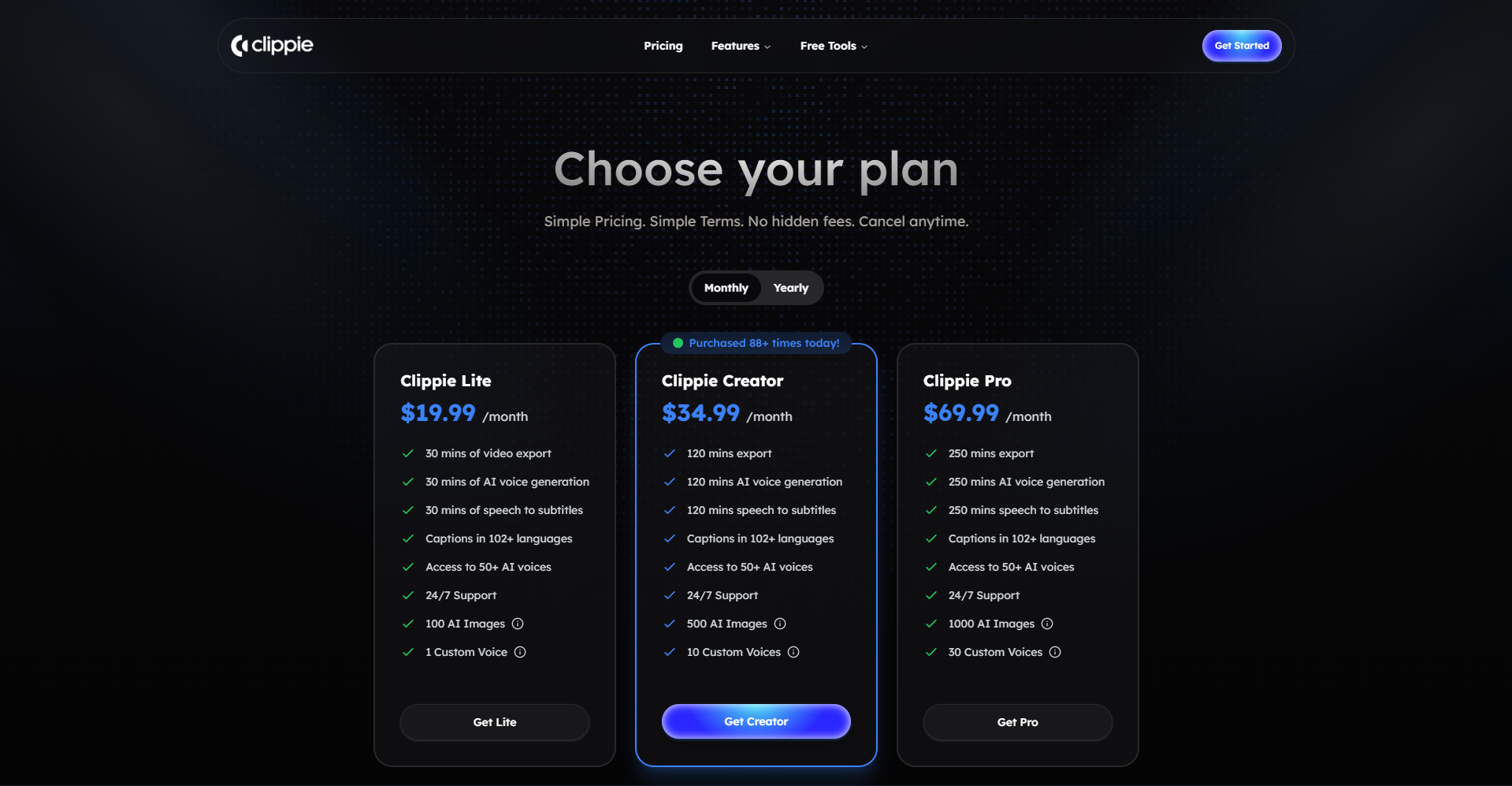
Capacity Planning by Clippie AI Plan
Production capacity directly limits business scale. Know your constraints before committing to a posting schedule.
Lite: $19.99/month:
30 mins export capacity
Supports approximately 3–5 videos/month
Right for: Single channel in the validation phase, testing formats and niches
Creator: $34.99/month:
120 mins export capacity
Supports approximately 10–15 videos/month
Right for: Single channel with validated format, posting 3–4 videos per week consistently
Pro: $69.99/month:
250 mins export capacity
Supports approximately 15–25 videos/month
Right for: Multi-channel operator, content agency, or high-frequency single channel combining long-form and short-form

5. How to Automate Your Video Production With Clippie AI
Clippie AI is the production engine of an automated video business. It replaces the most time-consuming manual production tasks, recording, subtitle creation, image sourcing, and export optimisation, with an integrated AI workflow.
What Clippie AI Automates in the Production Stage
AI Voiceover, replaces recording entirely
50+ natural-sounding AI voices
Custom voice cloning, consistent channel identity without ever recording a single line
Narration generated from pasted script in seconds
Up to 30 custom voices on the Pro plan, one per channel in a multi-channel operation
AI Image Generation, replaces stock footage sourcing
Custom scene visuals, title cards, and supporting imagery generated inside the platform
No stock library subscription
No external sourcing or file importing
100–1,000 images per month depending on plan
Auto-Captioning, replaces manual subtitle creation
Speech-to-subtitles auto-synced to AI voiceover
102+ languages, international audience reach without additional production effort
No manual alignment, no timing adjustments
Video Export, replaces technical post-production
Export-ready output for TikTok, Shorts, Reels, and YouTube
Vertical and horizontal format support
Production-ready file quality without manual encoding
The Automated Production Workflow: Step by Step
Step 1: Script input (2 minutes): Paste your reviewed AI-generated script into Clippie AI.
Step 2: Voice selection (1 minute): Select from 50+ pre-built voices or activate your custom cloned voice for the channel.
Step 3: Voiceover generation (1–2 minutes): Generate narration. Review for any pacing or pronunciation issues. Regenerate individual lines if needed.
Step 4: Image generation (5–8 minutes): Generate 3–6 scene images using Clippie's built-in AI image tool:
Opening title card
2–3 section visuals
Closing CTA graphic
Step 5: Caption review (2 minutes): Clippie auto-generates and syncs subtitles to the voiceover. Review for accuracy. Adjust language if publishing internationally.
Step 6: Export (2–3 minutes): Select format (vertical or horizontal), export the video.
Total production time per video inside Clippie AI: 15–20 minutes.
At that speed, a full week of 7 videos takes approximately 2–2.5 hours of production time inside the platform, the core of a genuinely automated production operation.
Clippie AI Plans: Matched to Business Scale
Lite: $19.99/month
30 mins video export (~3–5 videos/month)
30 mins AI voice generation
30 mins speech-to-subtitles
100 AI images
1 custom voice
Captions in 102+ languages
50+ AI voices
24/7 support
Best for: Building and validating the first channel before scaling
Creator: $34.99/month
120 mins video export (~10–15 videos/month)
120 mins AI voice generation
120 mins speech-to-subtitles
500 AI images
10 custom voices
Captions in 102+ languages
50+ AI voices
24/7 support
Best for: A single automated channel running at full posting frequency
Pro: $69.99/month
250 mins video export (~15–25 videos/month)
250 mins AI voice generation
250 mins speech-to-subtitles
1,000 AI images
30 custom voices
Captions in 102+ languages
50+ AI voices
24/7 support
Best for: Multi-channel video business or content agency managing parallel production workflows
No free tier is available on Clippie AI.
💡 For the complete production workflow that sits inside this business model, read our guide on How Online Businesses Can Scale Video Content Production 10x in 2026
💡 To understand which AI tools belong in each stage of this business, read our breakdown of Best Tools for Faceless Video Creation in 2026 (Ranked by Use Case)
💡 Start building your automated video business with Clippie AI →
Conclusion: The Automated Video Business Is a Systems Business
The creators building the most profitable AI video operations in 2026 are not the most talented or the most technically sophisticated.
They are the most systematic.
They have a defined idea pipeline. A scripting system. A production workflow that runs in hours, not days. A monetisation stack that compounds as the content library grows. And a weekly review loop that continuously improves every part of the operation.
Clippie AI is the production engine that makes the volume possible. But the engine only creates value when it's running inside a system built for automation.
Build the system. Run it consistently. The compounding starts from the first week.

6. Frequently Asked Questions
Q1: How much does it cost to start an automated AI video business in 2026?
The minimum viable setup cost is extremely low. Clippie AI's Lite plan at $19.99/month covers production for 3–5 videos per month. Combined with free tools, ChatGPT for scripting, TikTok and YouTube Studio for publishing and analytics, the total startup cost is under $20/month. Once the first channel generates affiliate or AdSense revenue, that income can fund the upgrade to Creator or Pro for higher output volume.
Q2: How long does it take before an automated video business generates meaningful income?
Most faceless channels reach YouTube Partner Programme eligibility within 3–6 months of consistent posting at 2–4 videos per week. Affiliate income can begin earlier, a single video that ranks for a buying-intent keyword can generate commission within its first week live. Realistically, a well-executed automated video business in a monetisable niche should generate its first $500–$1,000/month within 4–8 months. Scaling to $3,000–$10,000/month typically requires 12–18 months of consistent operation.
Q3: How many channels can I realistically run with Clippie AI's Pro plan?
The Pro plan at $69.99/month provides 250 minutes of export capacity, 1,000 AI images, and 30 custom voices. A channel posting 4–5 short-form videos per week averages 60–80 minutes of export per month. That leaves capacity for 3–4 channels at that posting frequency on a single Pro plan. For each additional channel, a custom cloned voice (up to 30 available on Pro) maintains separate channel identities without overlap.
Q4: Does an automated video business require any human involvement at all?
Yes, some human involvement is always required, but it can be reduced to strategic decision-making. The tasks that require human judgment are: niche and topic strategy, script review for accuracy and quality, analytics interpretation, and monetisation decisions. The tasks that can be fully automated or delegated are: trend monitoring, script drafting, production (voiceover, visuals, captions, export), and post scheduling. A well-built automated video business requires 5–10 hours of human input per week at mature operating scale.
Q5: What is the biggest risk to an automated video business and how do you mitigate it?
Platform dependency is the primary risk, if a single platform changes its algorithm, monetisation policy, or distribution rules, a business built entirely on that platform is vulnerable. The mitigation is diversification: publish across TikTok, YouTube, and Instagram Reels simultaneously, and build an email list or off-platform audience from day one. The second risk is content quality degradation at scale, rushing production to hit volume targets without quality review. The mitigation is a fixed review step in the SOP that catches quality issues before publishing.
Q6: How is an automated video business different from a regular YouTube channel?
A regular YouTube channel is built around a creator's individual effort and personal brand. An automated video business is built around systems, not people. The key differences are: production is handled by AI rather than manual recording and editing; content decisions are driven by data and structured processes rather than inspiration; monetisation is diversified across multiple income streams rather than relying on one platform's payouts; and the business can scale beyond the capacity of a single creator because the workflow is documented and replicable. The goal is a content asset that generates revenue based on its catalogue size and niche authority, not based on how many hours the creator works each week.
Make an AI story video
Write a script or let AI write one. Clippie turns it into a narrated video with AI scenes, voiceover and captions.
Read more

How Faceless YouTube Channels Make Money in 2026: 6 Streams
Faceless YouTube channels make money from far more than ads: Shorts, affiliates, sponsors and products. February 2027 Shorts rules shift the whole mix.

How to Monetize AI Videos in 2026 Without Getting Demonetized
Monetizing AI videos now depends on YouTube's July 2026 originality rules. Payout routes on YouTube and TikTok, eligibility bars and formats that fail.
How to Create AI Story Videos Step by Step (2026 Guide)
AI story videos follow one pipeline: script, scenes, characters, voice, captions, export. Each stage explained, plus where YouTube draws the template line.